> ## Documentation Index
> Fetch the complete documentation index at: https://cometchat-22654f5b-docs-audit-mechanical-fixes.mintlify.site/llms.txt
> Use this file to discover all available pages before exploring further.
# Setup
> Install, configure, and initialize the CometChat iOS SDK with app credentials, region, dependencies, and setup steps.
```swift theme={null}
// CocoaPods
pod 'CometChatSDK', '4.1.0'
// Swift Package Manager
// https://github.com/cometchat/chat-sdk-ios.git
```
```swift theme={null}
import CometChatSDK
let appSettings = AppSettings.AppSettingsBuilder()
.setRegion(region: "APP_REGION")
.subscribePresenceForAllUsers()
.autoEstablishSocketConnection(true)
.build()
CometChat.init(appId: "APP_ID", appSettings: appSettings, onSuccess: { _ in
print("CometChat initialized")
}, onError: { error in
print("Init failed: \(error.errorDescription)")
})
```
**Prerequisites:** Xcode 12+, iOS 11+, credentials from [CometChat Dashboard](https://app.cometchat.com)
## Prerequisites
| Requirement | Version |
| ----------- | ------------ |
| Xcode | 12 or above |
| iOS | 11 or higher |
Get your credentials from the [CometChat Dashboard](https://app.cometchat.com):
* App ID
* Region
* Auth Key (for development)
**Auth Key** is for development/testing only. In production, generate **Auth Tokens** on your server using the REST API. Never expose Auth Keys in production client code.
## Installation
### CocoaPods
Create a `Podfile` in your project directory:
```bash theme={null}
$ pod init
```
Add the CometChat SDK to your Podfile:
```ruby theme={null}
platform :ios, '11.0'
use_frameworks!
target 'MyApp' do
pod 'CometChatSDK', '4.1.0'
end
```
Install the dependency:
```bash theme={null}
$ pod install
```
To update to the latest version:
```bash theme={null}
$ pod update CometChatSDK
```
CometChatSDK includes video calling components. We suggest you run on physical devices to avoid errors.
### Swift Package Manager
1. Open **Xcode**, go to the project's **General** settings tab and select the project under **Project** in the left column.
2. Go to the **Swift packages** tab and click on the **+** button.
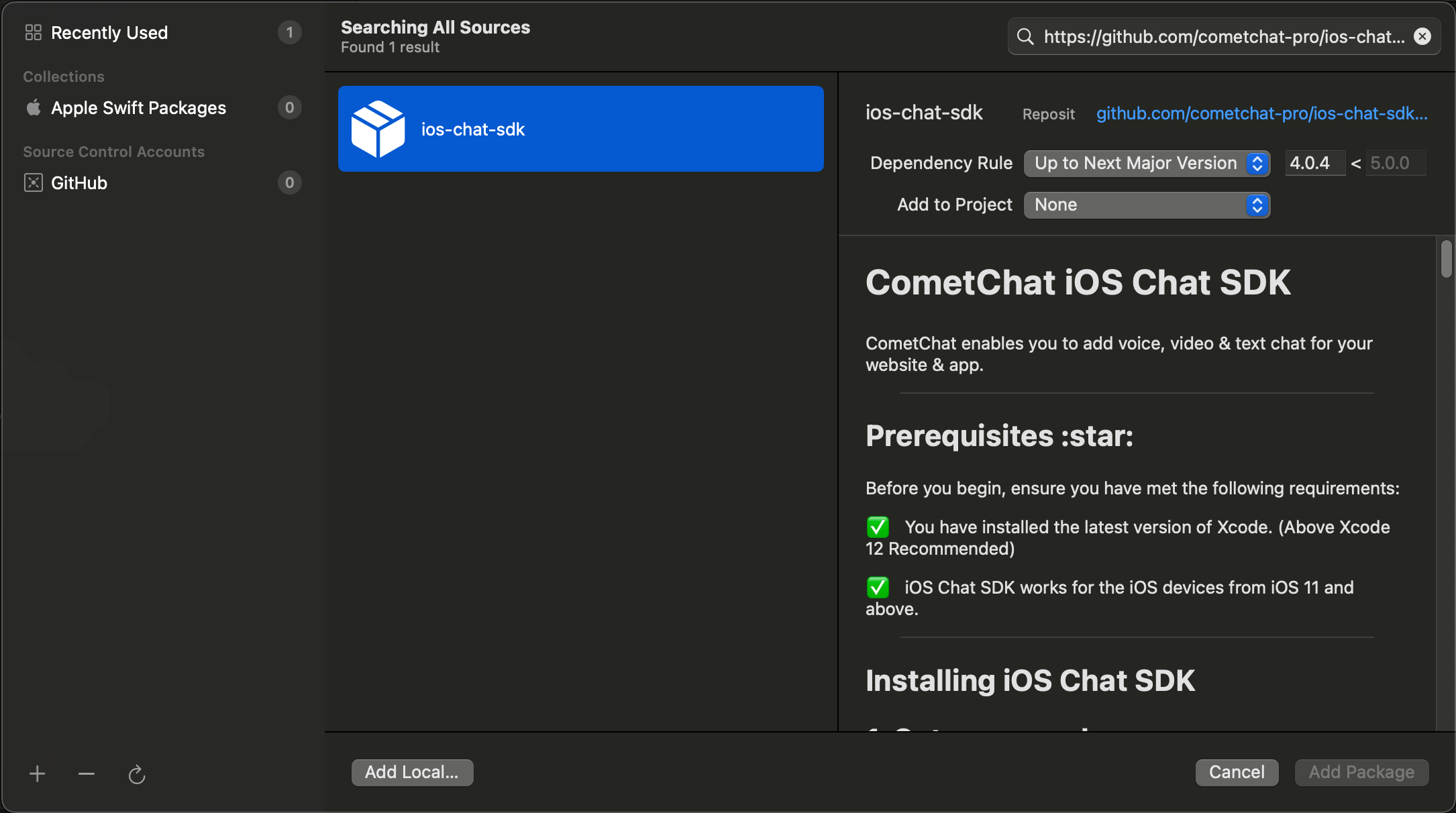
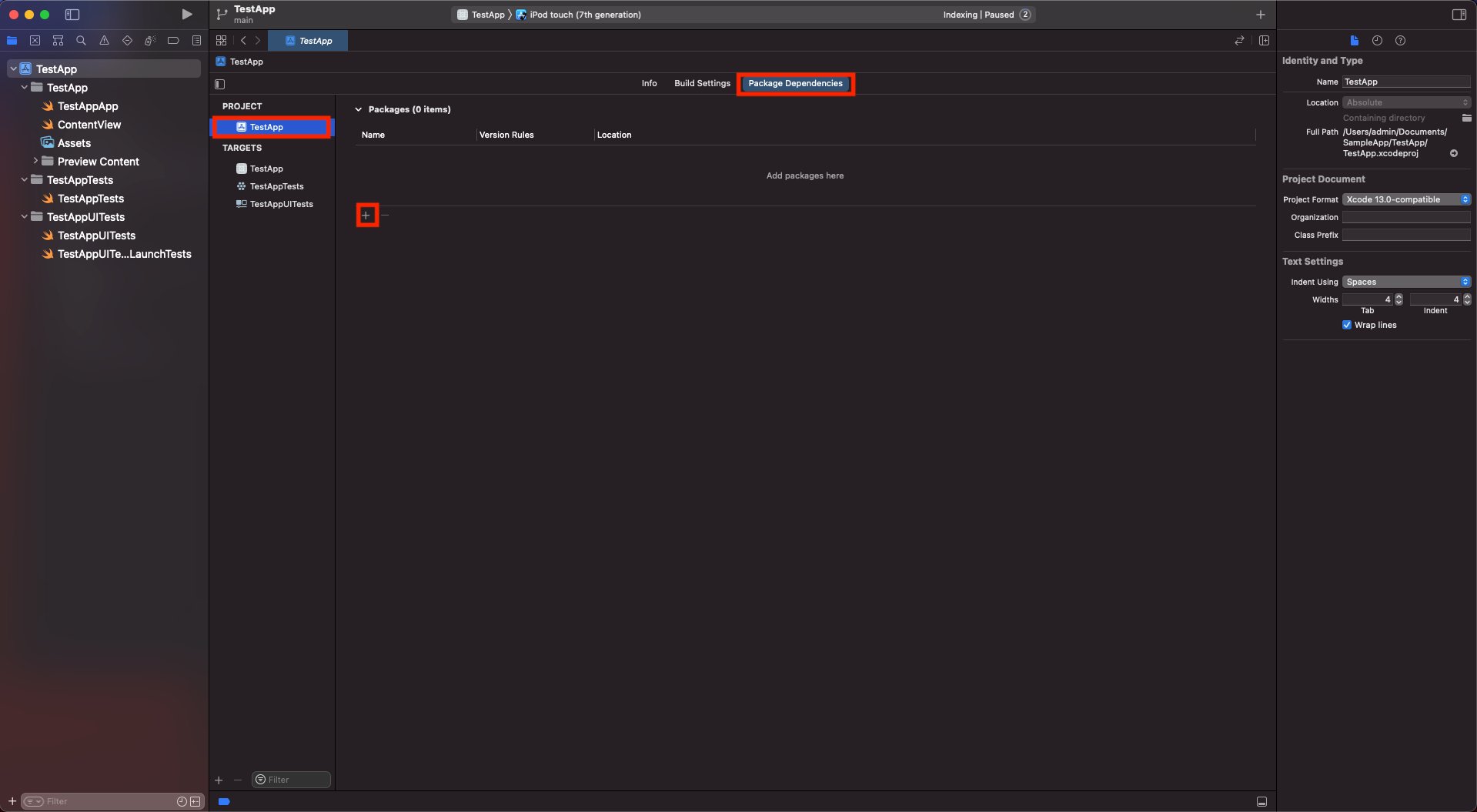 3. Enter the repository URL [`https://github.com/cometchat/chat-sdk-ios.git`](https://github.com/cometchat/chat-sdk-ios.git), set dependency rule to `Up to Next Major Version` with version `4.1.0`, and click **Add Package**.
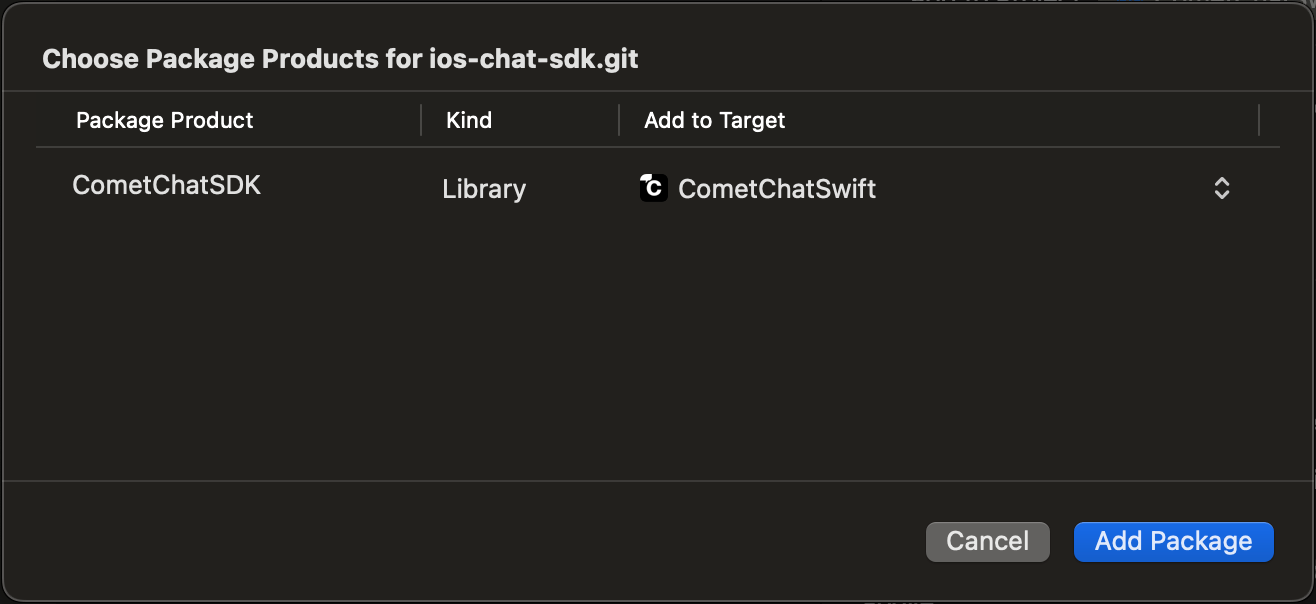
 4. Ensure `CometChatSDK` is checked in the **Package Product** column and click **Add Package**.
 ### Request Authorization
Add justification strings to your app's `Info.plist` for camera, microphone, and photo library access:
### Request Authorization
Add justification strings to your app's `Info.plist` for camera, microphone, and photo library access:
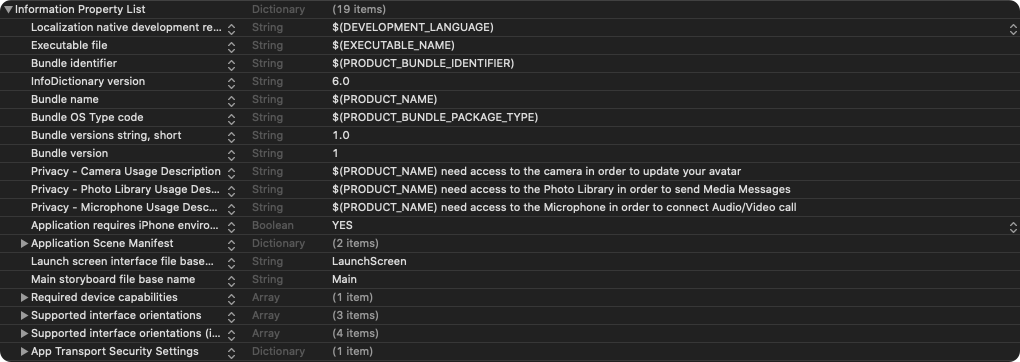 ```xml theme={null}
NSAppTransportSecurity
NSAllowsArbitraryLoads
NSCameraUsageDescription
$(PRODUCT_NAME) need access to the camera in order to update your avatar
NSPhotoLibraryUsageDescription
$(PRODUCT_NAME) need access to the Photo Library in order to send Media Messages
NSMicrophoneUsageDescription
$(PRODUCT_NAME) need access to the Microphone in order to connect Audio/Video call
```
### Setup Bitcode
Set **Enable Bitcode** to `YES` in your target's build settings.
```xml theme={null}
NSAppTransportSecurity
NSAllowsArbitraryLoads
NSCameraUsageDescription
$(PRODUCT_NAME) need access to the camera in order to update your avatar
NSPhotoLibraryUsageDescription
$(PRODUCT_NAME) need access to the Photo Library in order to send Media Messages
NSMicrophoneUsageDescription
$(PRODUCT_NAME) need access to the Microphone in order to connect Audio/Video call
```
### Setup Bitcode
Set **Enable Bitcode** to `YES` in your target's build settings.
 ### Swift Standard Libraries
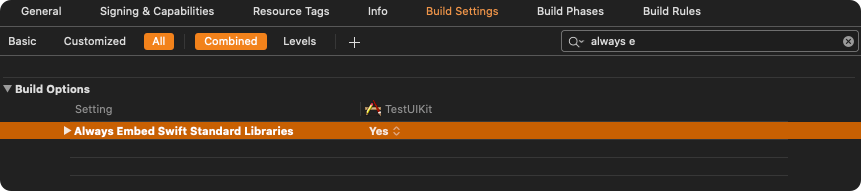
Set `"Always Embed Swift Standard Libraries"` to `Yes` in your target's build settings:
### Swift Standard Libraries
Set `"Always Embed Swift Standard Libraries"` to `Yes` in your target's build settings:
 ### Set Header Search Path
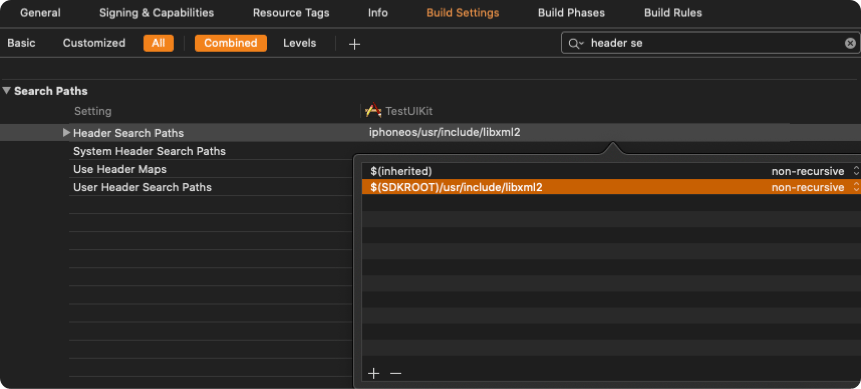
Set `Header Search Paths` to `$SDKROOT/usr/include/libxml2`.
### Set Header Search Path
Set `Header Search Paths` to `$SDKROOT/usr/include/libxml2`.
 ## Initialization
The `init()` method initializes the SDK and must be called before any other CometChat method. Call it once at app startup, typically in `didFinishLaunchingWithOptions:` of your `AppDelegate`.
```swift theme={null}
import CometChatSDK
class AppDelegate: UIResponder, UIApplicationDelegate {
var window: UIWindow?
let appId: String = "APP_ID"
let region: String = "APP_REGION"
func application(_ application: UIApplication, didFinishLaunchingWithOptions launchOptions: [UIApplication.LaunchOptionsKey: Any]?) -> Bool {
let mySettings = AppSettings.AppSettingsBuilder()
.subscribePresenceForAllUsers()
.setRegion(region: region)
.autoEstablishSocketConnection(true)
.build()
CometChat.init(appId: appId, appSettings: mySettings, onSuccess: { (isSuccess) in
if (isSuccess) {
print("CometChat SDK initialized successfully.")
}
}) { (error) in
print("CometChat SDK failed to initialize with error: \(error.errorDescription)")
}
return true
}
}
```
```objc theme={null}
#import
@implementation AppDelegate
- (BOOL)application:(UIApplication *)application didFinishLaunchingWithOptions:(NSDictionary *)launchOptions {
NSString *region = @"APP_REGION";
NSString *appID = @"APP_ID";
AppSettingsBuilder *appSettingBuilder = [[AppSettingsBuilder alloc] init];
AppSettings *appSettings = [[[appSettingBuilder subscribePresenceForAllUsers] setRegionWithRegion:region] build];
[[CometChat alloc] initWithAppId:appID appSettings:appSettings onSuccess:^(BOOL isSuccess) {
NSLog(isSuccess ? @"CometChat Initialize Success" : @"CometChat Initialize Failed");
} onError:^(CometChatException * error) {
NSLog(@"Error %@", [error errorDescription]);
}];
return YES;
}
@end
```
Replace `APP_ID` and `APP_REGION` with your credentials from the [Dashboard](https://app.cometchat.com).
`CometChat.init()` must be called before any other SDK method. Calling `login()`, `sendMessage()`, or registering listeners before `init()` will fail.
### Parameters
| Parameter | Type | Description |
| ----------- | ----------- | -------------------------------------------------- |
| appId | String | Your CometChat App ID |
| appSettings | AppSettings | Configuration object built with AppSettingsBuilder |
### AppSettings Options
| Method | Description | Default |
| ----------------------------------- | ---------------------------------------------------- | -------- |
| `setRegion(region:)` | Region where your app was created (`us`, `eu`, `in`) | Required |
| `subscribePresenceForAllUsers()` | Subscribe to presence events for all users | — |
| `subscribePresenceForRoles(roles:)` | Subscribe to presence for specific roles | — |
| `subscribePresenceForFriends()` | Subscribe to presence for friends only | — |
| `autoEstablishSocketConnection(_:)` | Let SDK manage WebSocket connections | `true` |
| `overrideAdminHost(adminHost:)` | Custom admin URL (dedicated deployment) | — |
| `overrideClientHost(clientHost:)` | Custom client URL (dedicated deployment) | — |
### Presence Subscription
Choose how to subscribe to user presence (online/offline status):
```swift theme={null}
// All users
AppSettings.AppSettingsBuilder()
.subscribePresenceForAllUsers()
.setRegion(region: region)
.build()
// Specific roles
AppSettings.AppSettingsBuilder()
.subscribePresenceForRoles(roles: ["admin", "moderator"])
.setRegion(region: region)
.build()
// Friends only
AppSettings.AppSettingsBuilder()
.subscribePresenceForFriends()
.setRegion(region: region)
.build()
```
See [User Presence](/sdk/ios/user-presence) for more details.
### WebSocket Connection
By default, the SDK manages WebSocket connections automatically. To manage them manually:
```swift theme={null}
let mySettings = AppSettings.AppSettingsBuilder()
.setRegion(region: region)
.autoEstablishSocketConnection(false)
.build()
```
See [Managing WebSocket Connections](/sdk/ios/managing-web-socket-connections-manually) for manual control.
***
## Next Steps
Log in users with Auth Key or Auth Token
Send your first message
## Initialization
The `init()` method initializes the SDK and must be called before any other CometChat method. Call it once at app startup, typically in `didFinishLaunchingWithOptions:` of your `AppDelegate`.
```swift theme={null}
import CometChatSDK
class AppDelegate: UIResponder, UIApplicationDelegate {
var window: UIWindow?
let appId: String = "APP_ID"
let region: String = "APP_REGION"
func application(_ application: UIApplication, didFinishLaunchingWithOptions launchOptions: [UIApplication.LaunchOptionsKey: Any]?) -> Bool {
let mySettings = AppSettings.AppSettingsBuilder()
.subscribePresenceForAllUsers()
.setRegion(region: region)
.autoEstablishSocketConnection(true)
.build()
CometChat.init(appId: appId, appSettings: mySettings, onSuccess: { (isSuccess) in
if (isSuccess) {
print("CometChat SDK initialized successfully.")
}
}) { (error) in
print("CometChat SDK failed to initialize with error: \(error.errorDescription)")
}
return true
}
}
```
```objc theme={null}
#import
@implementation AppDelegate
- (BOOL)application:(UIApplication *)application didFinishLaunchingWithOptions:(NSDictionary *)launchOptions {
NSString *region = @"APP_REGION";
NSString *appID = @"APP_ID";
AppSettingsBuilder *appSettingBuilder = [[AppSettingsBuilder alloc] init];
AppSettings *appSettings = [[[appSettingBuilder subscribePresenceForAllUsers] setRegionWithRegion:region] build];
[[CometChat alloc] initWithAppId:appID appSettings:appSettings onSuccess:^(BOOL isSuccess) {
NSLog(isSuccess ? @"CometChat Initialize Success" : @"CometChat Initialize Failed");
} onError:^(CometChatException * error) {
NSLog(@"Error %@", [error errorDescription]);
}];
return YES;
}
@end
```
Replace `APP_ID` and `APP_REGION` with your credentials from the [Dashboard](https://app.cometchat.com).
`CometChat.init()` must be called before any other SDK method. Calling `login()`, `sendMessage()`, or registering listeners before `init()` will fail.
### Parameters
| Parameter | Type | Description |
| ----------- | ----------- | -------------------------------------------------- |
| appId | String | Your CometChat App ID |
| appSettings | AppSettings | Configuration object built with AppSettingsBuilder |
### AppSettings Options
| Method | Description | Default |
| ----------------------------------- | ---------------------------------------------------- | -------- |
| `setRegion(region:)` | Region where your app was created (`us`, `eu`, `in`) | Required |
| `subscribePresenceForAllUsers()` | Subscribe to presence events for all users | — |
| `subscribePresenceForRoles(roles:)` | Subscribe to presence for specific roles | — |
| `subscribePresenceForFriends()` | Subscribe to presence for friends only | — |
| `autoEstablishSocketConnection(_:)` | Let SDK manage WebSocket connections | `true` |
| `overrideAdminHost(adminHost:)` | Custom admin URL (dedicated deployment) | — |
| `overrideClientHost(clientHost:)` | Custom client URL (dedicated deployment) | — |
### Presence Subscription
Choose how to subscribe to user presence (online/offline status):
```swift theme={null}
// All users
AppSettings.AppSettingsBuilder()
.subscribePresenceForAllUsers()
.setRegion(region: region)
.build()
// Specific roles
AppSettings.AppSettingsBuilder()
.subscribePresenceForRoles(roles: ["admin", "moderator"])
.setRegion(region: region)
.build()
// Friends only
AppSettings.AppSettingsBuilder()
.subscribePresenceForFriends()
.setRegion(region: region)
.build()
```
See [User Presence](/sdk/ios/user-presence) for more details.
### WebSocket Connection
By default, the SDK manages WebSocket connections automatically. To manage them manually:
```swift theme={null}
let mySettings = AppSettings.AppSettingsBuilder()
.setRegion(region: region)
.autoEstablishSocketConnection(false)
.build()
```
See [Managing WebSocket Connections](/sdk/ios/managing-web-socket-connections-manually) for manual control.
***
## Next Steps
Log in users with Auth Key or Auth Token
Send your first message