> ## Documentation Index
> Fetch the complete documentation index at: https://cometchat-22654f5b-docs-audit-mechanical-fixes.mintlify.site/llms.txt
> Use this file to discover all available pages before exploring further.
# Message List
> Scrollable list of messages for a conversation with real-time updates, reactions, threaded replies, and message actions.
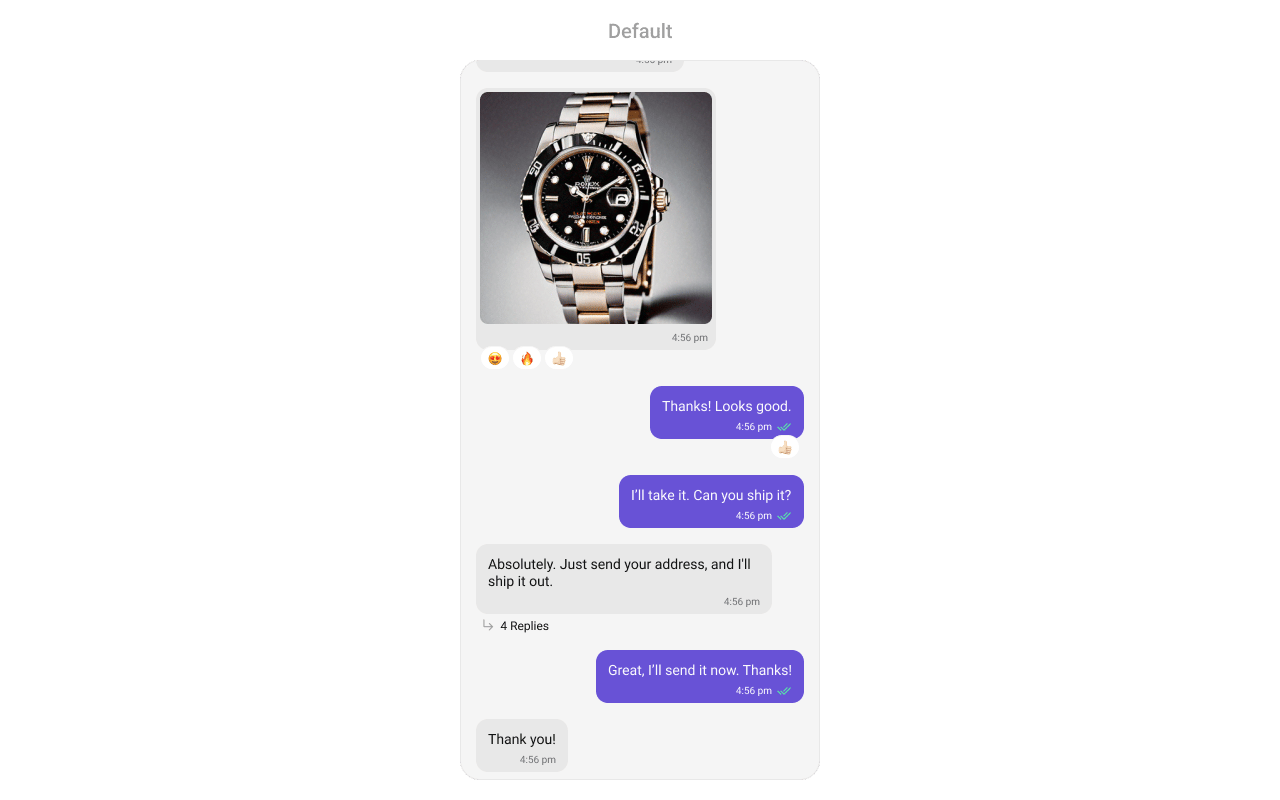
`CometChatMessageList` renders a scrollable list of messages for a conversation with real-time updates for new messages, edits, deletions, reactions, and threaded replies.
 ***
## Where It Fits
`CometChatMessageList` is a message display component. It requires either a `User` or `Group` object to fetch and render messages. Wire it with `CometChatMessageHeader` and `CometChatMessageComposer` to build a complete messaging layout.
```xml activity_chat.xml lines theme={null}
```
```kotlin lines theme={null}
val messageList = findViewById(R.id.message_list)
messageList.setUser(user)
```
```kotlin lines theme={null}
CometChatMessageList(
user = user
)
```
***
## Quick Start
Add to your layout XML:
```xml lines theme={null}
```
Set a `User` or `Group` — this is required:
```kotlin lines theme={null}
override fun onCreate(savedInstanceState: Bundle?) {
super.onCreate(savedInstanceState)
setContentView(R.layout.your_layout)
val messageList = findViewById(R.id.message_list)
messageList.setUser(user)
// or messageList.setGroup(group)
}
```
```kotlin lines theme={null}
@Composable
fun MessagesScreen() {
CometChatMessageList(
user = user
// or group = group
)
}
```
Prerequisites: CometChat SDK initialized with `CometChatUIKit.init()`, a user logged in, and the UI Kit dependency added.
Simply adding the `MessageList` component to the layout will only display the loading indicator. You must supply a `User` or `Group` object to fetch messages.
***
## Filtering
Pass a `MessagesRequest.MessagesRequestBuilder` to control what loads:
```kotlin lines theme={null}
messageList.setMessagesRequestBuilder(
MessagesRequest.MessagesRequestBuilder()
.setSearchKeyword("hello")
.setLimit(30)
)
```
```kotlin lines theme={null}
CometChatMessageList(
user = user,
messagesRequestBuilder = MessagesRequest.MessagesRequestBuilder()
.setSearchKeyword("hello")
.setLimit(30)
)
```
### Filter Recipes
| Recipe | Builder method |
| --------------------- | ---------------------------- |
| Search by keyword | `.setSearchKeyword("hello")` |
| Filter by UID | `.setUID("user_uid")` |
| Filter by GUID | `.setGUID("group_guid")` |
| Limit per page | `.setLimit(30)` |
| Unread only | `.setUnread(true)` |
| Hide deleted messages | `.hideDeletedMessages(true)` |
Pass the builder object, not the result of `.build()`. The component calls `.build()` internally.
***
## Actions and Events
### Callback Methods
#### `onThreadRepliesClick`
Fires when a user taps a threaded message bubble.
```kotlin lines theme={null}
messageList.setOnThreadRepliesClick { context, baseMessage, template ->
// Navigate to thread view
}
```
```kotlin lines theme={null}
CometChatMessageList(
user = user,
onThreadRepliesClick = { context, baseMessage, template ->
// Navigate to thread view
}
)
```
#### `onError`
Fires on internal errors (network failure, auth issue, SDK exception).
```kotlin lines theme={null}
messageList.setOnError { exception ->
Log.e("MessageList", "Error: ${exception.message}")
}
```
```kotlin lines theme={null}
CometChatMessageList(
user = user,
onError = { exception ->
Log.e("MessageList", "Error: ${exception.message}")
}
)
```
#### `onLoad`
Fires when the list is successfully fetched and loaded.
```kotlin lines theme={null}
messageList.setOnLoad { messages ->
Log.d("MessageList", "Loaded ${messages.size}")
}
```
```kotlin lines theme={null}
CometChatMessageList(
user = user,
onLoad = { messages ->
Log.d("MessageList", "Loaded ${messages.size}")
}
)
```
#### `onEmpty`
Fires when the list is empty after loading.
```kotlin lines theme={null}
messageList.setOnEmpty {
Log.d("MessageList", "No messages")
}
```
```kotlin lines theme={null}
CometChatMessageList(
user = user,
onEmpty = { /* no messages */ }
)
```
### SDK Events (Real-Time, Automatic)
The component listens to SDK message events internally. No manual setup needed.
> Automatic: new messages, edits, deletions, and reactions update the list in real time.
***
## Functionality
| Method (Kotlin XML) | Compose Parameter | Description |
| ------------------------------------ | ---------------------------------- | --------------------------------------------- |
| `setUser(user)` | `user = user` | Set user for 1-on-1 conversation |
| `setGroup(group)` | `group = group` | Set group for group conversation |
| `setHideLoadingState(true)` | `hideLoadingState = true` | Hide loading indicator |
| `setHideEmptyState(true)` | `hideEmptyState = true` | Hide empty state view |
| `setHideErrorState(true)` | `hideErrorState = true` | Hide error state view |
| `setStartFromUnreadMessages(true)` | `startFromUnreadMessages = true` | Scroll to first unread on load |
| `setMessagesRequestBuilder(builder)` | `messagesRequestBuilder = builder` | Custom message request builder |
| `setBubbleFactories(list)` | `bubbleFactories = list` | Set custom bubble factories for message types |
| `setOnThreadRepliesClick { }` | `onThreadRepliesClick = { }` | Thread reply tap callback |
***
## Custom View Slots
### Header View
Custom view displayed at the top of the message list.
***
## Where It Fits
`CometChatMessageList` is a message display component. It requires either a `User` or `Group` object to fetch and render messages. Wire it with `CometChatMessageHeader` and `CometChatMessageComposer` to build a complete messaging layout.
```xml activity_chat.xml lines theme={null}
```
```kotlin lines theme={null}
val messageList = findViewById(R.id.message_list)
messageList.setUser(user)
```
```kotlin lines theme={null}
CometChatMessageList(
user = user
)
```
***
## Quick Start
Add to your layout XML:
```xml lines theme={null}
```
Set a `User` or `Group` — this is required:
```kotlin lines theme={null}
override fun onCreate(savedInstanceState: Bundle?) {
super.onCreate(savedInstanceState)
setContentView(R.layout.your_layout)
val messageList = findViewById(R.id.message_list)
messageList.setUser(user)
// or messageList.setGroup(group)
}
```
```kotlin lines theme={null}
@Composable
fun MessagesScreen() {
CometChatMessageList(
user = user
// or group = group
)
}
```
Prerequisites: CometChat SDK initialized with `CometChatUIKit.init()`, a user logged in, and the UI Kit dependency added.
Simply adding the `MessageList` component to the layout will only display the loading indicator. You must supply a `User` or `Group` object to fetch messages.
***
## Filtering
Pass a `MessagesRequest.MessagesRequestBuilder` to control what loads:
```kotlin lines theme={null}
messageList.setMessagesRequestBuilder(
MessagesRequest.MessagesRequestBuilder()
.setSearchKeyword("hello")
.setLimit(30)
)
```
```kotlin lines theme={null}
CometChatMessageList(
user = user,
messagesRequestBuilder = MessagesRequest.MessagesRequestBuilder()
.setSearchKeyword("hello")
.setLimit(30)
)
```
### Filter Recipes
| Recipe | Builder method |
| --------------------- | ---------------------------- |
| Search by keyword | `.setSearchKeyword("hello")` |
| Filter by UID | `.setUID("user_uid")` |
| Filter by GUID | `.setGUID("group_guid")` |
| Limit per page | `.setLimit(30)` |
| Unread only | `.setUnread(true)` |
| Hide deleted messages | `.hideDeletedMessages(true)` |
Pass the builder object, not the result of `.build()`. The component calls `.build()` internally.
***
## Actions and Events
### Callback Methods
#### `onThreadRepliesClick`
Fires when a user taps a threaded message bubble.
```kotlin lines theme={null}
messageList.setOnThreadRepliesClick { context, baseMessage, template ->
// Navigate to thread view
}
```
```kotlin lines theme={null}
CometChatMessageList(
user = user,
onThreadRepliesClick = { context, baseMessage, template ->
// Navigate to thread view
}
)
```
#### `onError`
Fires on internal errors (network failure, auth issue, SDK exception).
```kotlin lines theme={null}
messageList.setOnError { exception ->
Log.e("MessageList", "Error: ${exception.message}")
}
```
```kotlin lines theme={null}
CometChatMessageList(
user = user,
onError = { exception ->
Log.e("MessageList", "Error: ${exception.message}")
}
)
```
#### `onLoad`
Fires when the list is successfully fetched and loaded.
```kotlin lines theme={null}
messageList.setOnLoad { messages ->
Log.d("MessageList", "Loaded ${messages.size}")
}
```
```kotlin lines theme={null}
CometChatMessageList(
user = user,
onLoad = { messages ->
Log.d("MessageList", "Loaded ${messages.size}")
}
)
```
#### `onEmpty`
Fires when the list is empty after loading.
```kotlin lines theme={null}
messageList.setOnEmpty {
Log.d("MessageList", "No messages")
}
```
```kotlin lines theme={null}
CometChatMessageList(
user = user,
onEmpty = { /* no messages */ }
)
```
### SDK Events (Real-Time, Automatic)
The component listens to SDK message events internally. No manual setup needed.
> Automatic: new messages, edits, deletions, and reactions update the list in real time.
***
## Functionality
| Method (Kotlin XML) | Compose Parameter | Description |
| ------------------------------------ | ---------------------------------- | --------------------------------------------- |
| `setUser(user)` | `user = user` | Set user for 1-on-1 conversation |
| `setGroup(group)` | `group = group` | Set group for group conversation |
| `setHideLoadingState(true)` | `hideLoadingState = true` | Hide loading indicator |
| `setHideEmptyState(true)` | `hideEmptyState = true` | Hide empty state view |
| `setHideErrorState(true)` | `hideErrorState = true` | Hide error state view |
| `setStartFromUnreadMessages(true)` | `startFromUnreadMessages = true` | Scroll to first unread on load |
| `setMessagesRequestBuilder(builder)` | `messagesRequestBuilder = builder` | Custom message request builder |
| `setBubbleFactories(list)` | `bubbleFactories = list` | Set custom bubble factories for message types |
| `setOnThreadRepliesClick { }` | `onThreadRepliesClick = { }` | Thread reply tap callback |
***
## Custom View Slots
### Header View
Custom view displayed at the top of the message list.
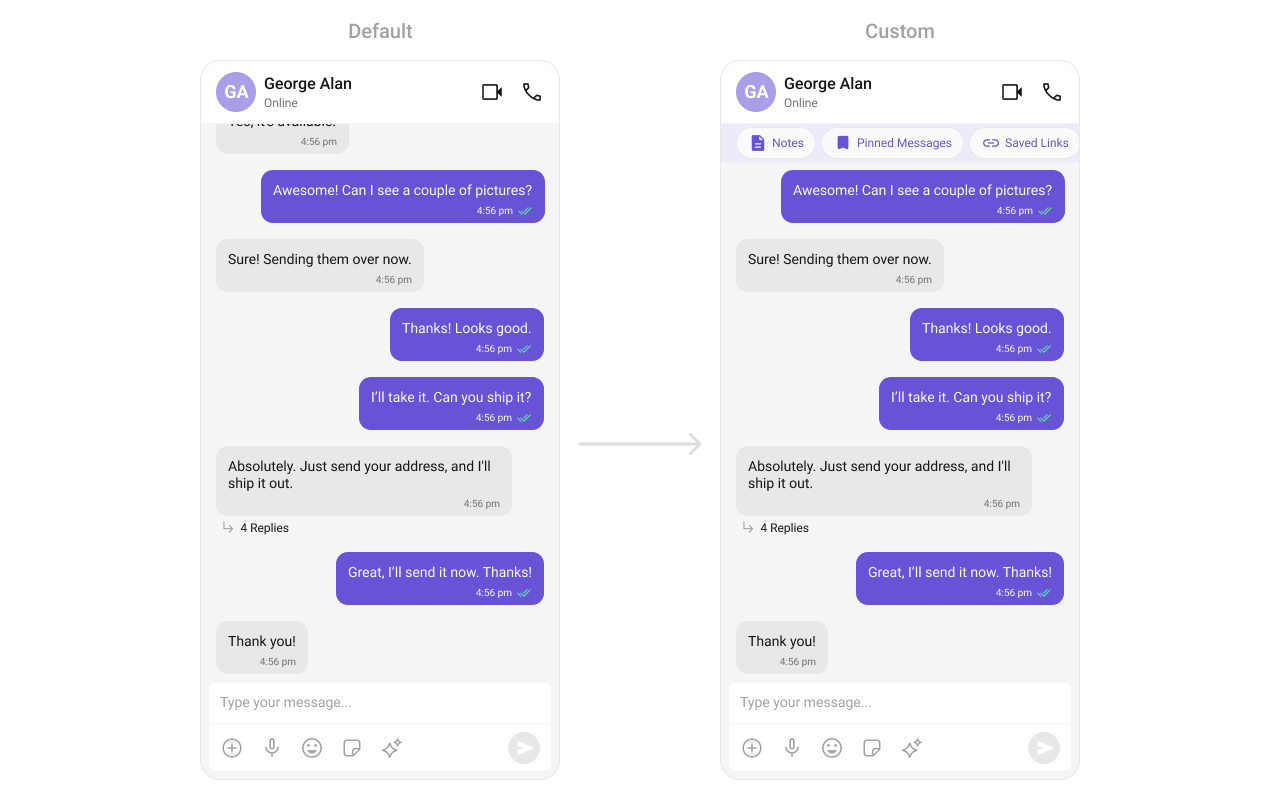 ```kotlin lines theme={null}
messageList.setHeaderView(View.inflate(context, R.layout.custom_header_layout, null))
```
```kotlin lines theme={null}
CometChatMessageList(
user = user,
headerView = {
Row {
Text("Notes")
Spacer(Modifier.width(8.dp))
Text("Pinned Messages")
}
}
)
```
### Footer View
Custom view displayed at the bottom of the message list.
```kotlin lines theme={null}
messageList.setHeaderView(View.inflate(context, R.layout.custom_header_layout, null))
```
```kotlin lines theme={null}
CometChatMessageList(
user = user,
headerView = {
Row {
Text("Notes")
Spacer(Modifier.width(8.dp))
Text("Pinned Messages")
}
}
)
```
### Footer View
Custom view displayed at the bottom of the message list.
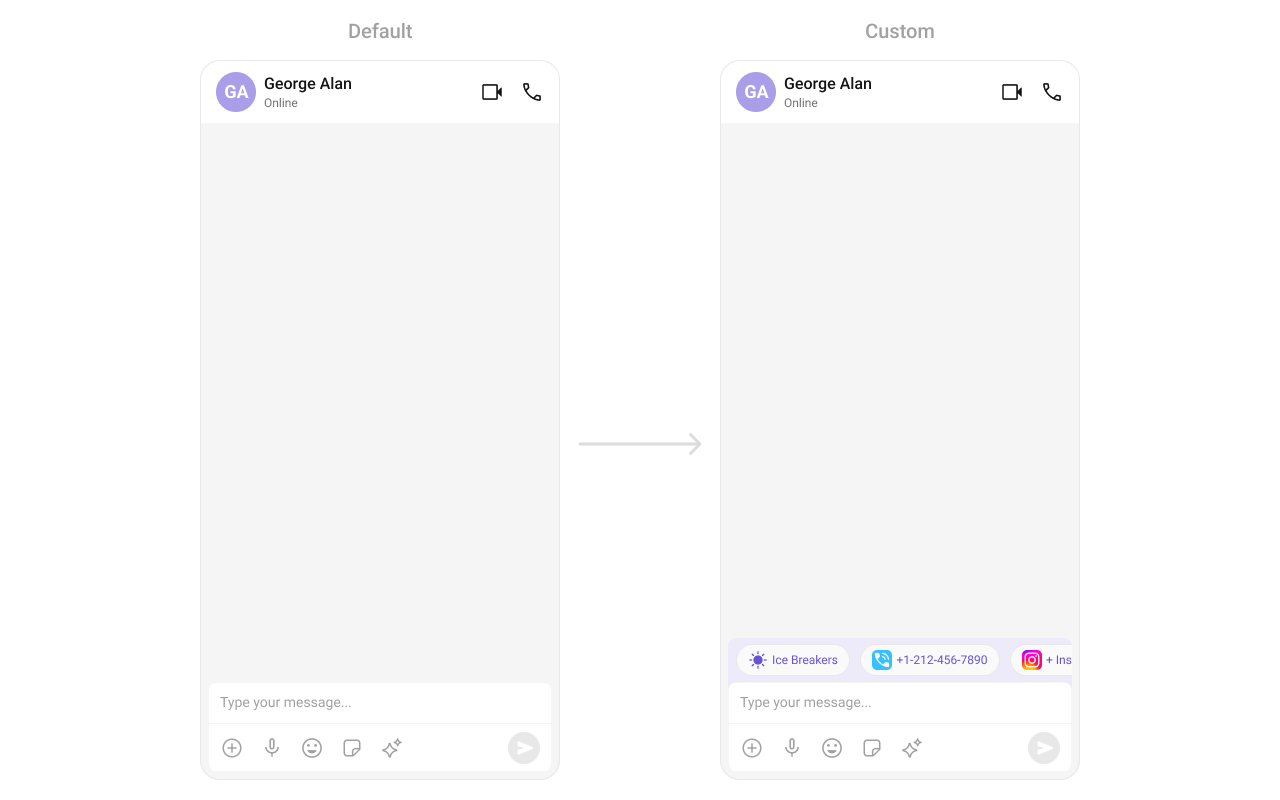 ```kotlin lines theme={null}
messageList.setFooterView(View.inflate(context, R.layout.custom_footer_layout, null))
```
```kotlin lines theme={null}
CometChatMessageList(
user = user,
footerView = {
Text("End of messages")
}
)
```
### State Views
```kotlin lines theme={null}
messageList.setEmptyView(customEmptyView)
messageList.setErrorView(customErrorView)
messageList.setLoadingView(customLoadingView)
```
```kotlin lines theme={null}
CometChatMessageList(
user = user,
emptyView = { Text("No messages yet") },
errorView = { onRetry -> Button(onClick = onRetry) { Text("Retry") } },
loadingView = { CircularProgressIndicator() }
)
```
### Text Formatters (Mentions)
```kotlin lines theme={null}
messageList.setFooterView(View.inflate(context, R.layout.custom_footer_layout, null))
```
```kotlin lines theme={null}
CometChatMessageList(
user = user,
footerView = {
Text("End of messages")
}
)
```
### State Views
```kotlin lines theme={null}
messageList.setEmptyView(customEmptyView)
messageList.setErrorView(customErrorView)
messageList.setLoadingView(customLoadingView)
```
```kotlin lines theme={null}
CometChatMessageList(
user = user,
emptyView = { Text("No messages yet") },
errorView = { onRetry -> Button(onClick = onRetry) { Text("Retry") } },
loadingView = { CircularProgressIndicator() }
)
```
### Text Formatters (Mentions)
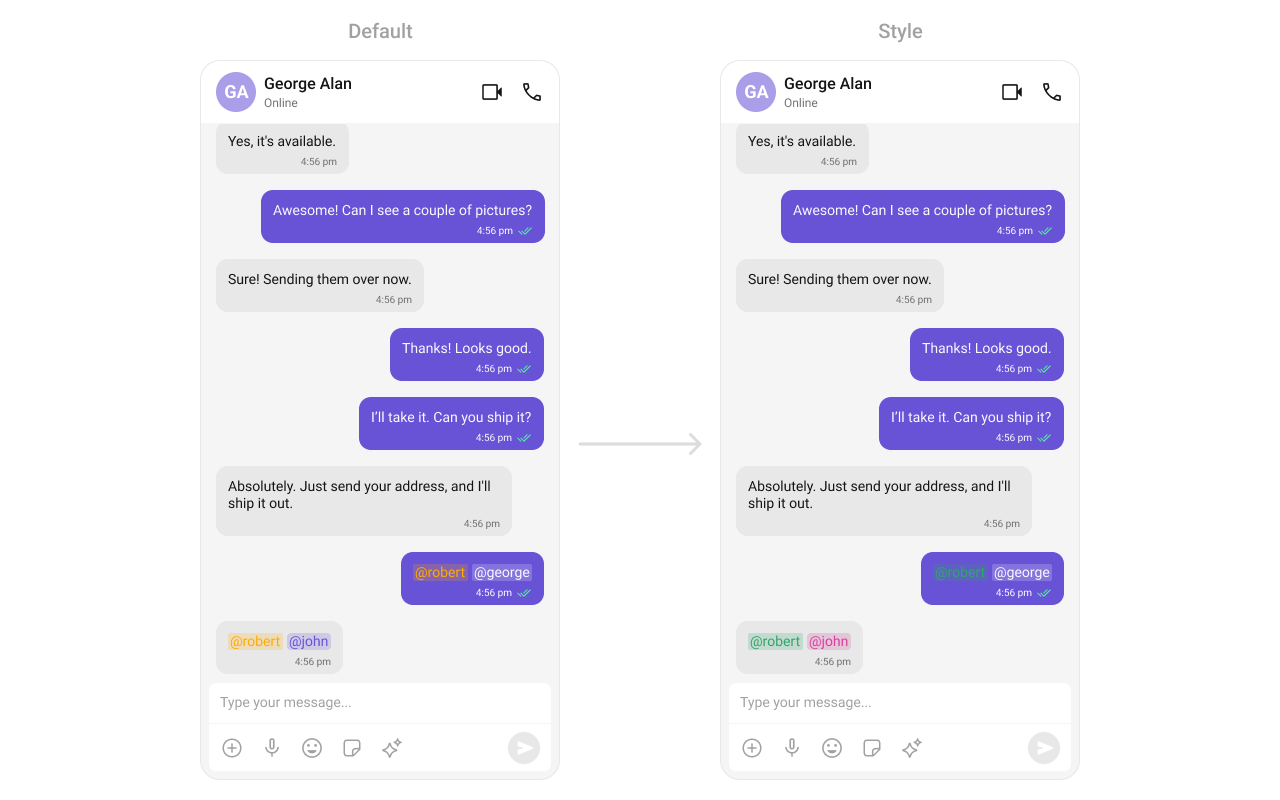 ```kotlin lines theme={null}
val mentionFormatter = CometChatMentionsFormatter(context)
mentionFormatter.setMessageListMentionTextStyle(context, R.style.CustomMentionsStyle)
val textFormatters: MutableList = ArrayList()
textFormatters.add(mentionFormatter)
messageList.setTextFormatters(textFormatters)
```
```kotlin lines theme={null}
val mentionFormatter = CometChatMentionsFormatter(context)
CometChatMessageList(
user = user,
textFormatters = listOf(mentionFormatter)
)
```
***
## Bubble Factory
`CometChatMessageList` uses a factory-based pattern to render message content. Each message type (text, image, video, etc.) has a corresponding `BubbleFactory` that creates and binds the bubble view. You can replace existing factories or register new ones for custom message types.
### How It Works
When a message is displayed, the list resolves a factory key from the message's `category` and `type` (e.g., `message_text`, `custom_location`). If a matching `BubbleFactory` is registered, it handles view creation and binding. Otherwise, the built-in `InternalContentRenderer` handles default rendering.
A `BubbleFactory` has two lifecycle phases:
1. `create*View(context)` — called once when the ViewHolder is created. The message object is **not** available at this point.
2. `bind*View(view, message, alignment, ...)` — called every time a message is displayed. This is where you populate the view with message data.
### Replacing an Existing Bubble Factory
Override how a built-in message type renders by registering a factory with the same category and type:
```kotlin lines theme={null}
class CustomTextBubbleFactory : BubbleFactory() {
override fun getCategory(): String = CometChatConstants.CATEGORY_MESSAGE
override fun getType(): String = CometChatConstants.MESSAGE_TYPE_TEXT
override fun createContentView(context: Context): View {
return TextView(context).apply {
setPadding(24, 16, 24, 16)
}
}
override fun bindContentView(
view: View,
message: BaseMessage,
alignment: UIKitConstants.MessageBubbleAlignment,
holder: RecyclerView.ViewHolder?,
position: Int
) {
(view as TextView).text = (message as? TextMessage)?.text ?: ""
}
}
// Replace the default text bubble
messageList.setBubbleFactories(listOf(CustomTextBubbleFactory()))
```
```kotlin lines theme={null}
class CustomTextBubbleFactory : BubbleFactory {
override fun getCategory(): String = CometChatConstants.CATEGORY_MESSAGE
override fun getType(): String = CometChatConstants.MESSAGE_TYPE_TEXT
override fun getContentView(
message: BaseMessage,
alignment: UIKitConstants.MessageBubbleAlignment,
style: CometChatMessageBubbleStyle,
textFormatters: List
): @Composable () -> Unit = {
Text(
text = (message as? TextMessage)?.text ?: "",
modifier = Modifier.padding(horizontal = 24.dp, vertical = 16.dp)
)
}
}
CometChatMessageList(
user = user,
bubbleFactories = listOf(CustomTextBubbleFactory())
)
```
### Adding a New Bubble Factory for Custom Messages
Register a factory for a custom message type that the SDK doesn't handle by default:
```kotlin lines theme={null}
class LocationBubbleFactory : BubbleFactory() {
override fun getCategory(): String = CometChatConstants.CATEGORY_CUSTOM
override fun getType(): String = "location"
override fun createContentView(context: Context): View {
return LayoutInflater.from(context)
.inflate(R.layout.bubble_location, null)
}
override fun bindContentView(
view: View,
message: BaseMessage,
alignment: UIKitConstants.MessageBubbleAlignment,
holder: RecyclerView.ViewHolder?,
position: Int
) {
val customMessage = message as? CustomMessage ?: return
val lat = customMessage.customData?.optDouble("latitude") ?: 0.0
val lng = customMessage.customData?.optDouble("longitude") ?: 0.0
view.findViewById(R.id.tv_coordinates).text = "$lat, $lng"
}
}
messageList.setBubbleFactories(listOf(LocationBubbleFactory()))
```
```kotlin lines theme={null}
class LocationBubbleFactory : BubbleFactory {
override fun getCategory(): String = CometChatConstants.CATEGORY_CUSTOM
override fun getType(): String = "location"
override fun getContentView(
message: BaseMessage,
alignment: UIKitConstants.MessageBubbleAlignment,
style: CometChatMessageBubbleStyle,
textFormatters: List
): @Composable () -> Unit = {
val customMessage = message as? CustomMessage
val lat = customMessage?.customData?.optDouble("latitude") ?: 0.0
val lng = customMessage?.customData?.optDouble("longitude") ?: 0.0
Text(text = "$lat, $lng")
}
}
CometChatMessageList(
user = user,
bubbleFactories = listOf(LocationBubbleFactory())
)
```
### Replacing the Entire Bubble
Override `getBubbleView` to replace the entire message bubble (including all slots like header, footer, avatar) instead of just the content area:
```kotlin lines theme={null}
class FullCustomBubbleFactory : BubbleFactory() {
override fun getCategory(): String = CometChatConstants.CATEGORY_CUSTOM
override fun getType(): String = "meeting"
override fun createBubbleView(context: Context): View {
return LayoutInflater.from(context)
.inflate(R.layout.bubble_meeting_full, null)
}
override fun bindBubbleView(
view: View,
message: BaseMessage,
alignment: UIKitConstants.MessageBubbleAlignment,
holder: RecyclerView.ViewHolder?,
position: Int
) {
val customMessage = message as? CustomMessage ?: return
view.findViewById(R.id.tv_meeting_title).text =
customMessage.customData?.optString("title") ?: "Meeting"
}
}
messageList.setBubbleFactories(listOf(FullCustomBubbleFactory()))
```
```kotlin lines theme={null}
class FullCustomBubbleFactory : BubbleFactory {
override fun getCategory(): String = CometChatConstants.CATEGORY_CUSTOM
override fun getType(): String = "meeting"
override fun getBubbleView(
message: BaseMessage,
alignment: UIKitConstants.MessageBubbleAlignment
): (@Composable () -> Unit)? = {
val customMessage = message as? CustomMessage
val title = customMessage?.customData?.optString("title") ?: "Meeting"
Text(text = title)
}
}
CometChatMessageList(
user = user,
bubbleFactories = listOf(FullCustomBubbleFactory())
)
```
### Bubble Slot Reference
Each `BubbleFactory` can override individual slots within the bubble:
| Slot | Create Method | Bind Method | Description |
| ------------- | ------------------------ | ---------------------- | ----------------------------------------------------------------------- |
| Bubble (full) | `createBubbleView()` | `bindBubbleView()` | Replaces the entire bubble. When non-null, all other slots are ignored. |
| Content | `createContentView()` | `bindContentView()` | Main message content (required). |
| Leading | `createLeadingView()` | `bindLeadingView()` | Avatar area on the left side. |
| Header | `createHeaderView()` | `bindHeaderView()` | Sender name and timestamp. |
| Reply | `createReplyView()` | `bindReplyView()` | Quoted/reply-to message preview. |
| Bottom | `createBottomView()` | `bindBottomView()` | Below content (e.g., moderation). |
| Status Info | `createStatusInfoView()` | `bindStatusInfoView()` | Timestamp and read receipts. |
| Thread | `createThreadView()` | `bindThreadView()` | Threaded replies indicator. |
| Footer | `createFooterView()` | `bindFooterView()` | Reactions and additional footer content. |
| Slot | Method | Description |
| ------------- | --------------------- | ----------------------------------------------------------------------- |
| Bubble (full) | `getBubbleView()` | Replaces the entire bubble. When non-null, all other slots are ignored. |
| Content | `getContentView()` | Main message content (required). |
| Leading | `getLeadingView()` | Avatar area on the left side. |
| Header | `getHeaderView()` | Sender name and timestamp. |
| Reply | `getReplyView()` | Quoted/reply-to message preview. |
| Bottom | `getBottomView()` | Below content (e.g., moderation). |
| Status Info | `getStatusInfoView()` | Timestamp and read receipts. |
| Thread | `getThreadView()` | Threaded replies indicator. |
| Footer | `getFooterView()` | Reactions and additional footer content. |
***
## Bubble Slot View Providers
While `BubbleFactory` customizes rendering per message type, slot view providers let you override a specific slot across all message types. This is useful when you want consistent customization (e.g., always show a custom avatar or always add a custom footer) regardless of the message type.
Slot view providers take priority over `BubbleFactory` slot methods. If both are set, the provider wins.
Use `BubbleViewProvider` — an interface with `createView()` (called once per ViewHolder) and `bindView()` (called each time a message binds):
```kotlin lines theme={null}
// Custom leading view (avatar) for all messages
messageList.setLeadingViewProvider(object : BubbleViewProvider {
override fun createView(
context: Context,
message: BaseMessage,
alignment: UIKitConstants.MessageBubbleAlignment
): View? {
return if (alignment == UIKitConstants.MessageBubbleAlignment.LEFT) {
CometChatAvatar(context)
} else null
}
override fun bindView(
view: View,
message: BaseMessage,
alignment: UIKitConstants.MessageBubbleAlignment
) {
(view as? CometChatAvatar)?.setUser(message.sender)
}
})
// Custom status info view for all messages
messageList.setStatusInfoViewProvider(object : BubbleViewProvider {
override fun createView(
context: Context,
message: BaseMessage,
alignment: UIKitConstants.MessageBubbleAlignment
): View? {
return TextView(context).apply { textSize = 10f }
}
override fun bindView(
view: View,
message: BaseMessage,
alignment: UIKitConstants.MessageBubbleAlignment
) {
(view as? TextView)?.text = formatTimestamp(message.sentAt)
}
})
```
Available provider setters:
| Method | Slot |
| ----------------------------- | -------------------------------------- |
| `setLeadingViewProvider()` | Avatar area |
| `setHeaderViewProvider()` | Sender name / timestamp |
| `setReplyViewProvider()` | Reply-to preview |
| `setContentViewProvider()` | Main content (overrides all factories) |
| `setBottomViewProvider()` | Below content (moderation) |
| `setStatusInfoViewProvider()` | Timestamp / receipts |
| `setThreadViewProvider()` | Thread replies indicator |
| `setFooterViewProvider()` | Reactions / footer |
Pass composable lambdas that receive the message and its alignment:
```kotlin lines theme={null}
CometChatMessageList(
user = user,
leadingView = { message, alignment ->
if (alignment == UIKitConstants.MessageBubbleAlignment.LEFT) {
CometChatAvatar(user = message.sender)
}
},
statusInfoView = { message, alignment ->
Text(
text = formatTimestamp(message.sentAt),
style = CometChatTheme.typography.caption1Regular
)
},
footerView = { message, alignment ->
// Custom reactions display
MessageReactions(message = message)
}
)
```
Available slot parameters:
| Parameter | Type | Slot |
| ---------------- | ----------------------------------------------------- | -------------------------------------- |
| `leadingView` | `@Composable (BaseMessage, MessageAlignment) -> Unit` | Avatar area |
| `headerView` | `@Composable (BaseMessage, MessageAlignment) -> Unit` | Sender name / timestamp |
| `replyView` | `@Composable (BaseMessage, MessageAlignment) -> Unit` | Reply-to preview |
| `contentView` | `@Composable (BaseMessage, MessageAlignment) -> Unit` | Main content (overrides all factories) |
| `bottomView` | `@Composable (BaseMessage, MessageAlignment) -> Unit` | Below content (moderation) |
| `statusInfoView` | `@Composable (BaseMessage, MessageAlignment) -> Unit` | Timestamp / receipts |
| `threadView` | `@Composable (BaseMessage, MessageAlignment) -> Unit` | Thread replies indicator |
| `footerView` | `@Composable (BaseMessage, MessageAlignment) -> Unit` | Reactions / footer |
***
## Message Options
Message options are the contextual actions shown when a user long-presses a message bubble (e.g., Reply, Copy, Edit, Delete). You can control their visibility, replace the entire options list, or append custom options.
### Toggling Default Option Visibility
Each built-in option has a visibility setter. Pass `View.VISIBLE` or `View.GONE`:
```kotlin lines theme={null}
// Hide specific options
messageList.setDeleteMessageOptionVisibility(View.GONE)
messageList.setEditMessageOptionVisibility(View.GONE)
messageList.setTranslateMessageOptionVisibility(View.GONE)
// Show an option that's hidden by default
messageList.setMarkAsUnreadOptionVisibility(View.VISIBLE)
```
```kotlin lines theme={null}
CometChatMessageList(
user = user,
hideDeleteOption = true,
hideEditOption = true,
hideTranslateOption = true,
showMarkAsUnreadOption = true
)
```
Available visibility methods (Kotlin XML):
| Method | Default | Description |
| --------------------------------------- | --------- | ----------------- |
| `setReplyInThreadOptionVisibility()` | `VISIBLE` | Reply in thread |
| `setReplyOptionVisibility()` | `VISIBLE` | Reply to message |
| `setCopyMessageOptionVisibility()` | `VISIBLE` | Copy message text |
| `setEditMessageOptionVisibility()` | `VISIBLE` | Edit sent message |
| `setDeleteMessageOptionVisibility()` | `VISIBLE` | Delete message |
| `setMessageReactionOptionVisibility()` | `VISIBLE` | Add reaction |
| `setMessageInfoOptionVisibility()` | `VISIBLE` | View message info |
| `setTranslateMessageOptionVisibility()` | `VISIBLE` | Translate message |
| `setShareMessageOptionVisibility()` | `VISIBLE` | Share message |
| `setMarkAsUnreadOptionVisibility()` | `GONE` | Mark as unread |
### Replacing All Options (`setOptions`)
Use `setOptions` to completely replace the default options for a message. Return a list to override, or `null` to fall back to defaults:
```kotlin lines theme={null}
messageList.setOptions { message ->
listOf(
CometChatMessageOption(
id = "custom_pin",
title = "Pin Message",
icon = R.drawable.ic_pin,
onClick = { pinMessage(message) }
),
CometChatMessageOption(
id = UIKitConstants.MessageOption.COPY,
title = context.getString(R.string.cometchat_copy),
icon = R.drawable.cometchat_ic_copy,
onClick = { copyMessage(message) }
)
)
}
```
```kotlin lines theme={null}
CometChatMessageList(
user = user,
options = { message ->
listOf(
CometChatMessageOption(
id = "custom_pin",
title = "Pin Message",
icon = R.drawable.ic_pin,
onClick = { pinMessage(message) }
),
CometChatMessageOption(
id = UIKitConstants.MessageOption.COPY,
title = context.getString(R.string.cometchat_copy),
icon = R.drawable.cometchat_ic_copy,
onClick = { copyMessage(message) }
)
)
}
)
```
> When `setOptions` returns a non-null list, `addOptions` is not invoked.
### Appending Custom Options (`addOptions`)
Use `addOptions` to append additional options after the default ones. This is invoked only when `setOptions` is not set or returns `null`:
```kotlin lines theme={null}
messageList.addOptions { message ->
listOf(
CometChatMessageOption(
id = "custom_bookmark",
title = "Bookmark",
icon = R.drawable.ic_bookmark,
onClick = { bookmarkMessage(message) }
),
CometChatMessageOption(
id = "custom_remind",
title = "Remind Me",
icon = R.drawable.ic_alarm,
onClick = { setReminder(message) }
)
)
}
```
```kotlin lines theme={null}
CometChatMessageList(
user = user,
addOptions = { message ->
listOf(
CometChatMessageOption(
id = "custom_bookmark",
title = "Bookmark",
icon = R.drawable.ic_bookmark,
onClick = { bookmarkMessage(message) }
),
CometChatMessageOption(
id = "custom_remind",
title = "Remind Me",
icon = R.drawable.ic_alarm,
onClick = { setReminder(message) }
)
)
}
)
```
### Conditional Options Per Message
Both `setOptions` and `addOptions` receive the `BaseMessage`, so you can return different options based on message type, sender, or any other condition:
```kotlin lines theme={null}
messageList.setOptions { message ->
when {
// Custom options for your own messages
message.sender?.uid == CometChat.getLoggedInUser()?.uid -> listOf(
CometChatMessageOption(id = "edit", title = "Edit", icon = R.drawable.cometchat_ic_edit),
CometChatMessageOption(id = "delete", title = "Delete", icon = R.drawable.cometchat_ic_delete)
)
// Default options for others' messages
else -> null
}
}
```
```kotlin lines theme={null}
CometChatMessageList(
user = user,
options = { message ->
when {
message.sender?.uid == CometChat.getLoggedInUser()?.uid -> listOf(
CometChatMessageOption(id = "edit", title = "Edit", icon = R.drawable.cometchat_ic_edit),
CometChatMessageOption(id = "delete", title = "Delete", icon = R.drawable.cometchat_ic_delete)
)
else -> null // fall back to defaults
}
}
)
```
### CometChatMessageOption Reference
| Property | Type | Description |
| ----------------- | ------------------ | -------------------------------------------------------------------------- |
| `id` | `String` | Unique identifier (use `UIKitConstants.MessageOption.*` for built-in IDs). |
| `title` | `String` | Display text for the option. |
| `titleColor` | `@ColorInt Int` | Text color (0 for default). |
| `icon` | `@DrawableRes Int` | Drawable resource for the option icon. |
| `iconTintColor` | `@ColorInt Int` | Icon tint color (0 for default). |
| `titleAppearance` | `@StyleRes Int` | Text appearance style resource. |
| `backgroundColor` | `@ColorInt Int` | Background color for the option row. |
| `onClick` | `(() -> Unit)?` | Callback invoked when the option is tapped. |
***
## Style
Define a custom style in `themes.xml`:
```xml themes.xml lines theme={null}
```
```kotlin lines theme={null}
CometChatMessageList(
user = user,
style = CometChatMessageListStyle.default().copy(
backgroundColor = Color(0xFFF5F5F5)
)
)
```
```kotlin lines theme={null}
val mentionFormatter = CometChatMentionsFormatter(context)
mentionFormatter.setMessageListMentionTextStyle(context, R.style.CustomMentionsStyle)
val textFormatters: MutableList = ArrayList()
textFormatters.add(mentionFormatter)
messageList.setTextFormatters(textFormatters)
```
```kotlin lines theme={null}
val mentionFormatter = CometChatMentionsFormatter(context)
CometChatMessageList(
user = user,
textFormatters = listOf(mentionFormatter)
)
```
***
## Bubble Factory
`CometChatMessageList` uses a factory-based pattern to render message content. Each message type (text, image, video, etc.) has a corresponding `BubbleFactory` that creates and binds the bubble view. You can replace existing factories or register new ones for custom message types.
### How It Works
When a message is displayed, the list resolves a factory key from the message's `category` and `type` (e.g., `message_text`, `custom_location`). If a matching `BubbleFactory` is registered, it handles view creation and binding. Otherwise, the built-in `InternalContentRenderer` handles default rendering.
A `BubbleFactory` has two lifecycle phases:
1. `create*View(context)` — called once when the ViewHolder is created. The message object is **not** available at this point.
2. `bind*View(view, message, alignment, ...)` — called every time a message is displayed. This is where you populate the view with message data.
### Replacing an Existing Bubble Factory
Override how a built-in message type renders by registering a factory with the same category and type:
```kotlin lines theme={null}
class CustomTextBubbleFactory : BubbleFactory() {
override fun getCategory(): String = CometChatConstants.CATEGORY_MESSAGE
override fun getType(): String = CometChatConstants.MESSAGE_TYPE_TEXT
override fun createContentView(context: Context): View {
return TextView(context).apply {
setPadding(24, 16, 24, 16)
}
}
override fun bindContentView(
view: View,
message: BaseMessage,
alignment: UIKitConstants.MessageBubbleAlignment,
holder: RecyclerView.ViewHolder?,
position: Int
) {
(view as TextView).text = (message as? TextMessage)?.text ?: ""
}
}
// Replace the default text bubble
messageList.setBubbleFactories(listOf(CustomTextBubbleFactory()))
```
```kotlin lines theme={null}
class CustomTextBubbleFactory : BubbleFactory {
override fun getCategory(): String = CometChatConstants.CATEGORY_MESSAGE
override fun getType(): String = CometChatConstants.MESSAGE_TYPE_TEXT
override fun getContentView(
message: BaseMessage,
alignment: UIKitConstants.MessageBubbleAlignment,
style: CometChatMessageBubbleStyle,
textFormatters: List
): @Composable () -> Unit = {
Text(
text = (message as? TextMessage)?.text ?: "",
modifier = Modifier.padding(horizontal = 24.dp, vertical = 16.dp)
)
}
}
CometChatMessageList(
user = user,
bubbleFactories = listOf(CustomTextBubbleFactory())
)
```
### Adding a New Bubble Factory for Custom Messages
Register a factory for a custom message type that the SDK doesn't handle by default:
```kotlin lines theme={null}
class LocationBubbleFactory : BubbleFactory() {
override fun getCategory(): String = CometChatConstants.CATEGORY_CUSTOM
override fun getType(): String = "location"
override fun createContentView(context: Context): View {
return LayoutInflater.from(context)
.inflate(R.layout.bubble_location, null)
}
override fun bindContentView(
view: View,
message: BaseMessage,
alignment: UIKitConstants.MessageBubbleAlignment,
holder: RecyclerView.ViewHolder?,
position: Int
) {
val customMessage = message as? CustomMessage ?: return
val lat = customMessage.customData?.optDouble("latitude") ?: 0.0
val lng = customMessage.customData?.optDouble("longitude") ?: 0.0
view.findViewById(R.id.tv_coordinates).text = "$lat, $lng"
}
}
messageList.setBubbleFactories(listOf(LocationBubbleFactory()))
```
```kotlin lines theme={null}
class LocationBubbleFactory : BubbleFactory {
override fun getCategory(): String = CometChatConstants.CATEGORY_CUSTOM
override fun getType(): String = "location"
override fun getContentView(
message: BaseMessage,
alignment: UIKitConstants.MessageBubbleAlignment,
style: CometChatMessageBubbleStyle,
textFormatters: List
): @Composable () -> Unit = {
val customMessage = message as? CustomMessage
val lat = customMessage?.customData?.optDouble("latitude") ?: 0.0
val lng = customMessage?.customData?.optDouble("longitude") ?: 0.0
Text(text = "$lat, $lng")
}
}
CometChatMessageList(
user = user,
bubbleFactories = listOf(LocationBubbleFactory())
)
```
### Replacing the Entire Bubble
Override `getBubbleView` to replace the entire message bubble (including all slots like header, footer, avatar) instead of just the content area:
```kotlin lines theme={null}
class FullCustomBubbleFactory : BubbleFactory() {
override fun getCategory(): String = CometChatConstants.CATEGORY_CUSTOM
override fun getType(): String = "meeting"
override fun createBubbleView(context: Context): View {
return LayoutInflater.from(context)
.inflate(R.layout.bubble_meeting_full, null)
}
override fun bindBubbleView(
view: View,
message: BaseMessage,
alignment: UIKitConstants.MessageBubbleAlignment,
holder: RecyclerView.ViewHolder?,
position: Int
) {
val customMessage = message as? CustomMessage ?: return
view.findViewById(R.id.tv_meeting_title).text =
customMessage.customData?.optString("title") ?: "Meeting"
}
}
messageList.setBubbleFactories(listOf(FullCustomBubbleFactory()))
```
```kotlin lines theme={null}
class FullCustomBubbleFactory : BubbleFactory {
override fun getCategory(): String = CometChatConstants.CATEGORY_CUSTOM
override fun getType(): String = "meeting"
override fun getBubbleView(
message: BaseMessage,
alignment: UIKitConstants.MessageBubbleAlignment
): (@Composable () -> Unit)? = {
val customMessage = message as? CustomMessage
val title = customMessage?.customData?.optString("title") ?: "Meeting"
Text(text = title)
}
}
CometChatMessageList(
user = user,
bubbleFactories = listOf(FullCustomBubbleFactory())
)
```
### Bubble Slot Reference
Each `BubbleFactory` can override individual slots within the bubble:
| Slot | Create Method | Bind Method | Description |
| ------------- | ------------------------ | ---------------------- | ----------------------------------------------------------------------- |
| Bubble (full) | `createBubbleView()` | `bindBubbleView()` | Replaces the entire bubble. When non-null, all other slots are ignored. |
| Content | `createContentView()` | `bindContentView()` | Main message content (required). |
| Leading | `createLeadingView()` | `bindLeadingView()` | Avatar area on the left side. |
| Header | `createHeaderView()` | `bindHeaderView()` | Sender name and timestamp. |
| Reply | `createReplyView()` | `bindReplyView()` | Quoted/reply-to message preview. |
| Bottom | `createBottomView()` | `bindBottomView()` | Below content (e.g., moderation). |
| Status Info | `createStatusInfoView()` | `bindStatusInfoView()` | Timestamp and read receipts. |
| Thread | `createThreadView()` | `bindThreadView()` | Threaded replies indicator. |
| Footer | `createFooterView()` | `bindFooterView()` | Reactions and additional footer content. |
| Slot | Method | Description |
| ------------- | --------------------- | ----------------------------------------------------------------------- |
| Bubble (full) | `getBubbleView()` | Replaces the entire bubble. When non-null, all other slots are ignored. |
| Content | `getContentView()` | Main message content (required). |
| Leading | `getLeadingView()` | Avatar area on the left side. |
| Header | `getHeaderView()` | Sender name and timestamp. |
| Reply | `getReplyView()` | Quoted/reply-to message preview. |
| Bottom | `getBottomView()` | Below content (e.g., moderation). |
| Status Info | `getStatusInfoView()` | Timestamp and read receipts. |
| Thread | `getThreadView()` | Threaded replies indicator. |
| Footer | `getFooterView()` | Reactions and additional footer content. |
***
## Bubble Slot View Providers
While `BubbleFactory` customizes rendering per message type, slot view providers let you override a specific slot across all message types. This is useful when you want consistent customization (e.g., always show a custom avatar or always add a custom footer) regardless of the message type.
Slot view providers take priority over `BubbleFactory` slot methods. If both are set, the provider wins.
Use `BubbleViewProvider` — an interface with `createView()` (called once per ViewHolder) and `bindView()` (called each time a message binds):
```kotlin lines theme={null}
// Custom leading view (avatar) for all messages
messageList.setLeadingViewProvider(object : BubbleViewProvider {
override fun createView(
context: Context,
message: BaseMessage,
alignment: UIKitConstants.MessageBubbleAlignment
): View? {
return if (alignment == UIKitConstants.MessageBubbleAlignment.LEFT) {
CometChatAvatar(context)
} else null
}
override fun bindView(
view: View,
message: BaseMessage,
alignment: UIKitConstants.MessageBubbleAlignment
) {
(view as? CometChatAvatar)?.setUser(message.sender)
}
})
// Custom status info view for all messages
messageList.setStatusInfoViewProvider(object : BubbleViewProvider {
override fun createView(
context: Context,
message: BaseMessage,
alignment: UIKitConstants.MessageBubbleAlignment
): View? {
return TextView(context).apply { textSize = 10f }
}
override fun bindView(
view: View,
message: BaseMessage,
alignment: UIKitConstants.MessageBubbleAlignment
) {
(view as? TextView)?.text = formatTimestamp(message.sentAt)
}
})
```
Available provider setters:
| Method | Slot |
| ----------------------------- | -------------------------------------- |
| `setLeadingViewProvider()` | Avatar area |
| `setHeaderViewProvider()` | Sender name / timestamp |
| `setReplyViewProvider()` | Reply-to preview |
| `setContentViewProvider()` | Main content (overrides all factories) |
| `setBottomViewProvider()` | Below content (moderation) |
| `setStatusInfoViewProvider()` | Timestamp / receipts |
| `setThreadViewProvider()` | Thread replies indicator |
| `setFooterViewProvider()` | Reactions / footer |
Pass composable lambdas that receive the message and its alignment:
```kotlin lines theme={null}
CometChatMessageList(
user = user,
leadingView = { message, alignment ->
if (alignment == UIKitConstants.MessageBubbleAlignment.LEFT) {
CometChatAvatar(user = message.sender)
}
},
statusInfoView = { message, alignment ->
Text(
text = formatTimestamp(message.sentAt),
style = CometChatTheme.typography.caption1Regular
)
},
footerView = { message, alignment ->
// Custom reactions display
MessageReactions(message = message)
}
)
```
Available slot parameters:
| Parameter | Type | Slot |
| ---------------- | ----------------------------------------------------- | -------------------------------------- |
| `leadingView` | `@Composable (BaseMessage, MessageAlignment) -> Unit` | Avatar area |
| `headerView` | `@Composable (BaseMessage, MessageAlignment) -> Unit` | Sender name / timestamp |
| `replyView` | `@Composable (BaseMessage, MessageAlignment) -> Unit` | Reply-to preview |
| `contentView` | `@Composable (BaseMessage, MessageAlignment) -> Unit` | Main content (overrides all factories) |
| `bottomView` | `@Composable (BaseMessage, MessageAlignment) -> Unit` | Below content (moderation) |
| `statusInfoView` | `@Composable (BaseMessage, MessageAlignment) -> Unit` | Timestamp / receipts |
| `threadView` | `@Composable (BaseMessage, MessageAlignment) -> Unit` | Thread replies indicator |
| `footerView` | `@Composable (BaseMessage, MessageAlignment) -> Unit` | Reactions / footer |
***
## Message Options
Message options are the contextual actions shown when a user long-presses a message bubble (e.g., Reply, Copy, Edit, Delete). You can control their visibility, replace the entire options list, or append custom options.
### Toggling Default Option Visibility
Each built-in option has a visibility setter. Pass `View.VISIBLE` or `View.GONE`:
```kotlin lines theme={null}
// Hide specific options
messageList.setDeleteMessageOptionVisibility(View.GONE)
messageList.setEditMessageOptionVisibility(View.GONE)
messageList.setTranslateMessageOptionVisibility(View.GONE)
// Show an option that's hidden by default
messageList.setMarkAsUnreadOptionVisibility(View.VISIBLE)
```
```kotlin lines theme={null}
CometChatMessageList(
user = user,
hideDeleteOption = true,
hideEditOption = true,
hideTranslateOption = true,
showMarkAsUnreadOption = true
)
```
Available visibility methods (Kotlin XML):
| Method | Default | Description |
| --------------------------------------- | --------- | ----------------- |
| `setReplyInThreadOptionVisibility()` | `VISIBLE` | Reply in thread |
| `setReplyOptionVisibility()` | `VISIBLE` | Reply to message |
| `setCopyMessageOptionVisibility()` | `VISIBLE` | Copy message text |
| `setEditMessageOptionVisibility()` | `VISIBLE` | Edit sent message |
| `setDeleteMessageOptionVisibility()` | `VISIBLE` | Delete message |
| `setMessageReactionOptionVisibility()` | `VISIBLE` | Add reaction |
| `setMessageInfoOptionVisibility()` | `VISIBLE` | View message info |
| `setTranslateMessageOptionVisibility()` | `VISIBLE` | Translate message |
| `setShareMessageOptionVisibility()` | `VISIBLE` | Share message |
| `setMarkAsUnreadOptionVisibility()` | `GONE` | Mark as unread |
### Replacing All Options (`setOptions`)
Use `setOptions` to completely replace the default options for a message. Return a list to override, or `null` to fall back to defaults:
```kotlin lines theme={null}
messageList.setOptions { message ->
listOf(
CometChatMessageOption(
id = "custom_pin",
title = "Pin Message",
icon = R.drawable.ic_pin,
onClick = { pinMessage(message) }
),
CometChatMessageOption(
id = UIKitConstants.MessageOption.COPY,
title = context.getString(R.string.cometchat_copy),
icon = R.drawable.cometchat_ic_copy,
onClick = { copyMessage(message) }
)
)
}
```
```kotlin lines theme={null}
CometChatMessageList(
user = user,
options = { message ->
listOf(
CometChatMessageOption(
id = "custom_pin",
title = "Pin Message",
icon = R.drawable.ic_pin,
onClick = { pinMessage(message) }
),
CometChatMessageOption(
id = UIKitConstants.MessageOption.COPY,
title = context.getString(R.string.cometchat_copy),
icon = R.drawable.cometchat_ic_copy,
onClick = { copyMessage(message) }
)
)
}
)
```
> When `setOptions` returns a non-null list, `addOptions` is not invoked.
### Appending Custom Options (`addOptions`)
Use `addOptions` to append additional options after the default ones. This is invoked only when `setOptions` is not set or returns `null`:
```kotlin lines theme={null}
messageList.addOptions { message ->
listOf(
CometChatMessageOption(
id = "custom_bookmark",
title = "Bookmark",
icon = R.drawable.ic_bookmark,
onClick = { bookmarkMessage(message) }
),
CometChatMessageOption(
id = "custom_remind",
title = "Remind Me",
icon = R.drawable.ic_alarm,
onClick = { setReminder(message) }
)
)
}
```
```kotlin lines theme={null}
CometChatMessageList(
user = user,
addOptions = { message ->
listOf(
CometChatMessageOption(
id = "custom_bookmark",
title = "Bookmark",
icon = R.drawable.ic_bookmark,
onClick = { bookmarkMessage(message) }
),
CometChatMessageOption(
id = "custom_remind",
title = "Remind Me",
icon = R.drawable.ic_alarm,
onClick = { setReminder(message) }
)
)
}
)
```
### Conditional Options Per Message
Both `setOptions` and `addOptions` receive the `BaseMessage`, so you can return different options based on message type, sender, or any other condition:
```kotlin lines theme={null}
messageList.setOptions { message ->
when {
// Custom options for your own messages
message.sender?.uid == CometChat.getLoggedInUser()?.uid -> listOf(
CometChatMessageOption(id = "edit", title = "Edit", icon = R.drawable.cometchat_ic_edit),
CometChatMessageOption(id = "delete", title = "Delete", icon = R.drawable.cometchat_ic_delete)
)
// Default options for others' messages
else -> null
}
}
```
```kotlin lines theme={null}
CometChatMessageList(
user = user,
options = { message ->
when {
message.sender?.uid == CometChat.getLoggedInUser()?.uid -> listOf(
CometChatMessageOption(id = "edit", title = "Edit", icon = R.drawable.cometchat_ic_edit),
CometChatMessageOption(id = "delete", title = "Delete", icon = R.drawable.cometchat_ic_delete)
)
else -> null // fall back to defaults
}
}
)
```
### CometChatMessageOption Reference
| Property | Type | Description |
| ----------------- | ------------------ | -------------------------------------------------------------------------- |
| `id` | `String` | Unique identifier (use `UIKitConstants.MessageOption.*` for built-in IDs). |
| `title` | `String` | Display text for the option. |
| `titleColor` | `@ColorInt Int` | Text color (0 for default). |
| `icon` | `@DrawableRes Int` | Drawable resource for the option icon. |
| `iconTintColor` | `@ColorInt Int` | Icon tint color (0 for default). |
| `titleAppearance` | `@StyleRes Int` | Text appearance style resource. |
| `backgroundColor` | `@ColorInt Int` | Background color for the option row. |
| `onClick` | `(() -> Unit)?` | Callback invoked when the option is tapped. |
***
## Style
Define a custom style in `themes.xml`:
```xml themes.xml lines theme={null}
```
```kotlin lines theme={null}
CometChatMessageList(
user = user,
style = CometChatMessageListStyle.default().copy(
backgroundColor = Color(0xFFF5F5F5)
)
)
```
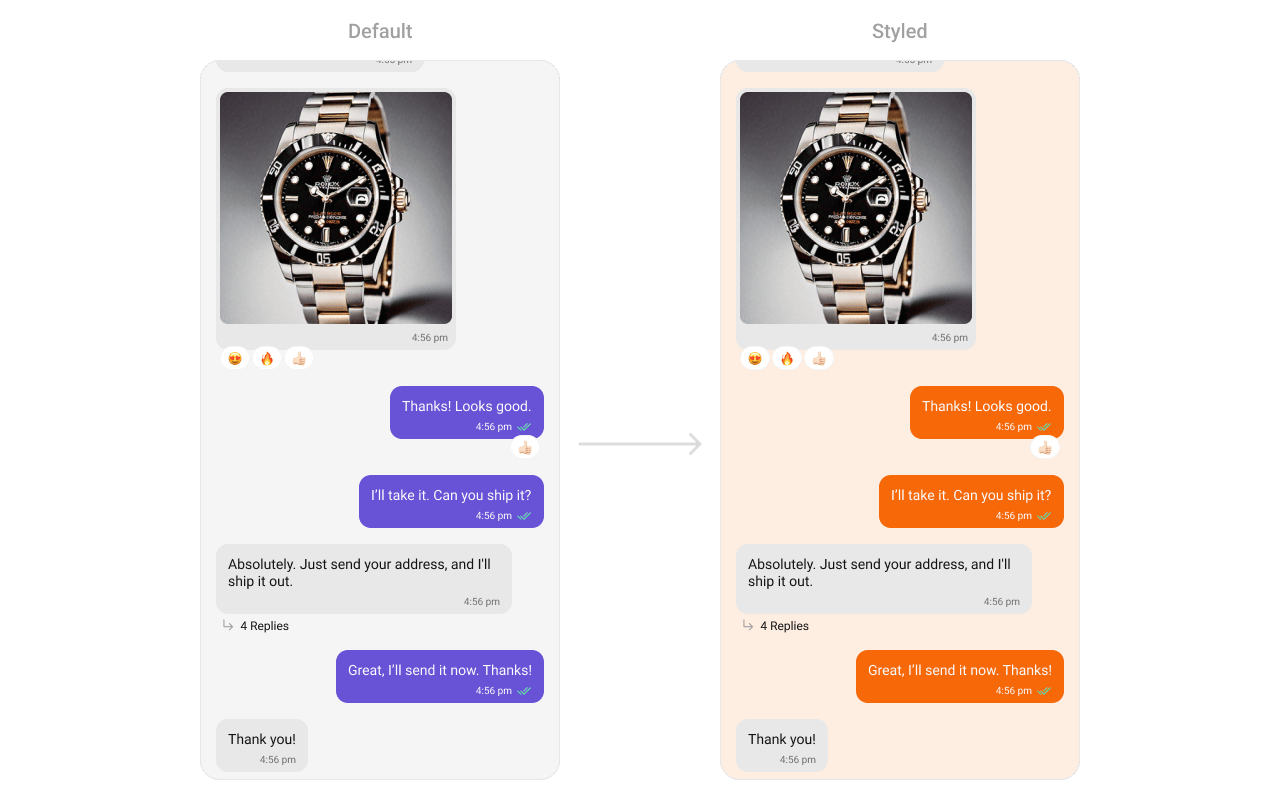 See [Component Styling](/ui-kit/android/v6/component-styling) for the full reference.
***
## ViewModel
```kotlin lines theme={null}
val viewModel = ViewModelProvider(this)
.get(CometChatMessageListViewModel::class.java)
```
```kotlin lines theme={null}
messageList.setViewModel(viewModel)
```
```kotlin lines theme={null}
CometChatMessageList(
user = user,
messageListViewModel = viewModel
)
```
See [ViewModel & Data](/ui-kit/android/v6/customization-viewmodel-data) for state observation and custom repositories.
***
## Next Steps
Display user/group info in the toolbar
Rich input for sending messages
Customize message bubble structure
Detailed styling reference
See [Component Styling](/ui-kit/android/v6/component-styling) for the full reference.
***
## ViewModel
```kotlin lines theme={null}
val viewModel = ViewModelProvider(this)
.get(CometChatMessageListViewModel::class.java)
```
```kotlin lines theme={null}
messageList.setViewModel(viewModel)
```
```kotlin lines theme={null}
CometChatMessageList(
user = user,
messageListViewModel = viewModel
)
```
See [ViewModel & Data](/ui-kit/android/v6/customization-viewmodel-data) for state observation and custom repositories.
***
## Next Steps
Display user/group info in the toolbar
Rich input for sending messages
Customize message bubble structure
Detailed styling reference