> ## Documentation Index
> Fetch the complete documentation index at: https://cometchat-22654f5b-docs-audit-mechanical-fixes.mintlify.site/llms.txt
> Use this file to discover all available pages before exploring further.
# Message Template
> Define and customize message bubble structure, layout, and behavior using MessageTemplate.
A `MessageTemplate` defines and customizes both the structure and the behavior of the MessageBubble. It acts as a schema for creating message bubble components, allowing you to manage the appearance and interactions of message bubbles within your application.
## When to Use This
* Customize the header, content, footer, bottom, or status info view of a message bubble
* Replace the default bubble layout with a completely custom view
* Add or modify the long-press options on a message bubble
* Create a new template for a custom message type (e.g., a contact card)
* Change how a specific message type (text, image, etc.) renders in the [MessageList](/ui-kit/android/v6/message-list)
## Prerequisites
* CometChat Android UI Kit dependency added
* `CometChatUIKit.init()` called and completed
* A logged-in CometChat user
* Familiarity with the [MessageList](/ui-kit/android/v6/message-list) component
***
## Quick Start
1. Get the list of existing message templates from the data source:
```kotlin lines theme={null}
val messageTemplates = CometChatUIKit.getDataSource()
.getMessageTemplates(messageList.additionParameter)
```
```kotlin lines theme={null}
val messageTemplates = CometChatUIKit.getDataSource()
.getMessageTemplates(additionParameter)
```
2. Find the template for the message type you want to customize:
```kotlin lines theme={null}
for (template in messageTemplates) {
if (template.type == UIKitConstants.MessageType.TEXT) {
// Customize text message template
}
}
```
```kotlin lines theme={null}
for (template in messageTemplates) {
if (template.type == UIKitConstants.MessageType.TEXT) {
// Customize text message template
}
}
```
3. Customize a view on the matched template:
```kotlin lines theme={null}
template.setContentView(object : MessagesViewHolderListener() {
override fun createView(
context: Context,
cometChatMessageBubble: CometChatMessageBubble,
messageBubbleAlignment: UIKitConstants.MessageBubbleAlignment
): View {
return LayoutInflater.from(context).inflate(R.layout.your_custom_layout, null)
}
override fun bindView(
context: Context, view: View, baseMessage: BaseMessage,
messageBubbleAlignment: UIKitConstants.MessageBubbleAlignment,
viewHolder: RecyclerView.ViewHolder, list: List, i: Int
) {
// Bind your custom view data here
}
})
```
```kotlin lines theme={null}
template.setContentView { baseMessage, alignment ->
// Return your custom composable content
Text(text = (baseMessage as? TextMessage)?.text ?: "")
}
```
4. Apply the modified templates to the MessageList:
```kotlin lines theme={null}
messageList.setTemplates(messageTemplates)
```
```kotlin lines theme={null}
CometChatMessageList(
user = user,
templates = messageTemplates
)
```
***
## Core Concepts
### MessageBubble Structure
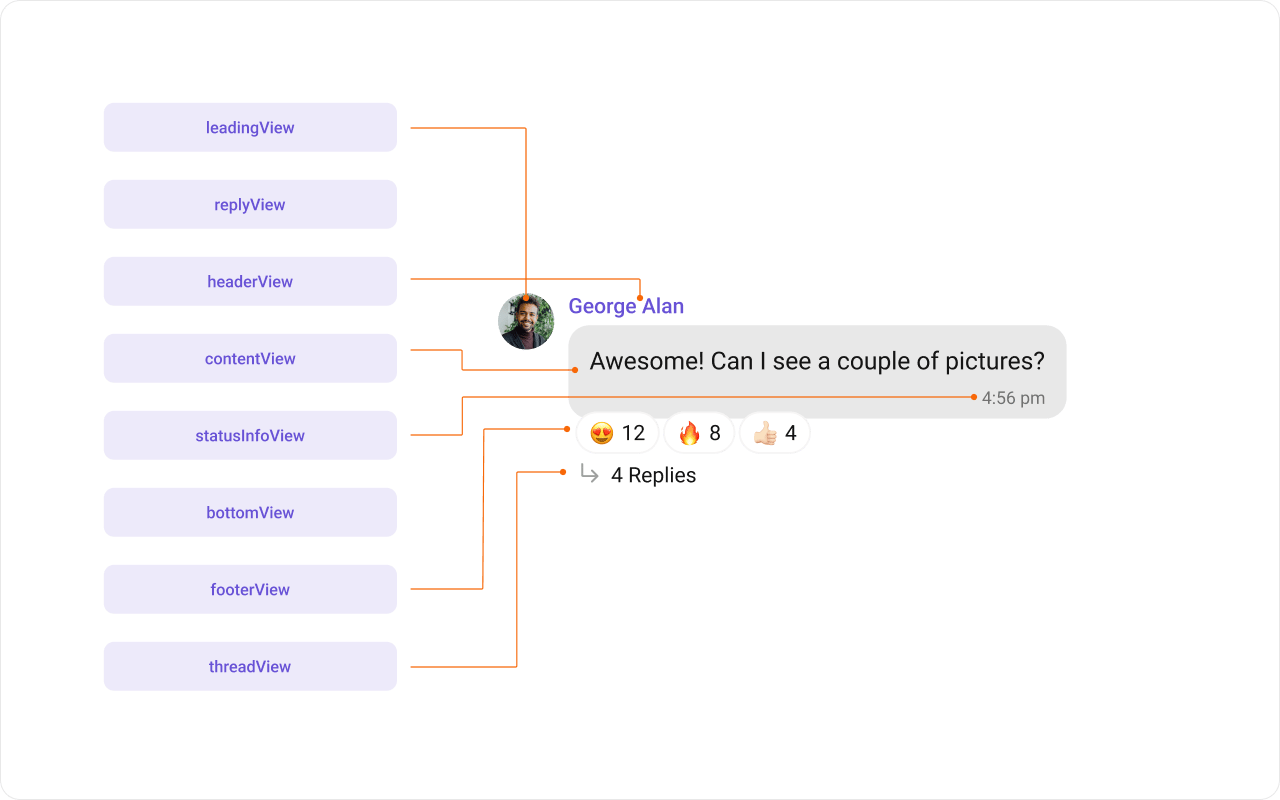 The `MessageBubble` structure is broken down into these views:
1. **Leading view** — Sender's avatar. Left for incoming, right for outgoing.
2. **Header view** — Sender's name. Useful in group chats.
3. **Content view** — Core message content (text, images, videos, etc.).
4. **Bottom view** — Additional elements like link previews or "load more" buttons.
5. **Footer view** — Timestamp and delivery/read status.
### Template Properties
* **Type**: `setType()` maps the template to a `CometChatMessage` type.
* **Category**: `setCategory()` links the template with a message category.
```kotlin lines theme={null}
messageTemplate.setType(UIKitConstants.MessageType.CUSTOM)
messageTemplate.setCategory(UIKitConstants.MessageCategory.CUSTOM)
```
***
## Implementation
### Header View
Customize the header area above the content view.
The `MessageBubble` structure is broken down into these views:
1. **Leading view** — Sender's avatar. Left for incoming, right for outgoing.
2. **Header view** — Sender's name. Useful in group chats.
3. **Content view** — Core message content (text, images, videos, etc.).
4. **Bottom view** — Additional elements like link previews or "load more" buttons.
5. **Footer view** — Timestamp and delivery/read status.
### Template Properties
* **Type**: `setType()` maps the template to a `CometChatMessage` type.
* **Category**: `setCategory()` links the template with a message category.
```kotlin lines theme={null}
messageTemplate.setType(UIKitConstants.MessageType.CUSTOM)
messageTemplate.setCategory(UIKitConstants.MessageCategory.CUSTOM)
```
***
## Implementation
### Header View
Customize the header area above the content view.
 ```kotlin lines theme={null}
template.setHeaderView(object : MessagesViewHolderListener() {
override fun createView(
context: Context,
cometChatMessageBubble: CometChatMessageBubble,
messageBubbleAlignment: UIKitConstants.MessageBubbleAlignment
): View {
return layoutInflater.inflate(R.layout.message_template_header_view, null)
}
override fun bindView(
context: Context, view: View, baseMessage: BaseMessage,
messageBubbleAlignment: UIKitConstants.MessageBubbleAlignment,
viewHolder: RecyclerView.ViewHolder, list: List, i: Int
) {
val textView = view.findViewById(R.id.name_with_status)
textView.text = baseMessage.sender.name + " • 🗓️ In meeting"
}
})
```
```kotlin lines theme={null}
template.setHeaderView { baseMessage, alignment ->
Text(
text = "${baseMessage.sender.name} • 🗓️ In meeting",
style = CometChatTheme.typography.caption2Regular,
color = CometChatTheme.colors.primary
)
}
```
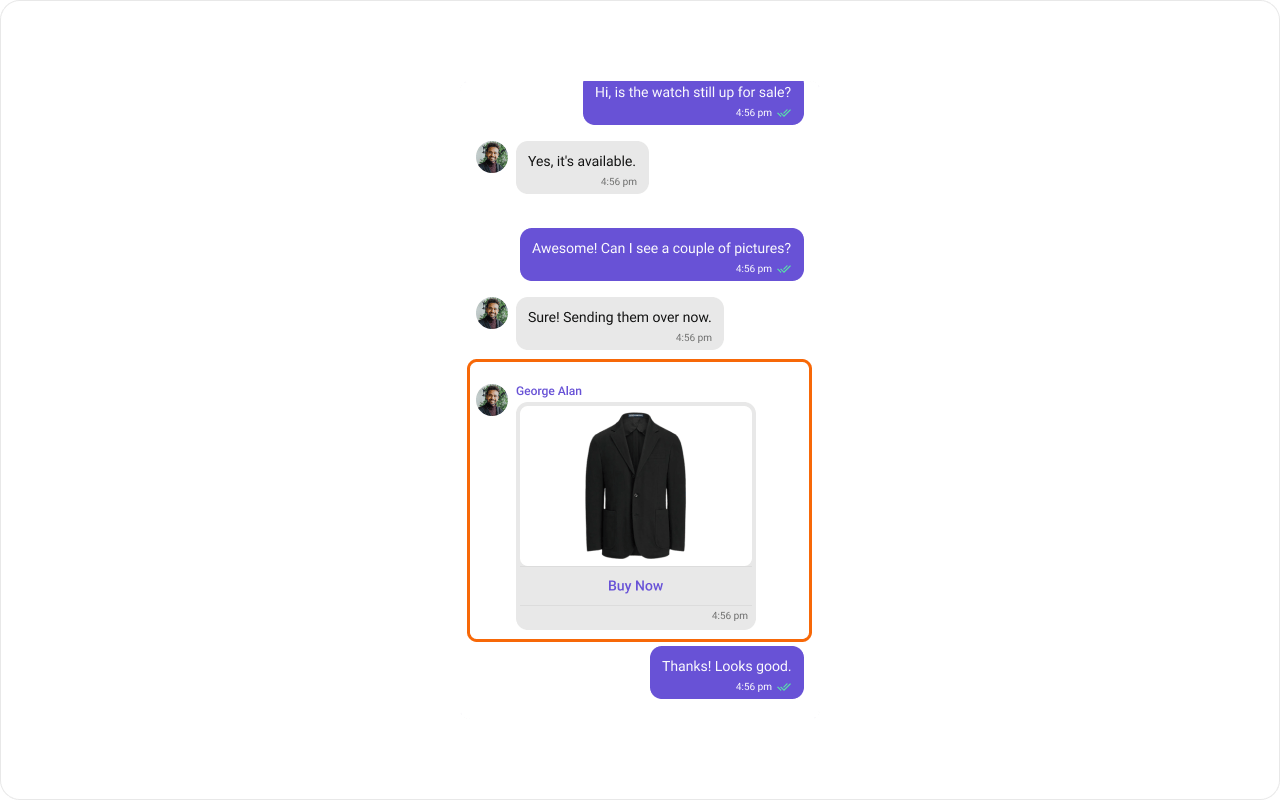
### Content View
Customize the main content area of the message bubble.
```kotlin lines theme={null}
template.setHeaderView(object : MessagesViewHolderListener() {
override fun createView(
context: Context,
cometChatMessageBubble: CometChatMessageBubble,
messageBubbleAlignment: UIKitConstants.MessageBubbleAlignment
): View {
return layoutInflater.inflate(R.layout.message_template_header_view, null)
}
override fun bindView(
context: Context, view: View, baseMessage: BaseMessage,
messageBubbleAlignment: UIKitConstants.MessageBubbleAlignment,
viewHolder: RecyclerView.ViewHolder, list: List, i: Int
) {
val textView = view.findViewById(R.id.name_with_status)
textView.text = baseMessage.sender.name + " • 🗓️ In meeting"
}
})
```
```kotlin lines theme={null}
template.setHeaderView { baseMessage, alignment ->
Text(
text = "${baseMessage.sender.name} • 🗓️ In meeting",
style = CometChatTheme.typography.caption2Regular,
color = CometChatTheme.colors.primary
)
}
```
### Content View
Customize the main content area of the message bubble.
 ```kotlin lines theme={null}
template.setContentView(object : MessagesViewHolderListener() {
override fun createView(
context: Context,
cometChatMessageBubble: CometChatMessageBubble,
messageBubbleAlignment: UIKitConstants.MessageBubbleAlignment
): View {
return LayoutInflater.from(context).inflate(R.layout.image_bubble_content_view, null)
}
override fun bindView(
context: Context, view: View, baseMessage: BaseMessage,
messageBubbleAlignment: UIKitConstants.MessageBubbleAlignment,
viewHolder: RecyclerView.ViewHolder, list: List, i: Int
) {
val imageBubble = view.findViewById(R.id.imageBubble)
val mediaMessage = baseMessage as MediaMessage
val attachment = mediaMessage.attachment
imageBubble.setImageUrl(
Utils.getFileFromLocalPath(mediaMessage),
attachment?.fileUrl ?: "",
attachment?.fileExtension?.equals("gif", ignoreCase = true) ?: false
)
}
})
```
```kotlin lines theme={null}
template.setContentView { baseMessage, alignment ->
val mediaMessage = baseMessage as? MediaMessage
Column {
CometChatImageBubble(
imageUrl = mediaMessage?.attachment?.fileUrl ?: ""
)
Text(
text = "Buy Now",
textAlign = TextAlign.Center,
color = CometChatTheme.colors.primary
)
}
}
```
### Status Info View
Customize the status info area (delivery/read status indicators).
```kotlin lines theme={null}
template.setContentView(object : MessagesViewHolderListener() {
override fun createView(
context: Context,
cometChatMessageBubble: CometChatMessageBubble,
messageBubbleAlignment: UIKitConstants.MessageBubbleAlignment
): View {
return LayoutInflater.from(context).inflate(R.layout.image_bubble_content_view, null)
}
override fun bindView(
context: Context, view: View, baseMessage: BaseMessage,
messageBubbleAlignment: UIKitConstants.MessageBubbleAlignment,
viewHolder: RecyclerView.ViewHolder, list: List, i: Int
) {
val imageBubble = view.findViewById(R.id.imageBubble)
val mediaMessage = baseMessage as MediaMessage
val attachment = mediaMessage.attachment
imageBubble.setImageUrl(
Utils.getFileFromLocalPath(mediaMessage),
attachment?.fileUrl ?: "",
attachment?.fileExtension?.equals("gif", ignoreCase = true) ?: false
)
}
})
```
```kotlin lines theme={null}
template.setContentView { baseMessage, alignment ->
val mediaMessage = baseMessage as? MediaMessage
Column {
CometChatImageBubble(
imageUrl = mediaMessage?.attachment?.fileUrl ?: ""
)
Text(
text = "Buy Now",
textAlign = TextAlign.Center,
color = CometChatTheme.colors.primary
)
}
}
```
### Status Info View
Customize the status info area (delivery/read status indicators).
 ```kotlin lines theme={null}
// Replace status info with a minimal spacer
template.setStatusInfoView(object : MessagesViewHolderListener() {
override fun createView(
context: Context,
cometChatMessageBubble: CometChatMessageBubble,
messageBubbleAlignment: UIKitConstants.MessageBubbleAlignment
): View {
val view = View(context)
view.layoutParams = LinearLayout.LayoutParams(1.dp, 12.dp)
return view
}
override fun bindView(
context: Context, view: View, baseMessage: BaseMessage,
messageBubbleAlignment: UIKitConstants.MessageBubbleAlignment,
viewHolder: RecyclerView.ViewHolder, list: List, i: Int
) { }
})
// Move status content to footer
template.setFooterView(object : MessagesViewHolderListener() {
override fun createView(
context: Context,
cometChatMessageBubble: CometChatMessageBubble,
messageBubbleAlignment: UIKitConstants.MessageBubbleAlignment
): View {
return LayoutInflater.from(context).inflate(R.layout.status_info_layout, null)
}
override fun bindView(
context: Context, view: View, baseMessage: BaseMessage,
messageBubbleAlignment: UIKitConstants.MessageBubbleAlignment,
viewHolder: RecyclerView.ViewHolder, list: List, i: Int
) {
val tvTime = view.findViewById(R.id.time)
val receipt = view.findViewById(R.id.receipt)
if (messageBubbleAlignment == UIKitConstants.MessageBubbleAlignment.RIGHT) {
receipt.visibility = View.VISIBLE
receipt.setMessageReceipt(MessageReceiptUtils.MessageReceipt(baseMessage))
} else {
receipt.visibility = View.GONE
}
tvTime.text = SimpleDateFormat("hh:mm a").format(baseMessage.sentAt * 1000)
}
})
```
```kotlin lines theme={null}
template.setStatusInfoView { _, _ ->
Spacer(Modifier.height(12.dp))
}
template.setFooterView { baseMessage, alignment ->
Row(
modifier = Modifier.fillMaxWidth(),
horizontalArrangement = Arrangement.End,
verticalAlignment = Alignment.CenterVertically
) {
Text(
text = SimpleDateFormat("hh:mm a").format(baseMessage.sentAt * 1000),
style = CometChatTheme.typography.caption2Regular
)
if (alignment == UIKitConstants.MessageBubbleAlignment.RIGHT) {
CometChatMessageReceipt(message = baseMessage)
}
}
}
```
### Bottom View
Extend the bubble with additional elements beneath the content view.
```kotlin lines theme={null}
// Replace status info with a minimal spacer
template.setStatusInfoView(object : MessagesViewHolderListener() {
override fun createView(
context: Context,
cometChatMessageBubble: CometChatMessageBubble,
messageBubbleAlignment: UIKitConstants.MessageBubbleAlignment
): View {
val view = View(context)
view.layoutParams = LinearLayout.LayoutParams(1.dp, 12.dp)
return view
}
override fun bindView(
context: Context, view: View, baseMessage: BaseMessage,
messageBubbleAlignment: UIKitConstants.MessageBubbleAlignment,
viewHolder: RecyclerView.ViewHolder, list: List, i: Int
) { }
})
// Move status content to footer
template.setFooterView(object : MessagesViewHolderListener() {
override fun createView(
context: Context,
cometChatMessageBubble: CometChatMessageBubble,
messageBubbleAlignment: UIKitConstants.MessageBubbleAlignment
): View {
return LayoutInflater.from(context).inflate(R.layout.status_info_layout, null)
}
override fun bindView(
context: Context, view: View, baseMessage: BaseMessage,
messageBubbleAlignment: UIKitConstants.MessageBubbleAlignment,
viewHolder: RecyclerView.ViewHolder, list: List, i: Int
) {
val tvTime = view.findViewById(R.id.time)
val receipt = view.findViewById(R.id.receipt)
if (messageBubbleAlignment == UIKitConstants.MessageBubbleAlignment.RIGHT) {
receipt.visibility = View.VISIBLE
receipt.setMessageReceipt(MessageReceiptUtils.MessageReceipt(baseMessage))
} else {
receipt.visibility = View.GONE
}
tvTime.text = SimpleDateFormat("hh:mm a").format(baseMessage.sentAt * 1000)
}
})
```
```kotlin lines theme={null}
template.setStatusInfoView { _, _ ->
Spacer(Modifier.height(12.dp))
}
template.setFooterView { baseMessage, alignment ->
Row(
modifier = Modifier.fillMaxWidth(),
horizontalArrangement = Arrangement.End,
verticalAlignment = Alignment.CenterVertically
) {
Text(
text = SimpleDateFormat("hh:mm a").format(baseMessage.sentAt * 1000),
style = CometChatTheme.typography.caption2Regular
)
if (alignment == UIKitConstants.MessageBubbleAlignment.RIGHT) {
CometChatMessageReceipt(message = baseMessage)
}
}
}
```
### Bottom View
Extend the bubble with additional elements beneath the content view.
 ```kotlin lines theme={null}
template.setBottomView(object : MessagesViewHolderListener() {
override fun createView(
context: Context,
cometChatMessageBubble: CometChatMessageBubble,
messageBubbleAlignment: UIKitConstants.MessageBubbleAlignment
): View {
return LayoutInflater.from(context).inflate(R.layout.message_template_bottom_view, null)
}
override fun bindView(
context: Context, view: View, baseMessage: BaseMessage,
messageBubbleAlignment: UIKitConstants.MessageBubbleAlignment,
viewHolder: RecyclerView.ViewHolder, list: List, i: Int
) {
// Bind bottom view data
}
})
```
```kotlin lines theme={null}
template.setBottomView { baseMessage, alignment ->
// Custom bottom content
Text("Link preview or additional info")
}
```
### Footer View
Customize the footer area (timestamp and delivery status).
```kotlin lines theme={null}
template.setBottomView(object : MessagesViewHolderListener() {
override fun createView(
context: Context,
cometChatMessageBubble: CometChatMessageBubble,
messageBubbleAlignment: UIKitConstants.MessageBubbleAlignment
): View {
return LayoutInflater.from(context).inflate(R.layout.message_template_bottom_view, null)
}
override fun bindView(
context: Context, view: View, baseMessage: BaseMessage,
messageBubbleAlignment: UIKitConstants.MessageBubbleAlignment,
viewHolder: RecyclerView.ViewHolder, list: List, i: Int
) {
// Bind bottom view data
}
})
```
```kotlin lines theme={null}
template.setBottomView { baseMessage, alignment ->
// Custom bottom content
Text("Link preview or additional info")
}
```
### Footer View
Customize the footer area (timestamp and delivery status).
 ```kotlin lines theme={null}
template.setFooterView(object : MessagesViewHolderListener() {
override fun createView(
context: Context,
cometChatMessageBubble: CometChatMessageBubble,
messageBubbleAlignment: UIKitConstants.MessageBubbleAlignment
): View {
return LayoutInflater.from(context).inflate(R.layout.message_template_footer_view, null)
}
override fun bindView(
context: Context, view: View, baseMessage: BaseMessage,
messageBubbleAlignment: UIKitConstants.MessageBubbleAlignment,
viewHolder: RecyclerView.ViewHolder, list: List, i: Int
) {
val tvTime = view.findViewById(R.id.time)
tvTime.text = SimpleDateFormat("hh:mm a").format(baseMessage.sentAt * 1000)
}
})
```
```kotlin lines theme={null}
template.setFooterView { baseMessage, alignment ->
Text(
text = SimpleDateFormat("hh:mm a").format(baseMessage.sentAt * 1000),
style = CometChatTheme.typography.caption2Regular
)
}
```
### Bubble View
Replace the entire message bubble with a fully custom layout.
```kotlin lines theme={null}
template.setFooterView(object : MessagesViewHolderListener() {
override fun createView(
context: Context,
cometChatMessageBubble: CometChatMessageBubble,
messageBubbleAlignment: UIKitConstants.MessageBubbleAlignment
): View {
return LayoutInflater.from(context).inflate(R.layout.message_template_footer_view, null)
}
override fun bindView(
context: Context, view: View, baseMessage: BaseMessage,
messageBubbleAlignment: UIKitConstants.MessageBubbleAlignment,
viewHolder: RecyclerView.ViewHolder, list: List, i: Int
) {
val tvTime = view.findViewById(R.id.time)
tvTime.text = SimpleDateFormat("hh:mm a").format(baseMessage.sentAt * 1000)
}
})
```
```kotlin lines theme={null}
template.setFooterView { baseMessage, alignment ->
Text(
text = SimpleDateFormat("hh:mm a").format(baseMessage.sentAt * 1000),
style = CometChatTheme.typography.caption2Regular
)
}
```
### Bubble View
Replace the entire message bubble with a fully custom layout.
 ```kotlin lines theme={null}
template.setBubbleView(object : MessagesViewHolderListener() {
override fun createView(
context: Context,
cometChatMessageBubble: CometChatMessageBubble,
messageBubbleAlignment: UIKitConstants.MessageBubbleAlignment
): View {
return LayoutInflater.from(context).inflate(R.layout.custom_bubble_view, null)
}
override fun bindView(
context: Context, view: View, baseMessage: BaseMessage,
messageBubbleAlignment: UIKitConstants.MessageBubbleAlignment,
viewHolder: RecyclerView.ViewHolder, list: List, i: Int
) {
// Bind entire custom bubble
}
})
```
```kotlin lines theme={null}
template.setBubbleView { baseMessage, alignment ->
Card {
Column(Modifier.padding(12.dp)) {
Text(baseMessage.sender.name)
Text((baseMessage as? TextMessage)?.text ?: "")
}
}
}
```
***
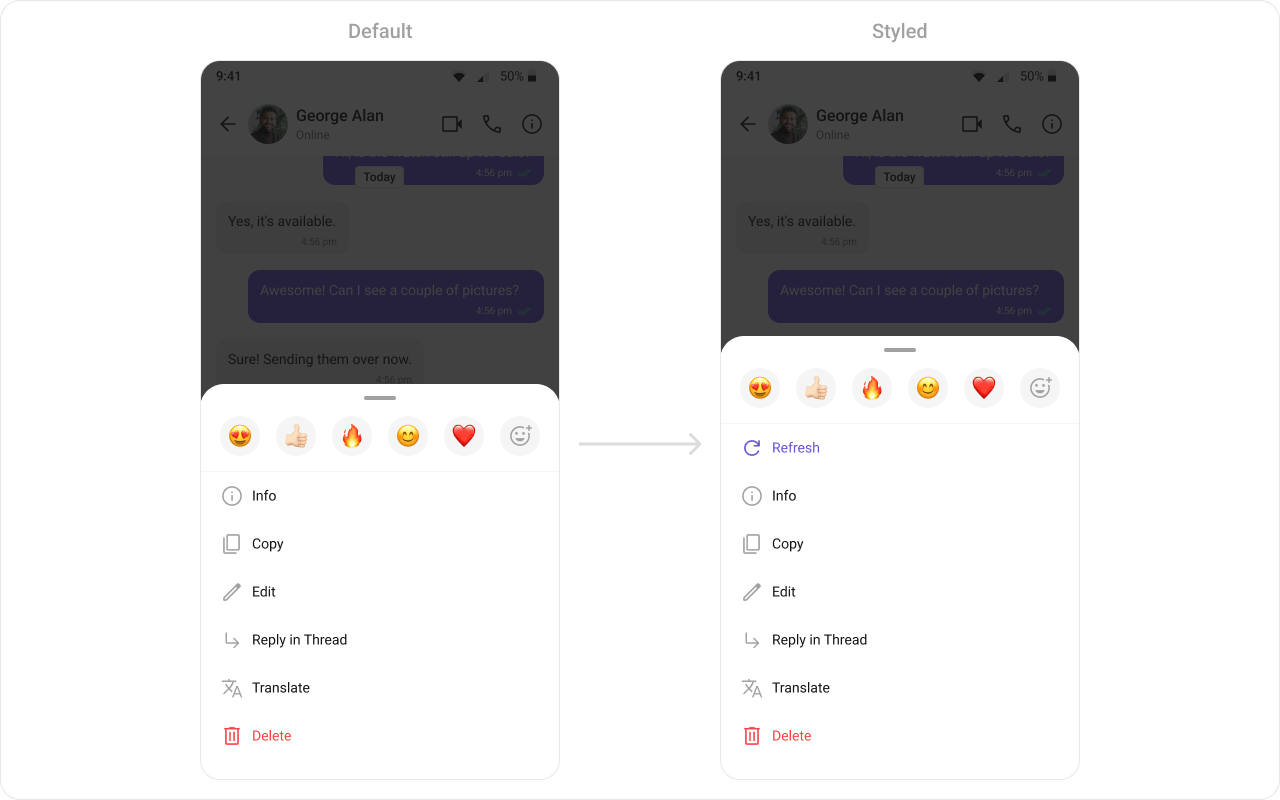
## Options
Customize the long-press action menu for a message type.
```kotlin lines theme={null}
template.setBubbleView(object : MessagesViewHolderListener() {
override fun createView(
context: Context,
cometChatMessageBubble: CometChatMessageBubble,
messageBubbleAlignment: UIKitConstants.MessageBubbleAlignment
): View {
return LayoutInflater.from(context).inflate(R.layout.custom_bubble_view, null)
}
override fun bindView(
context: Context, view: View, baseMessage: BaseMessage,
messageBubbleAlignment: UIKitConstants.MessageBubbleAlignment,
viewHolder: RecyclerView.ViewHolder, list: List, i: Int
) {
// Bind entire custom bubble
}
})
```
```kotlin lines theme={null}
template.setBubbleView { baseMessage, alignment ->
Card {
Column(Modifier.padding(12.dp)) {
Text(baseMessage.sender.name)
Text((baseMessage as? TextMessage)?.text ?: "")
}
}
}
```
***
## Options
Customize the long-press action menu for a message type.
 ```kotlin lines theme={null}
template.setOptions { context, baseMessage, isLeftAligned ->
listOf(
CometChatPopupMenu.MenuItem(
id = "bookmark",
name = "Bookmark",
onClick = { /* handle */ }
)
)
}
```
```kotlin lines theme={null}
template.setOptions { context, baseMessage, isLeftAligned ->
listOf(
MenuItem(id = "bookmark", name = "Bookmark", onClick = { /* handle */ })
)
}
```
***
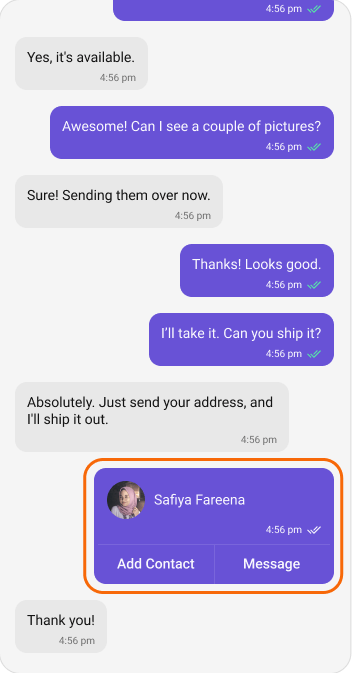
## Creating a New Template
Create a template for a custom message type (e.g., a contact card):
```kotlin lines theme={null}
template.setOptions { context, baseMessage, isLeftAligned ->
listOf(
CometChatPopupMenu.MenuItem(
id = "bookmark",
name = "Bookmark",
onClick = { /* handle */ }
)
)
}
```
```kotlin lines theme={null}
template.setOptions { context, baseMessage, isLeftAligned ->
listOf(
MenuItem(id = "bookmark", name = "Bookmark", onClick = { /* handle */ })
)
}
```
***
## Creating a New Template
Create a template for a custom message type (e.g., a contact card):
 ```kotlin lines theme={null}
val contactTemplate = CometChatMessageTemplate()
contactTemplate.setType("contact")
contactTemplate.setCategory(UIKitConstants.MessageCategory.CUSTOM)
contactTemplate.setContentView(object : MessagesViewHolderListener() {
override fun createView(
context: Context,
cometChatMessageBubble: CometChatMessageBubble,
messageBubbleAlignment: UIKitConstants.MessageBubbleAlignment
): View {
return LayoutInflater.from(context).inflate(R.layout.contact_card_bubble, null)
}
override fun bindView(
context: Context, view: View, baseMessage: BaseMessage,
messageBubbleAlignment: UIKitConstants.MessageBubbleAlignment,
viewHolder: RecyclerView.ViewHolder, list: List, i: Int
) {
val customMessage = baseMessage as CustomMessage
val name = view.findViewById(R.id.contact_name)
name.text = customMessage.customData?.getString("name") ?: ""
}
})
// Add to existing templates
val templates = CometChatUIKit.getDataSource()
.getMessageTemplates(messageList.additionParameter)
templates.add(contactTemplate)
messageList.setTemplates(templates)
```
```kotlin lines theme={null}
val contactTemplate = CometChatMessageTemplate()
contactTemplate.setType("contact")
contactTemplate.setCategory(UIKitConstants.MessageCategory.CUSTOM)
contactTemplate.setContentView { baseMessage, alignment ->
val customMessage = baseMessage as? CustomMessage
val name = customMessage?.customData?.optString("name") ?: ""
Card {
Row(Modifier.padding(12.dp), verticalAlignment = Alignment.CenterVertically) {
CometChatAvatar(name = name)
Spacer(Modifier.width(8.dp))
Text(name)
}
}
}
val templates = CometChatUIKit.getDataSource()
.getMessageTemplates(additionParameter)
.toMutableList()
templates.add(contactTemplate)
CometChatMessageList(
user = user,
templates = templates
)
```
***
## Next Steps
Display messages in a conversation
Style individual bubble types
Detailed styling reference
Replace specific UI regions
```kotlin lines theme={null}
val contactTemplate = CometChatMessageTemplate()
contactTemplate.setType("contact")
contactTemplate.setCategory(UIKitConstants.MessageCategory.CUSTOM)
contactTemplate.setContentView(object : MessagesViewHolderListener() {
override fun createView(
context: Context,
cometChatMessageBubble: CometChatMessageBubble,
messageBubbleAlignment: UIKitConstants.MessageBubbleAlignment
): View {
return LayoutInflater.from(context).inflate(R.layout.contact_card_bubble, null)
}
override fun bindView(
context: Context, view: View, baseMessage: BaseMessage,
messageBubbleAlignment: UIKitConstants.MessageBubbleAlignment,
viewHolder: RecyclerView.ViewHolder, list: List, i: Int
) {
val customMessage = baseMessage as CustomMessage
val name = view.findViewById(R.id.contact_name)
name.text = customMessage.customData?.getString("name") ?: ""
}
})
// Add to existing templates
val templates = CometChatUIKit.getDataSource()
.getMessageTemplates(messageList.additionParameter)
templates.add(contactTemplate)
messageList.setTemplates(templates)
```
```kotlin lines theme={null}
val contactTemplate = CometChatMessageTemplate()
contactTemplate.setType("contact")
contactTemplate.setCategory(UIKitConstants.MessageCategory.CUSTOM)
contactTemplate.setContentView { baseMessage, alignment ->
val customMessage = baseMessage as? CustomMessage
val name = customMessage?.customData?.optString("name") ?: ""
Card {
Row(Modifier.padding(12.dp), verticalAlignment = Alignment.CenterVertically) {
CometChatAvatar(name = name)
Spacer(Modifier.width(8.dp))
Text(name)
}
}
}
val templates = CometChatUIKit.getDataSource()
.getMessageTemplates(additionParameter)
.toMutableList()
templates.add(contactTemplate)
CometChatMessageList(
user = user,
templates = templates
)
```
***
## Next Steps
Display messages in a conversation
Style individual bubble types
Detailed styling reference
Replace specific UI regions