> ## Documentation Index
> Fetch the complete documentation index at: https://cometchat-22654f5b-docs-audit-mechanical-fixes.mintlify.site/llms.txt
> Use this file to discover all available pages before exploring further.
# Core Features
> Comprehensive guide to CometChat's core messaging features including instant messaging, media sharing, read receipts, and more
| Field | Value |
| -------------- | ------------------------------------------------------------------------------------------------------------------------------------------------------------------------------------------------------------------------------------------------------------------------------------------------------------------------------------------------------------------------------------------------------------------------------------------------------------------------------------------------------------------------ |
| Package | `cometchat_chat_uikit` |
| Required setup | `CometChatUIKit.init(uiKitSettings: UIKitSettings)` then `CometChatUIKit.login(uid)` — must complete before rendering any component |
| Core features | Instant Messaging, Media Sharing, Read Receipts, Mark as Unread, Typing Indicator, User Presence, Reactions, Mentions, Rich Text Formatting, Quoted Reply, Search, Threaded Conversations, Moderation, Report Message, Group Chat |
| Key components | `CometChatConversations` → [Conversations](/ui-kit/flutter/v5/conversations), `CometChatMessageList` → [Message List](/ui-kit/flutter/v5/message-list), `CometChatMessageComposer` → [Message Composer](/ui-kit/flutter/v5/message-composer), `CometChatMessageHeader` → [Message Header](/ui-kit/flutter/v5/message-header), `CometChatUsers` → [Users](/ui-kit/flutter/v5/users), `CometChatGroups` → [Groups](/ui-kit/flutter/v5/groups), `CometChatGroupMembers` → [Group Members](/ui-kit/flutter/v5/group-members) |
The UI Kit comprises a variety of widgets, each designed to work seamlessly with one another to deliver a comprehensive and intuitive chat experience.
Here's how different UI Kit widgets work together to achieve CometChat's Core features:
***
## Instant Messaging
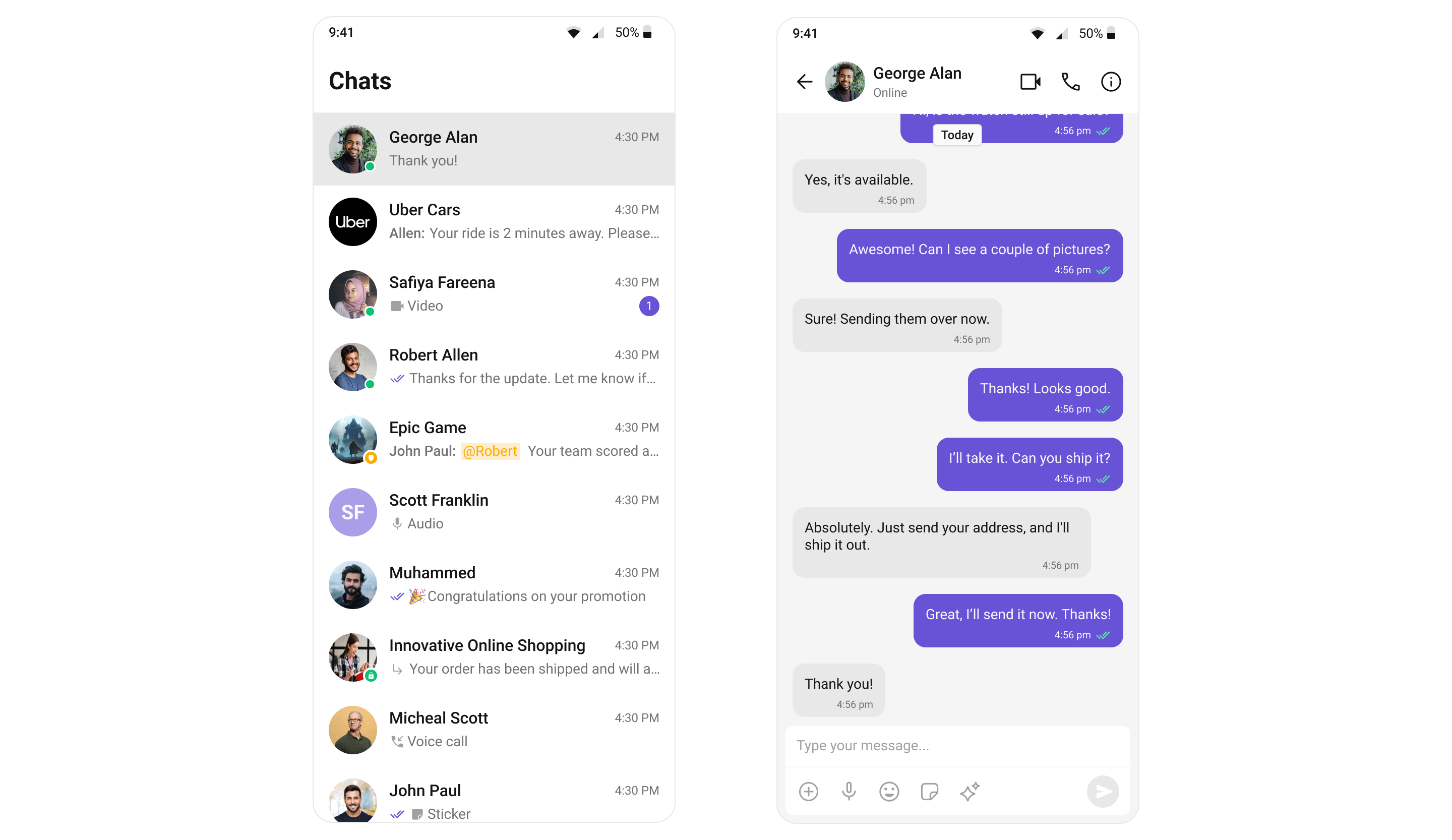
At the heart of CometChat's functionality is the ability to support real-time text messaging. Users can send and receive instant messages, fostering quick and efficient communication.
 | Widgets | Functionality |
| ------------------------------------------------------ | ------------------------------------------------------------------------------------------------------------------------------------------------------------------------------------------------ |
| [MessageComposer](/ui-kit/flutter/v5/message-composer) | [MessageComposer](/ui-kit/flutter/v5/message-composer) is a Widget that enables users to write and send a variety of messages. |
| [MessageList](/ui-kit/flutter/v5/message-list) | [MessageList](/ui-kit/flutter/v5/message-list) is a Widget that renders a list of messages sent and messages received using [TextBubble](/ui-kit/flutter/v5/message-bubble-styling#text-bubble). |
***
## Media Sharing
Beyond text, CometChat allows users to share various media types within their conversations. This includes images, videos, audio files, and documents, enriching the chat experience and enabling more comprehensive communication.
| Widgets | Functionality |
| ------------------------------------------------------ | ------------------------------------------------------------------------------------------------------------------------------------------------------------------------------------------------ |
| [MessageComposer](/ui-kit/flutter/v5/message-composer) | [MessageComposer](/ui-kit/flutter/v5/message-composer) is a Widget that enables users to write and send a variety of messages. |
| [MessageList](/ui-kit/flutter/v5/message-list) | [MessageList](/ui-kit/flutter/v5/message-list) is a Widget that renders a list of messages sent and messages received using [TextBubble](/ui-kit/flutter/v5/message-bubble-styling#text-bubble). |
***
## Media Sharing
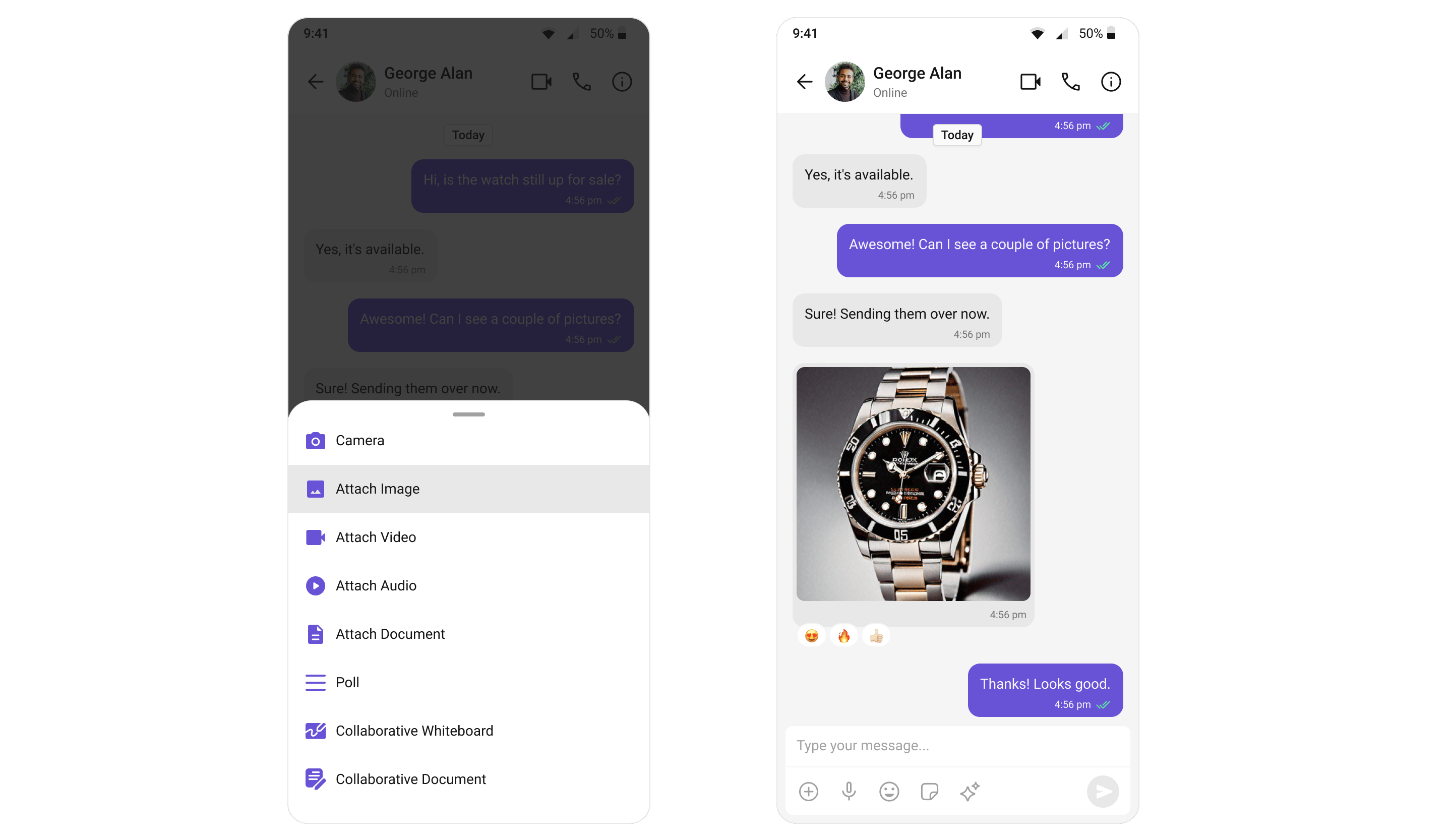
Beyond text, CometChat allows users to share various media types within their conversations. This includes images, videos, audio files, and documents, enriching the chat experience and enabling more comprehensive communication.
 | Widgets | Functionality |
| ------------------------------------------------------ | --------------------------------------------------------------------------------------------------------------------------------------------------------------------------------------------------------------------------------------------------------------------------------------------------------------------------------------------------------------------------------------------------------- |
| [MessageComposer](/ui-kit/flutter/v5/message-composer) | [MessageComposer](/ui-kit/flutter/v5/message-composer) is a Widget that has ActionSheet, ActionSheet is a menu that appears over the context of the app, providing multiple options for sharing media files. |
| [MessageList](/ui-kit/flutter/v5/message-list) | [MessageList](/ui-kit/flutter/v5/message-list) is a Widget that renders different Media Message bubbles like [Image Bubble](/ui-kit/flutter/v5/message-bubble-styling#image-bubble), [File Bubble](/ui-kit/flutter/v5/message-bubble-styling#file-bubble), [Audio Bubble](/ui-kit/flutter/v5/message-bubble-styling#audio-bubble), [Video Bubble](/ui-kit/flutter/v5/message-bubble-styling#video-bubble) |
***
## Read Receipts
CometChat's Read Receipts feature provides visibility into the message status, letting users know when a message has been delivered and read. This brings clarity to the communication and ensures users are informed about the status of their messages.
| Widgets | Functionality |
| ------------------------------------------------------ | --------------------------------------------------------------------------------------------------------------------------------------------------------------------------------------------------------------------------------------------------------------------------------------------------------------------------------------------------------------------------------------------------------- |
| [MessageComposer](/ui-kit/flutter/v5/message-composer) | [MessageComposer](/ui-kit/flutter/v5/message-composer) is a Widget that has ActionSheet, ActionSheet is a menu that appears over the context of the app, providing multiple options for sharing media files. |
| [MessageList](/ui-kit/flutter/v5/message-list) | [MessageList](/ui-kit/flutter/v5/message-list) is a Widget that renders different Media Message bubbles like [Image Bubble](/ui-kit/flutter/v5/message-bubble-styling#image-bubble), [File Bubble](/ui-kit/flutter/v5/message-bubble-styling#file-bubble), [Audio Bubble](/ui-kit/flutter/v5/message-bubble-styling#audio-bubble), [Video Bubble](/ui-kit/flutter/v5/message-bubble-styling#video-bubble) |
***
## Read Receipts
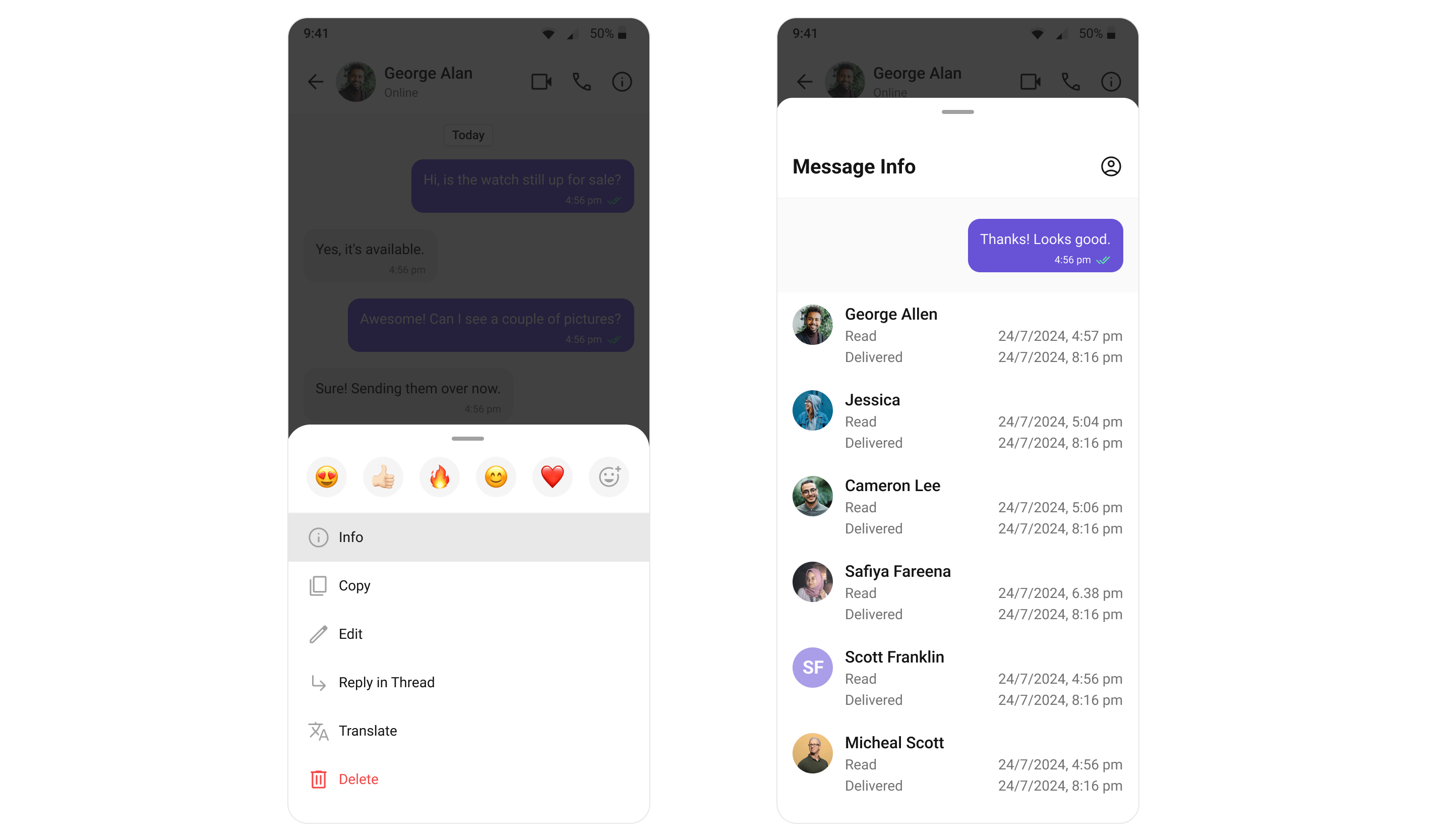
CometChat's Read Receipts feature provides visibility into the message status, letting users know when a message has been delivered and read. This brings clarity to the communication and ensures users are informed about the status of their messages.
 | Widgets | Functionality |
| ------------------------------------------------- | --------------------------------------------------------------------------------------------------------------------------------------------------------------------------------------------------------------------------------------------------------------- |
| [Conversations](/ui-kit/flutter/v5/conversations) | [Conversations](/ui-kit/flutter/v5/conversations) is a Widget that renders Conversations item List, Conversation item also displays the delivery status of the last message providing users with real-time updates on the status of their messages. |
| [MessageList](/ui-kit/flutter/v5/message-list) | [MessageList](/ui-kit/flutter/v5/message-list) is a Widget that renders different types of Message bubbles, Read Receipt status is an integral part of all message bubbles, no matter the type, and provides real-time updates about the status of the message. |
***
## Mark As Unread
Mark as Unread feature allows users to manually mark messages as unread, helping them keep track of important conversations they want to revisit later. When enabled, the message list can automatically start from the first unread message, making it easier to pick up where you left off.
| Widgets | Functionality |
| ------------------------------------------------- | --------------------------------------------------------------------------------------------------------------------------------------------------------------------------------------------------------------------------------------------------------------- |
| [Conversations](/ui-kit/flutter/v5/conversations) | [Conversations](/ui-kit/flutter/v5/conversations) is a Widget that renders Conversations item List, Conversation item also displays the delivery status of the last message providing users with real-time updates on the status of their messages. |
| [MessageList](/ui-kit/flutter/v5/message-list) | [MessageList](/ui-kit/flutter/v5/message-list) is a Widget that renders different types of Message bubbles, Read Receipt status is an integral part of all message bubbles, no matter the type, and provides real-time updates about the status of the message. |
***
## Mark As Unread
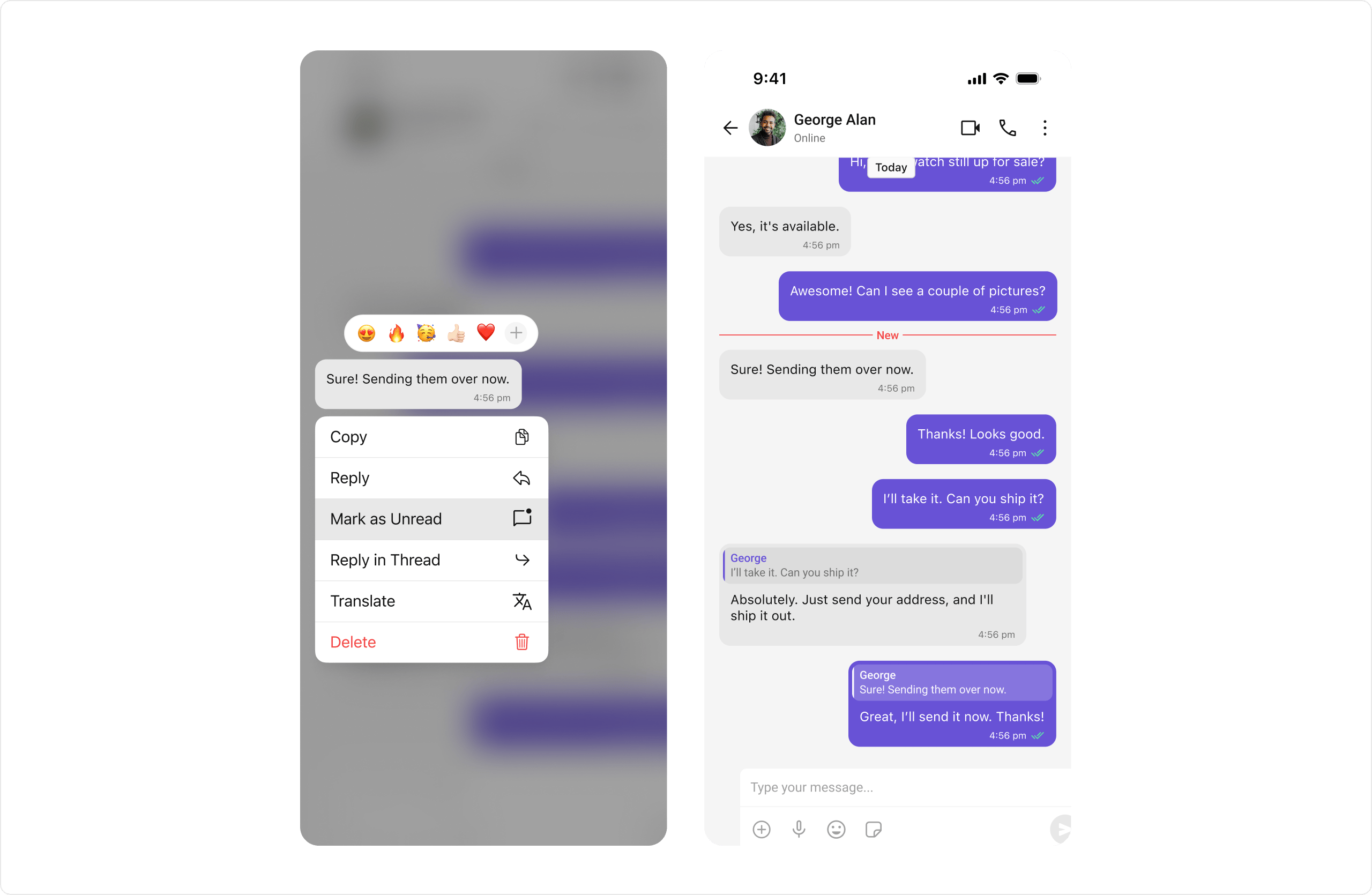
Mark as Unread feature allows users to manually mark messages as unread, helping them keep track of important conversations they want to revisit later. When enabled, the message list can automatically start from the first unread message, making it easier to pick up where you left off.
 | Widgets | Functionality |
| ------------------------------------------------- | ------------------------------------------------------------------------------------------------------------------------------------------------------------------------- |
| [Message List](/ui-kit/flutter/v5/message-list) | [Message List](/ui-kit/flutter/v5/message-list) provides the "Mark as unread" option in message actions and supports starting from the first unread message when enabled. |
| [Conversations](/ui-kit/flutter/v5/conversations) | [Conversations](/ui-kit/flutter/v5/conversations) widget listens to conversation updates and reflects the updated unread count in real-time. |
***
## Typing Indicator
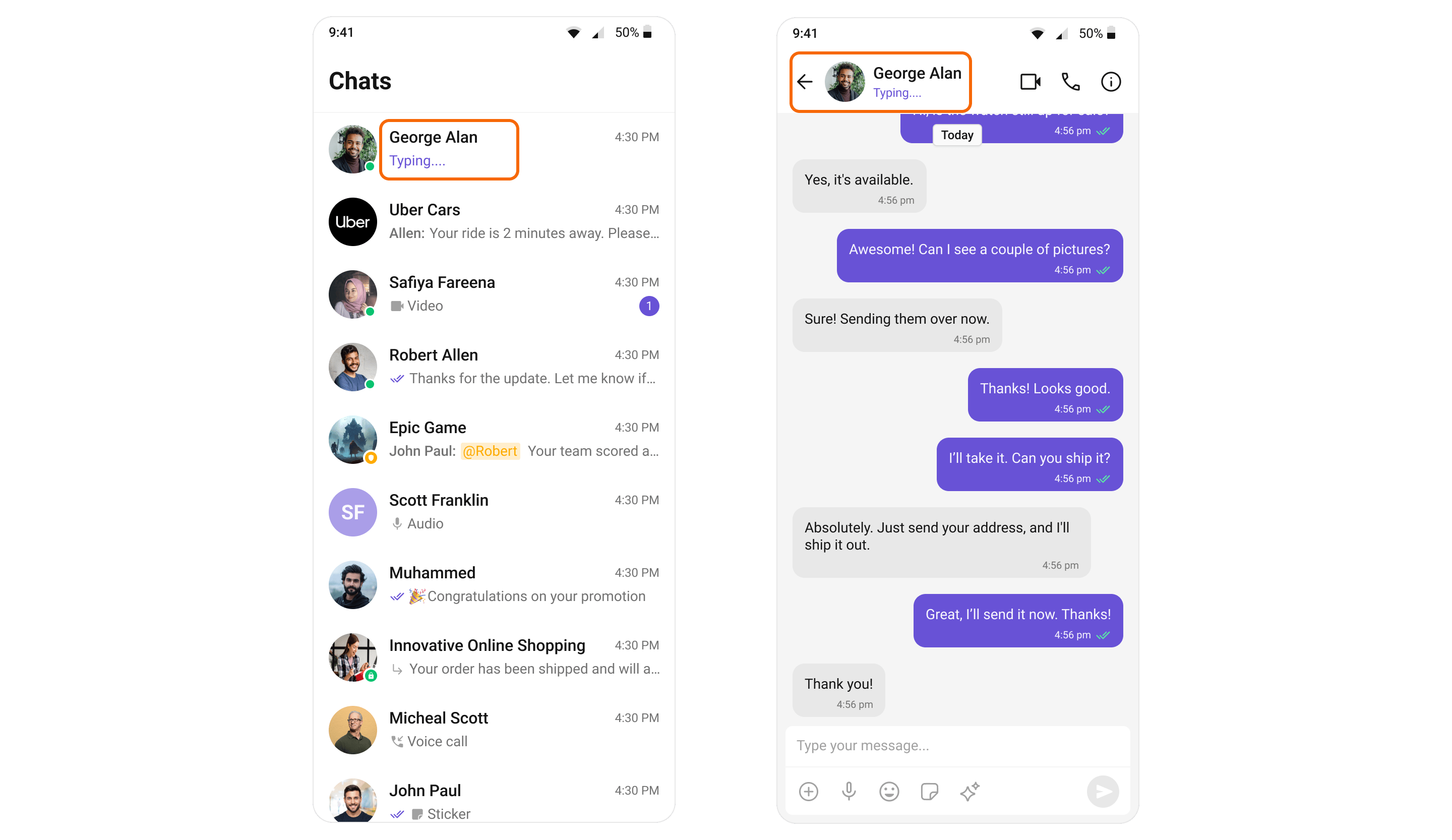
The Typing Indicator feature in CometChat shows when a user is typing a response in real-time, fostering a more interactive and engaging chat environment. This feature enhances the real-time communication experience, making conversations feel more natural and fluid.
| Widgets | Functionality |
| ------------------------------------------------- | ------------------------------------------------------------------------------------------------------------------------------------------------------------------------- |
| [Message List](/ui-kit/flutter/v5/message-list) | [Message List](/ui-kit/flutter/v5/message-list) provides the "Mark as unread" option in message actions and supports starting from the first unread message when enabled. |
| [Conversations](/ui-kit/flutter/v5/conversations) | [Conversations](/ui-kit/flutter/v5/conversations) widget listens to conversation updates and reflects the updated unread count in real-time. |
***
## Typing Indicator
The Typing Indicator feature in CometChat shows when a user is typing a response in real-time, fostering a more interactive and engaging chat environment. This feature enhances the real-time communication experience, making conversations feel more natural and fluid.
 | Widgets | Functionality |
| --------------------------------------------------- | ----------------------------------------------------------------------------------------------------------------------------------------------------------------------------------------------------------------------------------------------------------------------------------------------------------- |
| [Conversations](/ui-kit/flutter/v5/conversations) | [Conversations](/ui-kit/flutter/v5/conversations) is a Widget that renders Conversations item List, Conversations item also shows real-time typing status indicators. This means that if a user in a one-on-one chat or a participant in a group chat is currently typing a message |
| [Message Header](/ui-kit/flutter/v5/message-header) | [Message Header](/ui-kit/flutter/v5/message-header) that renders details of User or Groups in ToolBar. The MessageHeader also handles the Typing Indicator functionality. When a user or a member in a group is typing, the MessageHeader dynamically updates to display a 'typing...' status in real-time. |
***
## User Presence
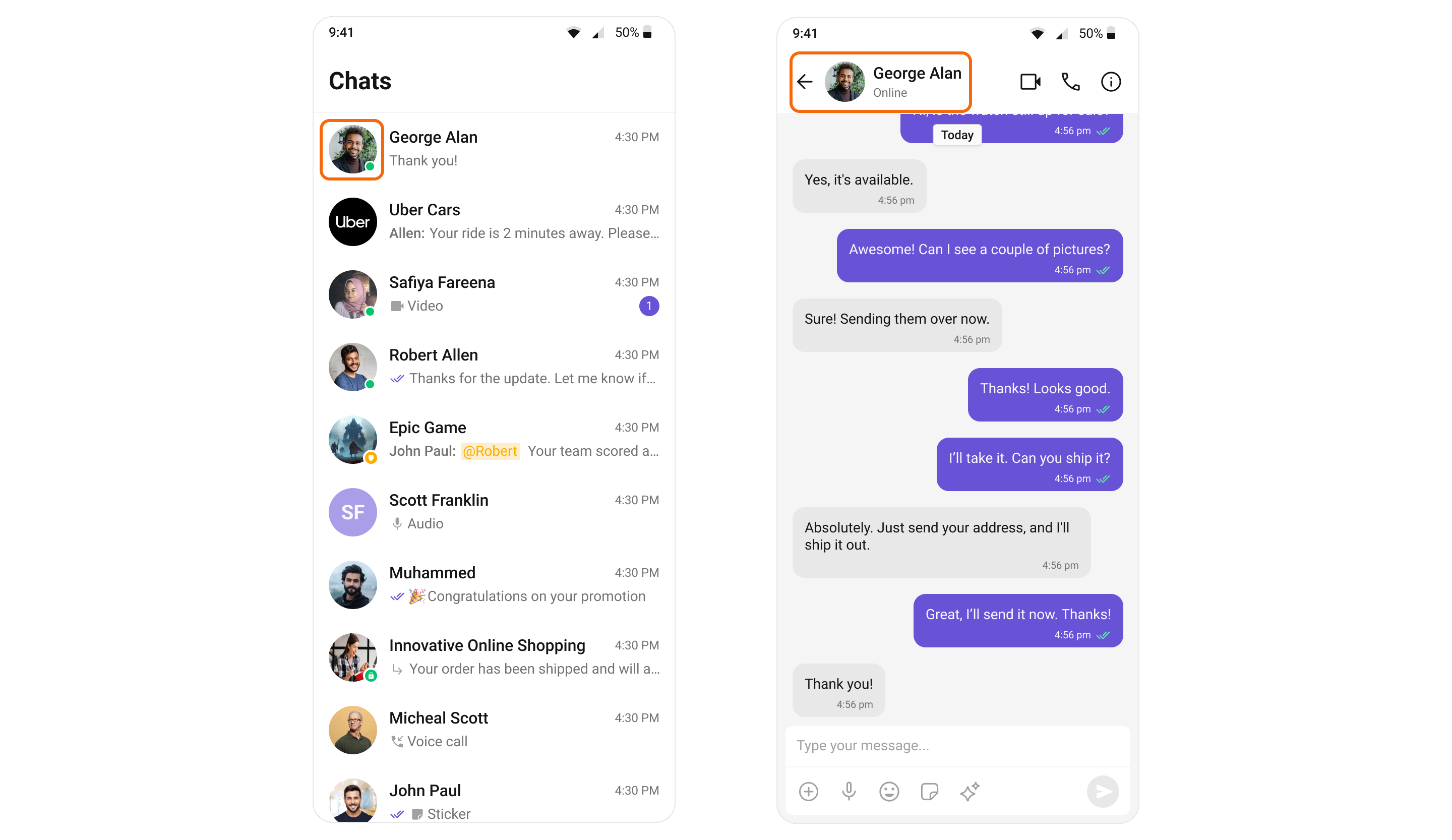
CometChat's User Presence feature allows users to see whether their contacts are online, offline. This helps users know the best time to initiate a conversation and sets expectations about response times.
| Widgets | Functionality |
| --------------------------------------------------- | ----------------------------------------------------------------------------------------------------------------------------------------------------------------------------------------------------------------------------------------------------------------------------------------------------------- |
| [Conversations](/ui-kit/flutter/v5/conversations) | [Conversations](/ui-kit/flutter/v5/conversations) is a Widget that renders Conversations item List, Conversations item also shows real-time typing status indicators. This means that if a user in a one-on-one chat or a participant in a group chat is currently typing a message |
| [Message Header](/ui-kit/flutter/v5/message-header) | [Message Header](/ui-kit/flutter/v5/message-header) that renders details of User or Groups in ToolBar. The MessageHeader also handles the Typing Indicator functionality. When a user or a member in a group is typing, the MessageHeader dynamically updates to display a 'typing...' status in real-time. |
***
## User Presence
CometChat's User Presence feature allows users to see whether their contacts are online, offline. This helps users know the best time to initiate a conversation and sets expectations about response times.
 | Widgets | Functionality |
| --------------------------------------------------- | ---------------------------------------------------------------------------------------------------------------------------------------------------------------- |
| [Conversations](/ui-kit/flutter/v5/conversations) | [Conversations](/ui-kit/flutter/v5/conversations) is a Widget that renders Conversations item List, Conversations item also shows user presence information. |
| [Message Header](/ui-kit/flutter/v5/message-header) | [Message Header](/ui-kit/flutter/v5/message-header) that renders details of User or Groups in ToolBar. The MessageHeader also handles user Presence information. |
| [Users](/ui-kit/flutter/v5/users) | [Users](/ui-kit/flutter/v5/users) renders list of users available in your app. It also responsible to render users Presence information. |
| [Group Members](/ui-kit/flutter/v5/group-members) | [Group Members](/ui-kit/flutter/v5/group-members) renders list of users available in the group. The Group Members widget also handles user Presence information. |
***
## Reactions
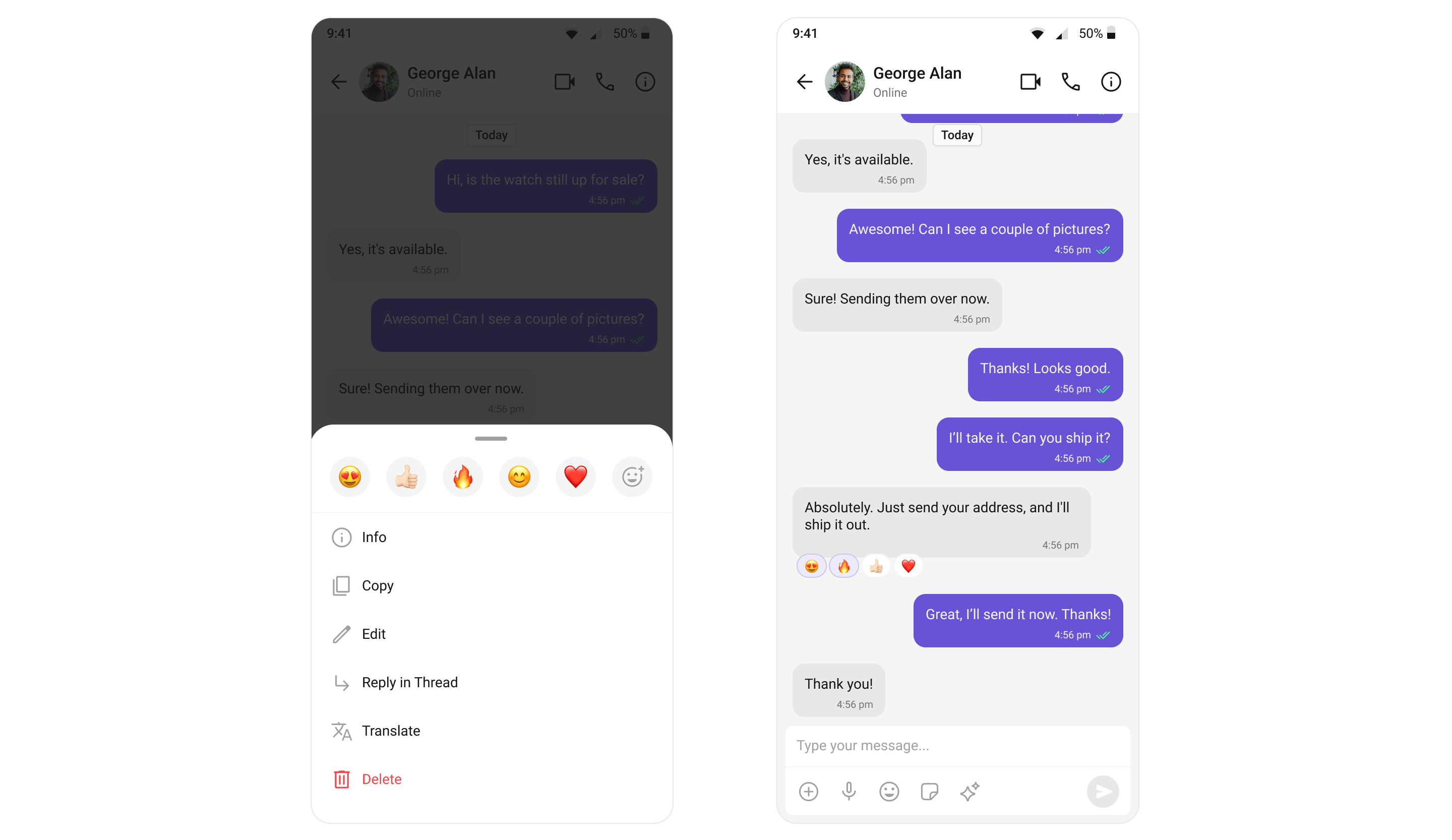
CometChat's Reactions feature adds a layer of expressiveness to your chat application by allowing users to react to messages. With Reactions, users can convey a range of emotions or express their thoughts on a particular message without typing out a full response, enhancing their user experience and fostering greater engagement.
The number of reactions displayed depends on the width of the view. For instance, if a message contains 5 reactions but the width of the CometChatReactions view can only accommodate 4 reactions at a time, the first three reactions will be shown along with an additional UI element at the end of the row. This element indicates the number of other unique reactions that are not immediately visible, informing users of the total count of different reactions.
In the example, tapping on this element (depicted as "+2" in the provided image) will by default trigger the CometChatReactionList widget. This action opens a modal sheet from the bottom of the screen, displaying all reactions received by the message.
| Widgets | Functionality |
| --------------------------------------------------- | ---------------------------------------------------------------------------------------------------------------------------------------------------------------- |
| [Conversations](/ui-kit/flutter/v5/conversations) | [Conversations](/ui-kit/flutter/v5/conversations) is a Widget that renders Conversations item List, Conversations item also shows user presence information. |
| [Message Header](/ui-kit/flutter/v5/message-header) | [Message Header](/ui-kit/flutter/v5/message-header) that renders details of User or Groups in ToolBar. The MessageHeader also handles user Presence information. |
| [Users](/ui-kit/flutter/v5/users) | [Users](/ui-kit/flutter/v5/users) renders list of users available in your app. It also responsible to render users Presence information. |
| [Group Members](/ui-kit/flutter/v5/group-members) | [Group Members](/ui-kit/flutter/v5/group-members) renders list of users available in the group. The Group Members widget also handles user Presence information. |
***
## Reactions
CometChat's Reactions feature adds a layer of expressiveness to your chat application by allowing users to react to messages. With Reactions, users can convey a range of emotions or express their thoughts on a particular message without typing out a full response, enhancing their user experience and fostering greater engagement.
The number of reactions displayed depends on the width of the view. For instance, if a message contains 5 reactions but the width of the CometChatReactions view can only accommodate 4 reactions at a time, the first three reactions will be shown along with an additional UI element at the end of the row. This element indicates the number of other unique reactions that are not immediately visible, informing users of the total count of different reactions.
In the example, tapping on this element (depicted as "+2" in the provided image) will by default trigger the CometChatReactionList widget. This action opens a modal sheet from the bottom of the screen, displaying all reactions received by the message.
 | Widgets | Functionality |
| ---------------------------------------------- | ------------------------------------------------------------------------------------------------------------------------------------------------------------------------------------------------------------------------------------------------------------------ |
| [MessageList](/ui-kit/flutter/v5/message-list) | [MessageList](/ui-kit/flutter/v5/message-list) is a Widget that renders different types of Message bubbles, Irrespective of the type of message bubble, Reactions are an integral part and offer a more engaging, expressive way for users to respond to messages. |
***
## Mentions
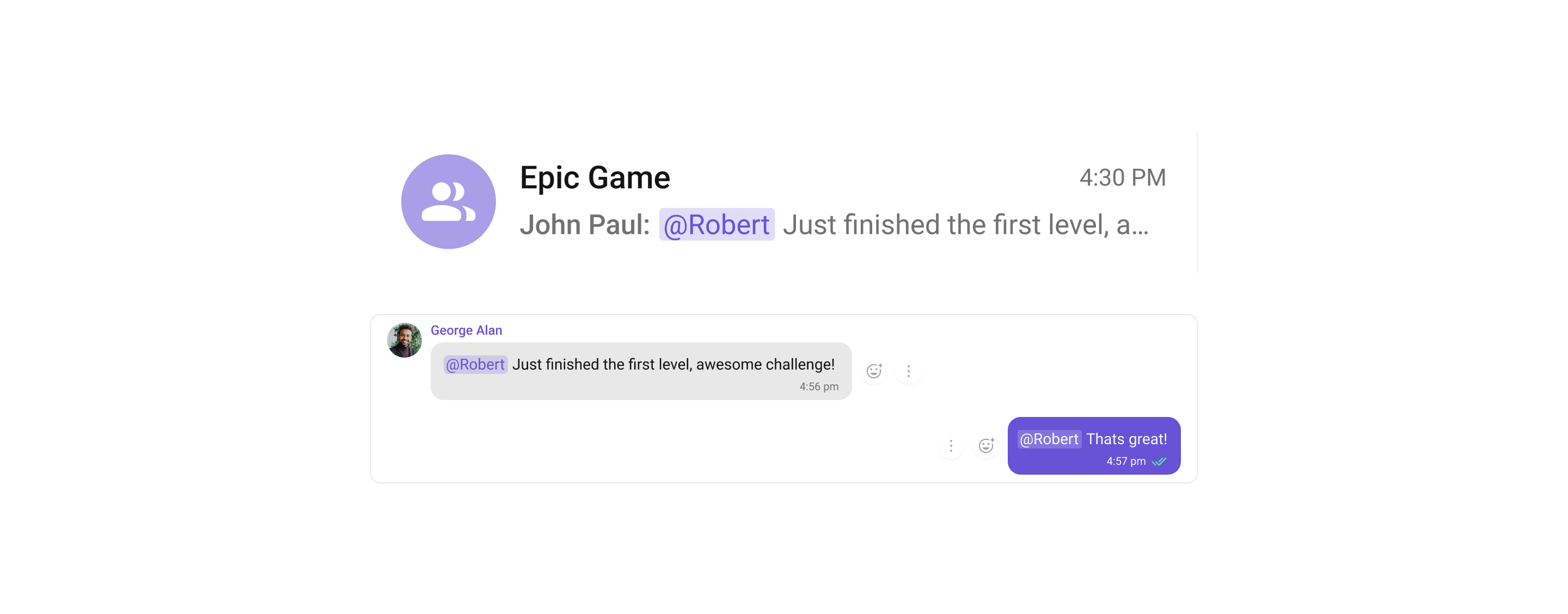
Mentions is a robust feature provided by CometChat that enhances the interactivity and clarity of group or 1-1 chats by allowing users to directly address or refer to specific individuals in a conversation. The feature also supports group mentions like @all, enabling users to quickly notify all members in a group chat simultaneously.
| Widgets | Functionality |
| ---------------------------------------------- | ------------------------------------------------------------------------------------------------------------------------------------------------------------------------------------------------------------------------------------------------------------------ |
| [MessageList](/ui-kit/flutter/v5/message-list) | [MessageList](/ui-kit/flutter/v5/message-list) is a Widget that renders different types of Message bubbles, Irrespective of the type of message bubble, Reactions are an integral part and offer a more engaging, expressive way for users to respond to messages. |
***
## Mentions
Mentions is a robust feature provided by CometChat that enhances the interactivity and clarity of group or 1-1 chats by allowing users to directly address or refer to specific individuals in a conversation. The feature also supports group mentions like @all, enabling users to quickly notify all members in a group chat simultaneously.
 | Widgets | Functionality |
| ------------------------------------------------------ | ---------------------------------------------------------------------------------------------------------------------------------------------------------------------------------------------------------------------------------------------------------------- |
| [Conversations](/ui-kit/flutter/v5/conversations) | [Conversations](/ui-kit/flutter/v5/conversations) widget provides an enhanced user experience by integrating the Mentions feature. This means that from the conversation list itself, users can see where they or someone else have been specifically mentioned. |
| [MessageComposer](/ui-kit/flutter/v5/message-composer) | [MessageComposer](/ui-kit/flutter/v5/message-composer) is a widget that allows users to craft and send various types of messages, including the usage of the Mentions feature for direct addressing within the conversation. |
| [MessageList](/ui-kit/flutter/v5/message-list) | [MessageList](/ui-kit/flutter/v5/message-list) is a widget that displays a list of sent and received messages. It also supports the rendering of Mentions, enhancing the readability and interactivity of conversations. |
***
## Rich Text Formatting
Rich Text Formatting allows users to style their messages with bold, italic, strikethrough, code, code blocks, blockquotes, ordered/unordered lists, and links. This brings richer expression to conversations and helps users emphasize key points.
| Widgets | Functionality |
| ------------------------------------------------------ | ---------------------------------------------------------------------------------------------------------------------------------------------------------------------------------------------------------------------------------------------------------------- |
| [Conversations](/ui-kit/flutter/v5/conversations) | [Conversations](/ui-kit/flutter/v5/conversations) widget provides an enhanced user experience by integrating the Mentions feature. This means that from the conversation list itself, users can see where they or someone else have been specifically mentioned. |
| [MessageComposer](/ui-kit/flutter/v5/message-composer) | [MessageComposer](/ui-kit/flutter/v5/message-composer) is a widget that allows users to craft and send various types of messages, including the usage of the Mentions feature for direct addressing within the conversation. |
| [MessageList](/ui-kit/flutter/v5/message-list) | [MessageList](/ui-kit/flutter/v5/message-list) is a widget that displays a list of sent and received messages. It also supports the rendering of Mentions, enhancing the readability and interactivity of conversations. |
***
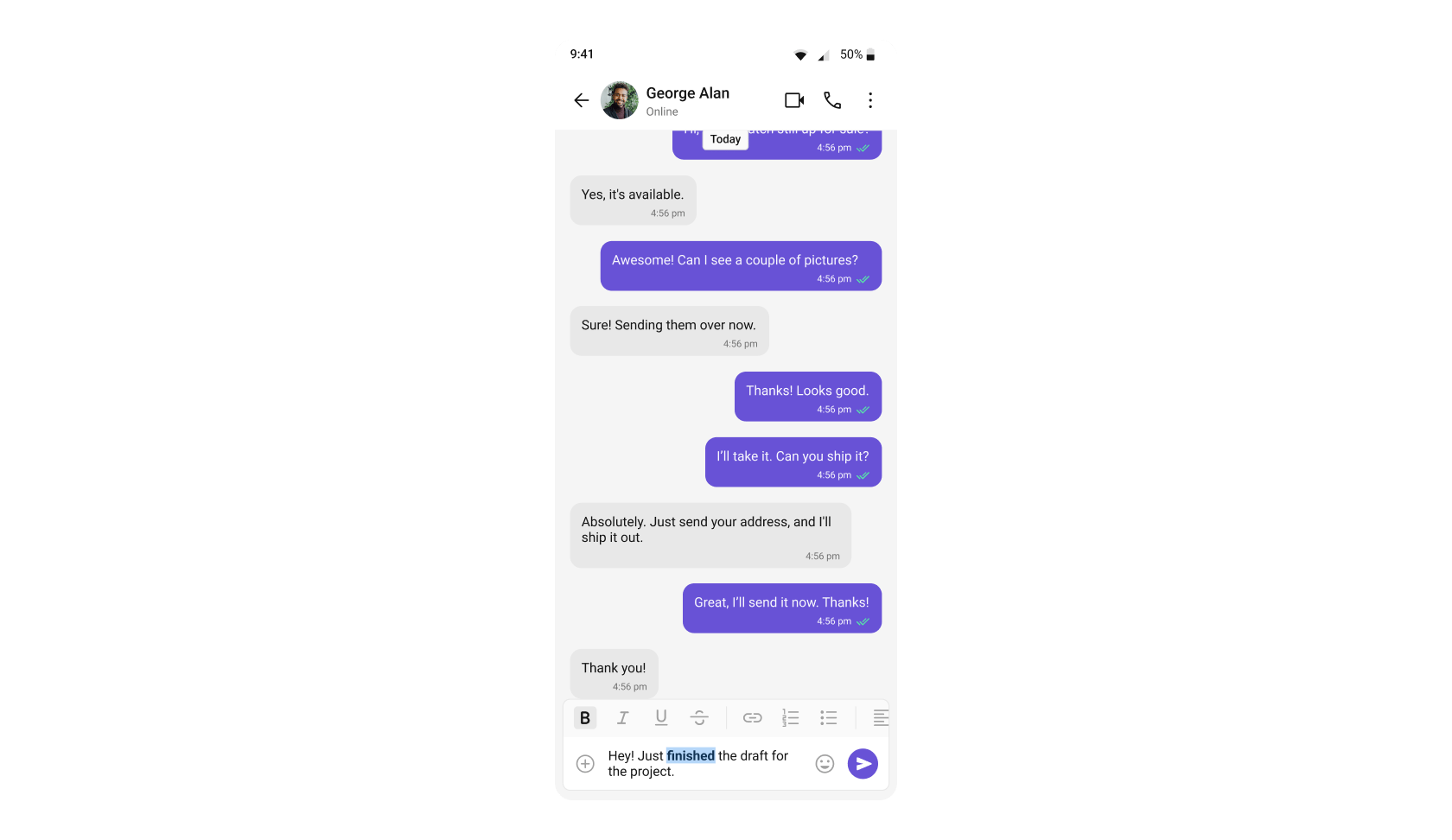
## Rich Text Formatting
Rich Text Formatting allows users to style their messages with bold, italic, strikethrough, code, code blocks, blockquotes, ordered/unordered lists, and links. This brings richer expression to conversations and helps users emphasize key points.
 | Widgets | Functionality |
| ------------------------------------------------------------------------------------------ | ------------------------------------------------------------------------------------------------------------------------------------------------------------------------------------------------------------------------------------------------------------------------ |
| [CompactMessageComposer](/ui-kit/flutter/v5/compact-message-composer#rich-text-formatting) | [CompactMessageComposer](/ui-kit/flutter/v5/compact-message-composer#rich-text-formatting) provides a built-in rich text editor with formatting toolbar and text selection menu items for bold, italic, strikethrough, code, links, lists, blockquotes, and code blocks. |
| [MessageList](/ui-kit/flutter/v5/message-list) | [MessageList](/ui-kit/flutter/v5/message-list) renders formatted messages with the appropriate styling automatically applied, ensuring that rich text formatting is displayed exactly as intended by the sender. |
***
## Quoted Reply
Quoted Reply is a robust feature provided by CometChat that enables users to quickly reply to specific messages by selecting the "Reply" option from a message's action menu. This enhances context, keeps conversations organized, and improves overall chat experience in both 1-1 and group chats.
| Widgets | Functionality |
| ------------------------------------------------------------------------------------------ | ------------------------------------------------------------------------------------------------------------------------------------------------------------------------------------------------------------------------------------------------------------------------ |
| [CompactMessageComposer](/ui-kit/flutter/v5/compact-message-composer#rich-text-formatting) | [CompactMessageComposer](/ui-kit/flutter/v5/compact-message-composer#rich-text-formatting) provides a built-in rich text editor with formatting toolbar and text selection menu items for bold, italic, strikethrough, code, links, lists, blockquotes, and code blocks. |
| [MessageList](/ui-kit/flutter/v5/message-list) | [MessageList](/ui-kit/flutter/v5/message-list) renders formatted messages with the appropriate styling automatically applied, ensuring that rich text formatting is displayed exactly as intended by the sender. |
***
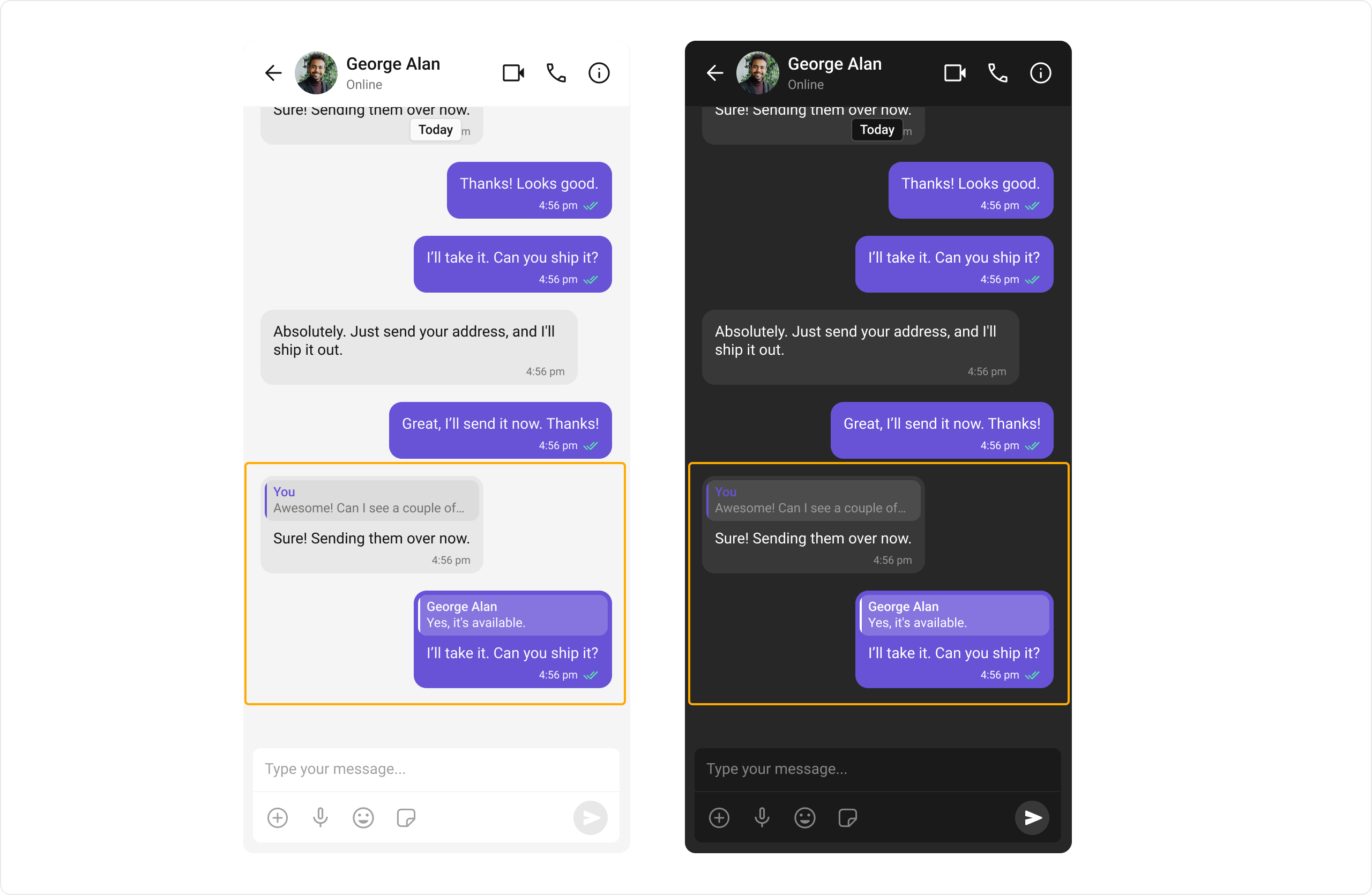
## Quoted Reply
Quoted Reply is a robust feature provided by CometChat that enables users to quickly reply to specific messages by selecting the "Reply" option from a message's action menu. This enhances context, keeps conversations organized, and improves overall chat experience in both 1-1 and group chats.
 | Widgets | Functionality |
| ------------------------------------------------------ | ---------------------------------------------------------------------------------------------------------------------------------------------------------------------------------------------------------------------- |
| [MessageList](/ui-kit/flutter/v5/message-list) | [MessageList](/ui-kit/flutter/v5/message-list) supports replying to messages via the "Reply" option. Users can select "Reply" on a message to open the composer with the quoted reply pre-filled, maintaining context. |
| [MessageComposer](/ui-kit/flutter/v5/message-composer) | [MessageComposer](/ui-kit/flutter/v5/message-composer) works seamlessly with Quoted Message by showing the quoted reply above the input field, letting users compose their response in proper context. |
***
## Conversation and Advanced Search
Conversation and Advanced Search is a powerful feature provided by CometChat that enables users to quickly find conversations, messages, and media across chats in real time. It supports filters, scopes, and custom actions, allowing users to locate content efficiently while keeping the chat experience smooth and intuitive.
| Widgets | Functionality |
| ------------------------------------------------------ | ---------------------------------------------------------------------------------------------------------------------------------------------------------------------------------------------------------------------- |
| [MessageList](/ui-kit/flutter/v5/message-list) | [MessageList](/ui-kit/flutter/v5/message-list) supports replying to messages via the "Reply" option. Users can select "Reply" on a message to open the composer with the quoted reply pre-filled, maintaining context. |
| [MessageComposer](/ui-kit/flutter/v5/message-composer) | [MessageComposer](/ui-kit/flutter/v5/message-composer) works seamlessly with Quoted Message by showing the quoted reply above the input field, letting users compose their response in proper context. |
***
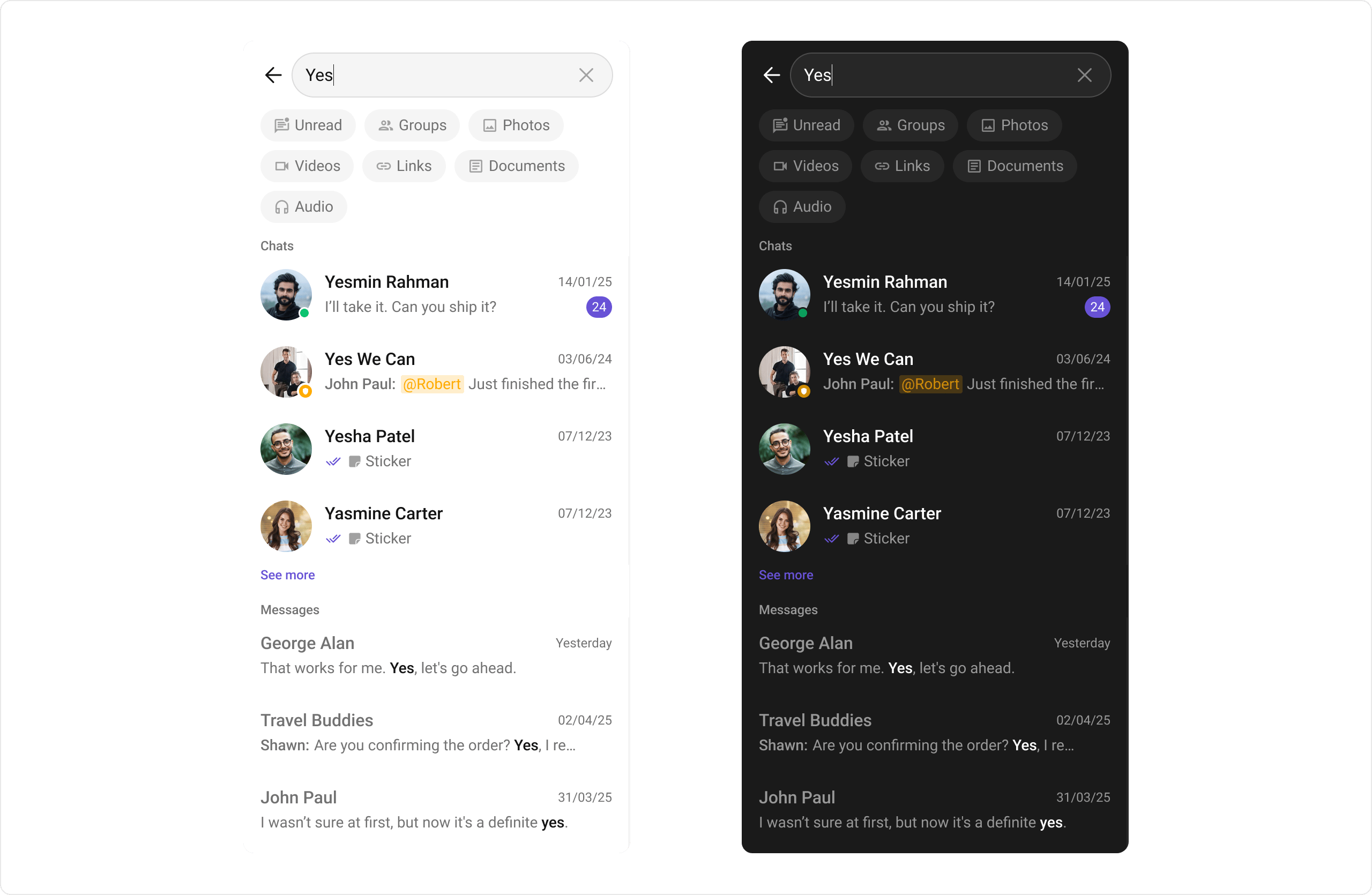
## Conversation and Advanced Search
Conversation and Advanced Search is a powerful feature provided by CometChat that enables users to quickly find conversations, messages, and media across chats in real time. It supports filters, scopes, and custom actions, allowing users to locate content efficiently while keeping the chat experience smooth and intuitive.
 | Widgets | Functionality |
| ------------------------------------------------------ | ------------------------------------------------------------------------------------------------------------------------------------------------------------------------------------------------------- |
| [Search](/ui-kit/flutter/v5/search) | [Search](/ui-kit/flutter/v5/search) allows users to search across conversations and messages in real time. Users can click on a result to open the conversation or jump directly to a specific message. |
| [Message Header](/ui-kit/flutter/v5/message-header) | [Message Header](/ui-kit/flutter/v5/message-header) shows the search button in the chat header, allowing users to search within a conversation. |
| [MessageList](/ui-kit/flutter/v5/message-list) | [MessageList](/ui-kit/flutter/v5/message-list) shows the selected message when clicked from search results and highlights it in the message list. |
| [MessageComposer](/ui-kit/flutter/v5/message-composer) | [MessageComposer](/ui-kit/flutter/v5/message-composer) displays the search input. |
***
## Moderation
CometChat's Message Moderation feature helps maintain a safe and respectful chat environment by automatically filtering and managing inappropriate content. Messages can be automatically blocked or flagged based on predefined rules, ensuring harmful content is handled before it reaches users.
| Widgets | Functionality |
| ------------------------------------------------------ | ------------------------------------------------------------------------------------------------------------------------------------------------------------------------------------------------------- |
| [Search](/ui-kit/flutter/v5/search) | [Search](/ui-kit/flutter/v5/search) allows users to search across conversations and messages in real time. Users can click on a result to open the conversation or jump directly to a specific message. |
| [Message Header](/ui-kit/flutter/v5/message-header) | [Message Header](/ui-kit/flutter/v5/message-header) shows the search button in the chat header, allowing users to search within a conversation. |
| [MessageList](/ui-kit/flutter/v5/message-list) | [MessageList](/ui-kit/flutter/v5/message-list) shows the selected message when clicked from search results and highlights it in the message list. |
| [MessageComposer](/ui-kit/flutter/v5/message-composer) | [MessageComposer](/ui-kit/flutter/v5/message-composer) displays the search input. |
***
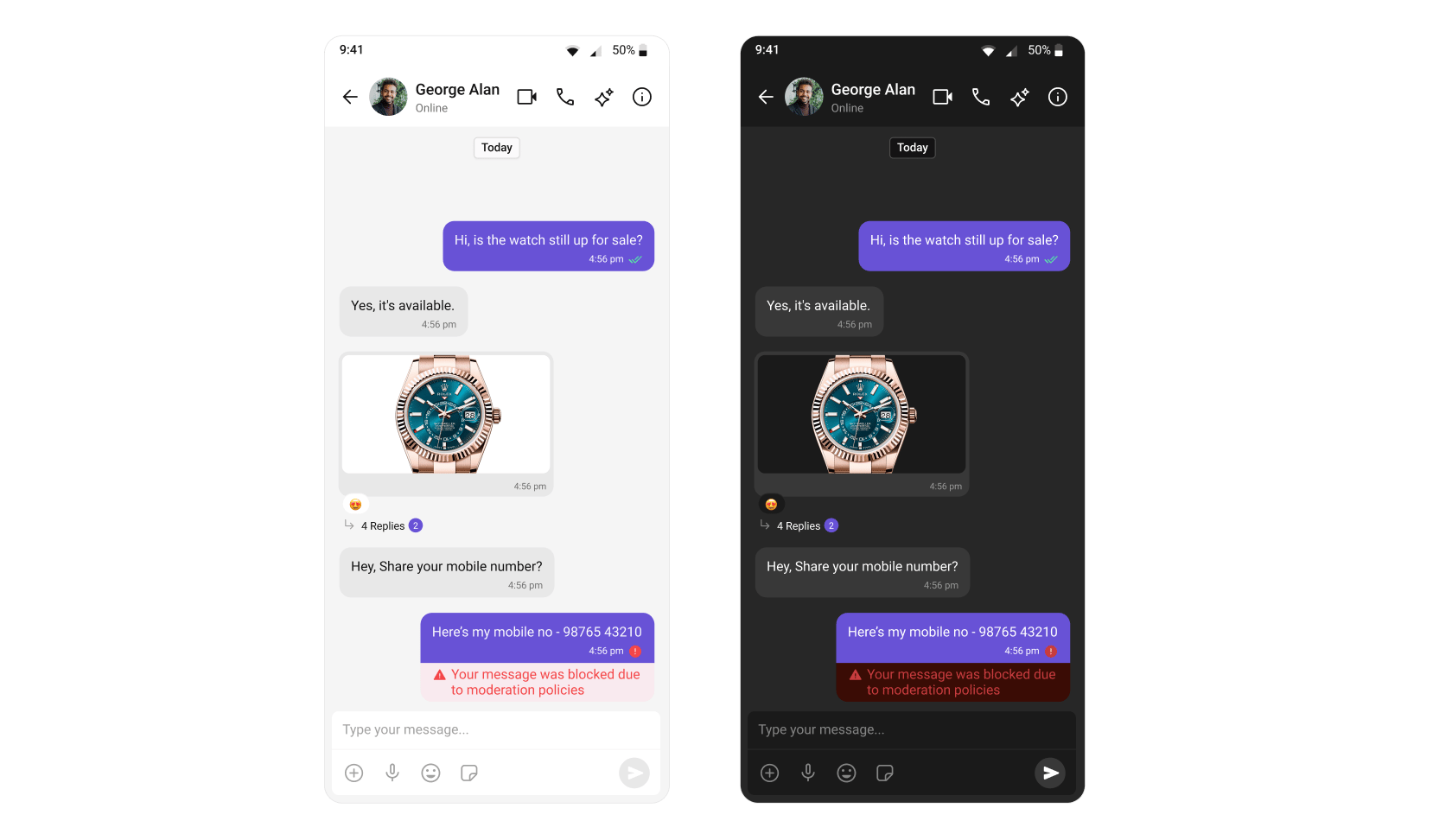
## Moderation
CometChat's Message Moderation feature helps maintain a safe and respectful chat environment by automatically filtering and managing inappropriate content. Messages can be automatically blocked or flagged based on predefined rules, ensuring harmful content is handled before it reaches users.
 Learn more about setting up moderation rules and managing content in the [Moderation](/moderation/overview) documentation.
| Widgets | Functionality |
| ----------------------------------------------- | --------------------------------------------------------------------------------------------------------------------------------------------------------------------- |
| [Message List](/ui-kit/flutter/v5/message-list) | [Message List](/ui-kit/flutter/v5/message-list) automatically handles moderated messages, displaying blocked content appropriately based on your moderation settings. |
After implementing moderation rules, users can report messages they find inappropriate or harmful. As a next step, you can enable the **[Report Message](#report-message)** feature to allow users to flag messages for review by moderators.
***
## Report Message
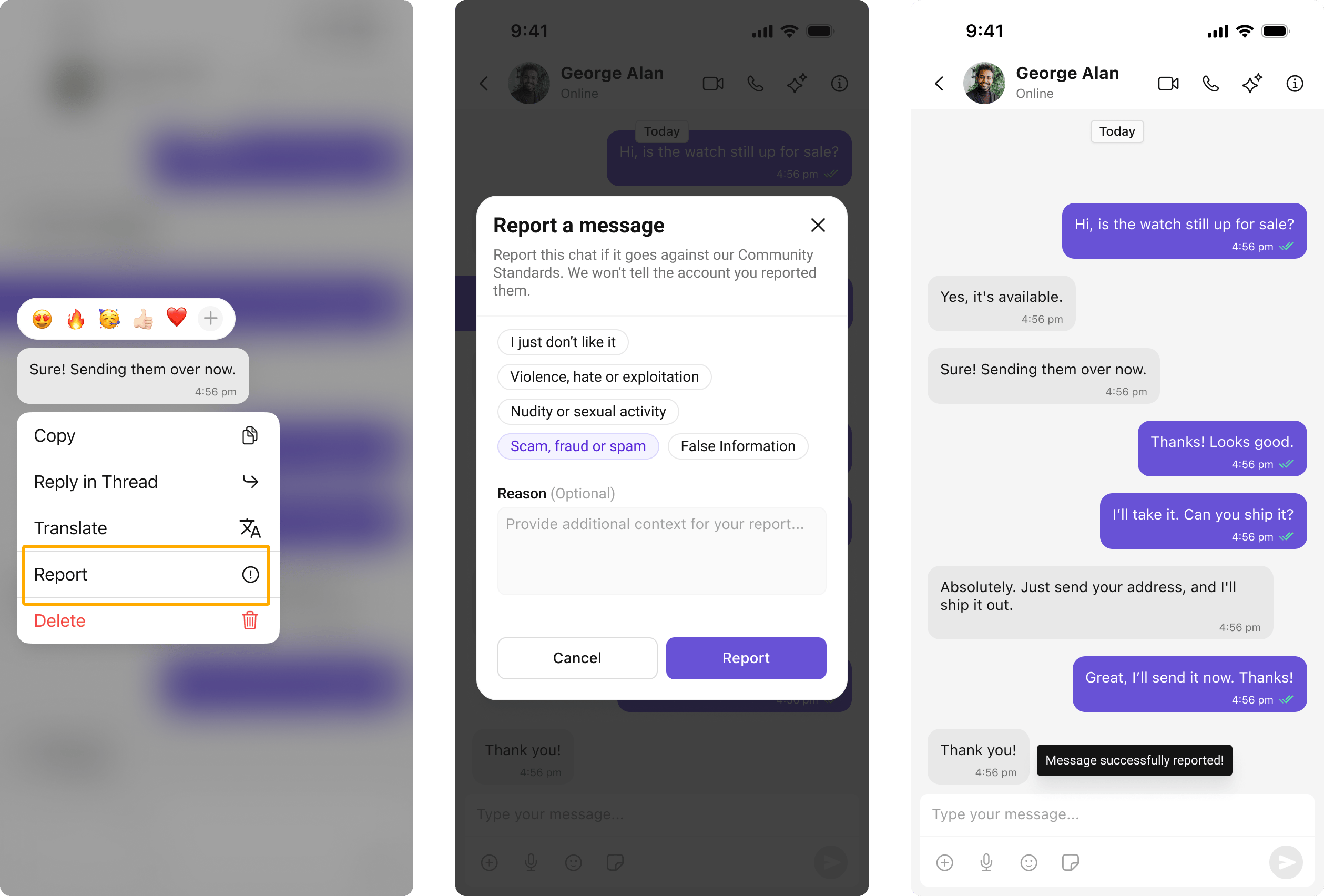
The Report Message feature allows users to report inappropriate or harmful messages within the chat. Users can choose from predefined reasons and provide additional remarks for detailed context. This feature helps maintain a safe and respectful chat environment.
Learn more about how flagged messages are handled, reviewed, and moderated in the [Flagged Messages](/moderation/flagged-messages) documentation.
Learn more about setting up moderation rules and managing content in the [Moderation](/moderation/overview) documentation.
| Widgets | Functionality |
| ----------------------------------------------- | --------------------------------------------------------------------------------------------------------------------------------------------------------------------- |
| [Message List](/ui-kit/flutter/v5/message-list) | [Message List](/ui-kit/flutter/v5/message-list) automatically handles moderated messages, displaying blocked content appropriately based on your moderation settings. |
After implementing moderation rules, users can report messages they find inappropriate or harmful. As a next step, you can enable the **[Report Message](#report-message)** feature to allow users to flag messages for review by moderators.
***
## Report Message
The Report Message feature allows users to report inappropriate or harmful messages within the chat. Users can choose from predefined reasons and provide additional remarks for detailed context. This feature helps maintain a safe and respectful chat environment.
Learn more about how flagged messages are handled, reviewed, and moderated in the [Flagged Messages](/moderation/flagged-messages) documentation.
 | Widgets | Functionality |
| ---------------------------------------------- | --------------------------------------------------------------------------------------------------------------------------------------------------------------------------------------------- |
| [MessageList](/ui-kit/flutter/v5/message-list) | [MessageList](/ui-kit/flutter/v5/message-list) provides the "Report Message" option in the message actions menu, allowing users to initiate the reporting process for inappropriate messages. |
***
## Threaded Conversations
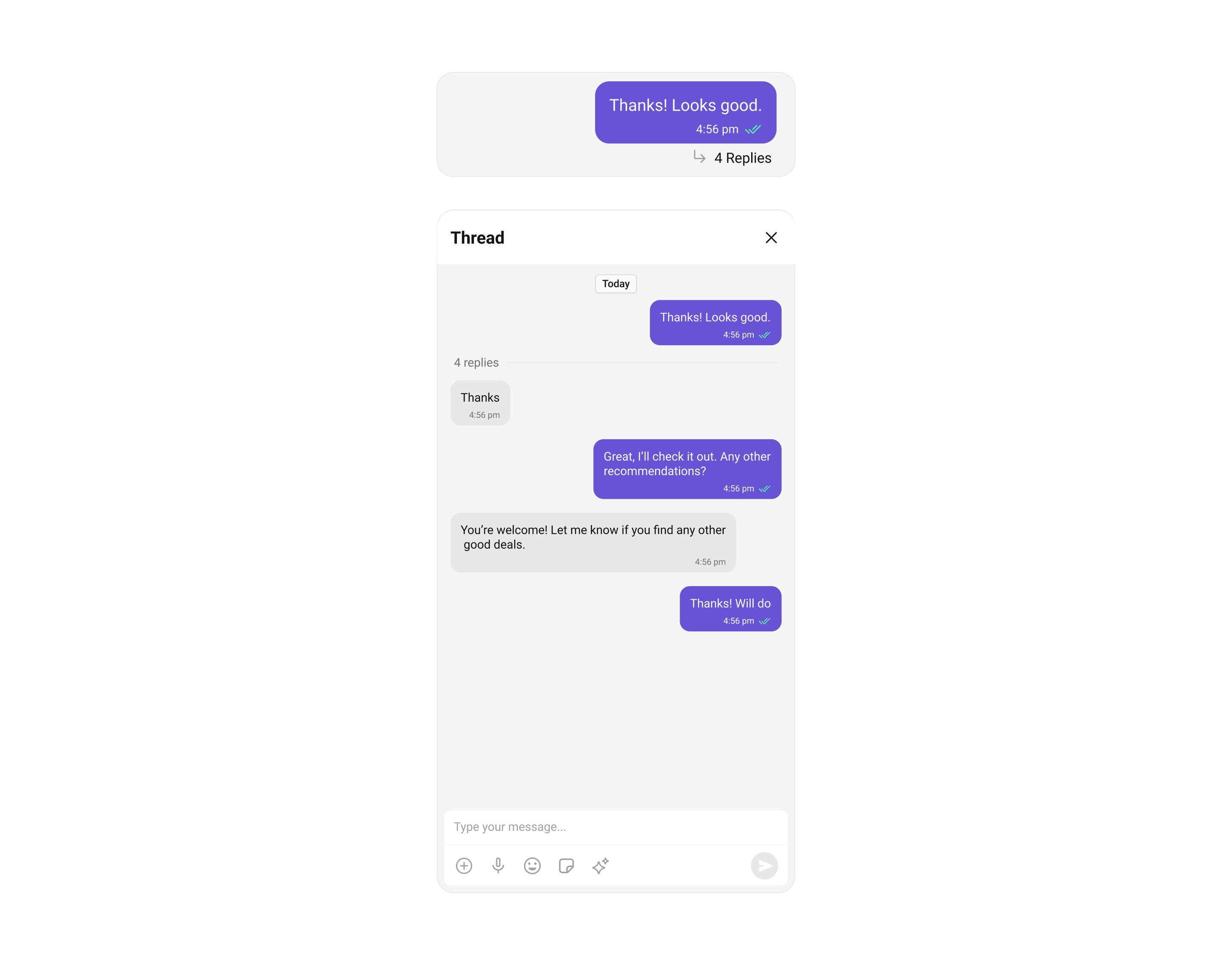
The Threaded Conversations feature enables users to respond directly to a specific message in a chat. This keeps conversations organized and enhances the user experience by maintaining context, especially in group chats.
| Widgets | Functionality |
| ---------------------------------------------- | --------------------------------------------------------------------------------------------------------------------------------------------------------------------------------------------- |
| [MessageList](/ui-kit/flutter/v5/message-list) | [MessageList](/ui-kit/flutter/v5/message-list) provides the "Report Message" option in the message actions menu, allowing users to initiate the reporting process for inappropriate messages. |
***
## Threaded Conversations
The Threaded Conversations feature enables users to respond directly to a specific message in a chat. This keeps conversations organized and enhances the user experience by maintaining context, especially in group chats.
 | Widgets | Functionality |
| ---------------------------------------------------------------- | ------------------------------------------------------------------------------------------------------------------------------------------ |
| [Threaded Messages](/ui-kit/flutter/v5/threaded-messages-header) | [Threaded Messages](/ui-kit/flutter/v5/threaded-messages-header) that displays all replies made to a particular message in a conversation. |
***
## Group Chat
CometChat facilitates Group Chats, allowing users to have conversations with multiple participants simultaneously. This feature is crucial for team collaborations, group discussions, social communities, and more.
| Widgets | Functionality |
| ---------------------------------------------------------------- | ------------------------------------------------------------------------------------------------------------------------------------------ |
| [Threaded Messages](/ui-kit/flutter/v5/threaded-messages-header) | [Threaded Messages](/ui-kit/flutter/v5/threaded-messages-header) that displays all replies made to a particular message in a conversation. |
***
## Group Chat
CometChat facilitates Group Chats, allowing users to have conversations with multiple participants simultaneously. This feature is crucial for team collaborations, group discussions, social communities, and more.
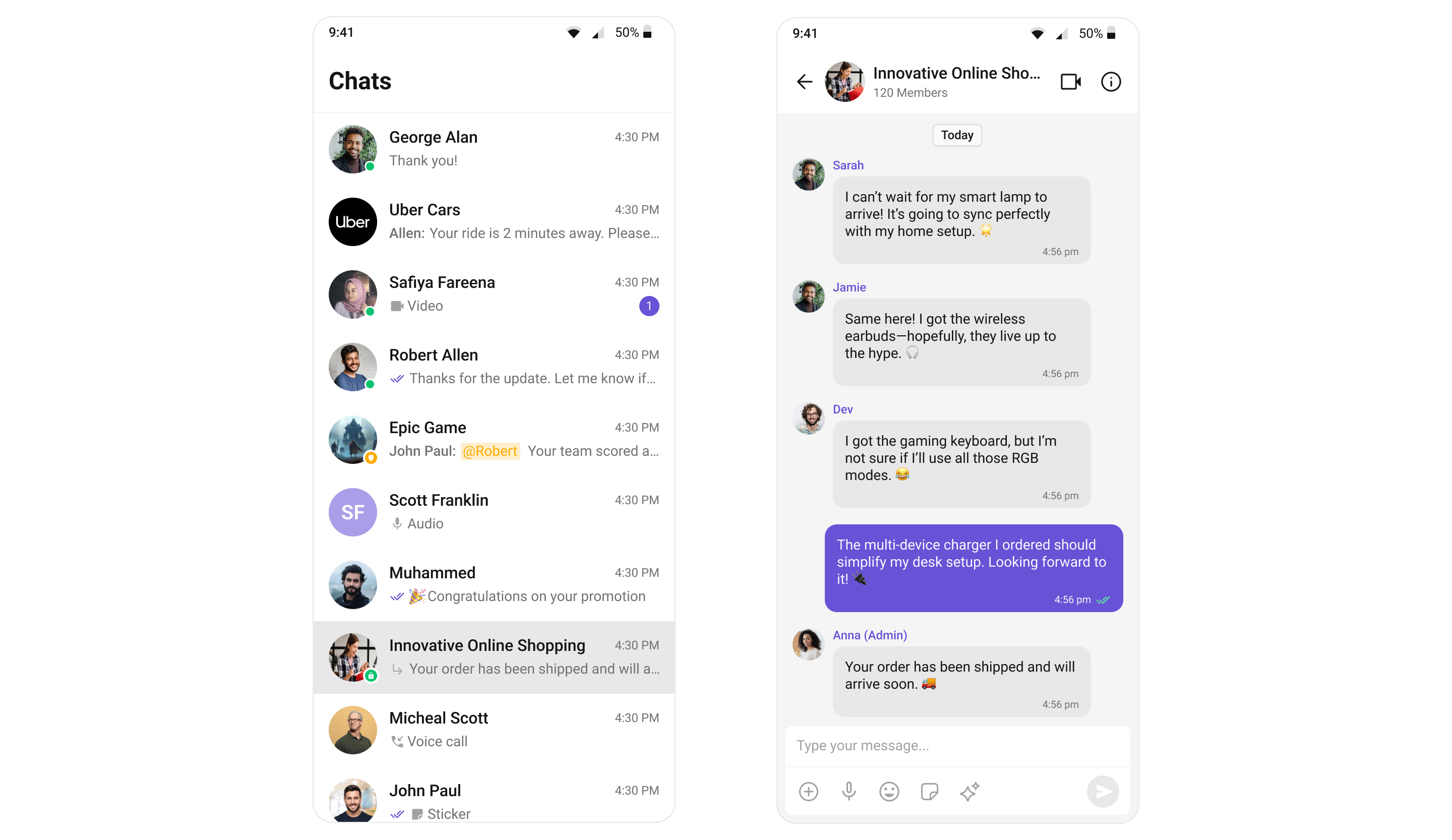 For a comprehensive understanding and guide on implementing and using the Groups feature in CometChat, you should refer to our detailed guide on [Groups](/ui-kit/flutter/v5/groups).
***
## Next Steps
Learn how to send text, media, and custom messages
Display and manage messages with real-time updates
Show conversation lists with typing indicators and receipts
Create and manage group conversations
***
For a comprehensive understanding and guide on implementing and using the Groups feature in CometChat, you should refer to our detailed guide on [Groups](/ui-kit/flutter/v5/groups).
***
## Next Steps
Learn how to send text, media, and custom messages
Display and manage messages with real-time updates
Show conversation lists with typing indicators and receipts
Create and manage group conversations
***