> ## Documentation Index
> Fetch the complete documentation index at: https://cometchat-22654f5b-docs-audit-mechanical-fixes.mintlify.site/llms.txt
> Use this file to discover all available pages before exploring further.
# One-to-One / Group Chat
> Build a focused one-to-one or group chat experience in React Native with CometChat UI Kit.
| Field | Value |
| ------------ | ---------------------------------------------------------------------------------------------------------- |
| Package | `@cometchat/chat-uikit-react-native` |
| Framework | React Native CLI |
| Components | `CometChatMessageHeader`, `CometChatMessageList`, `CometChatMessageComposer` |
| Layout | Single chat window — no conversation list |
| Prerequisite | Complete [React Native CLI Integration](/ui-kit/react-native/react-native-cli-integration) Steps 1–4 first |
| Pattern | Support chat, embedded widgets, focused messaging |
This guide builds a single chat window — no conversation list. Users go directly into a one-to-one or group chat. Good for support chat, embedded widgets, or any focused messaging experience.
This assumes you've already completed [React Native CLI Integration](/ui-kit/react-native/react-native-cli-integration) (project created, UI Kit installed, init + login working).
 ***
## What You're Building
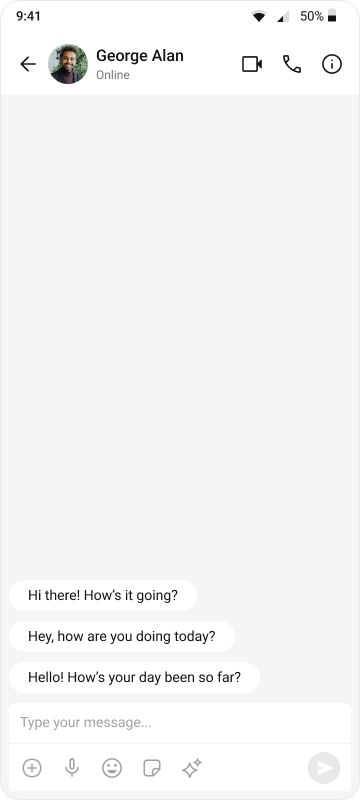
Three components stacked vertically:
1. **Chat header** — displays recipient name, avatar, online status, and optional call buttons
2. **Message list** — real-time chat history with scrolling
3. **Message composer** — text input with media, emojis, and send button
No additional files to create — everything goes in `App.tsx`.
***
## Step 1 — Update App.tsx
The app fetches a user (or group) on mount and renders the three message components.
```tsx title="App.tsx" theme={null}
import React, { useEffect, useState } from "react";
import { View, Text, StyleSheet } from "react-native";
import { SafeAreaProvider, SafeAreaView } from "react-native-safe-area-context";
import { GestureHandlerRootView } from "react-native-gesture-handler";
import {
CometChatMessageHeader,
CometChatMessageList,
CometChatMessageComposer,
CometChatUIKit,
UIKitSettings,
CometChatThemeProvider,
CometChatI18nProvider,
} from "@cometchat/chat-uikit-react-native";
import { CometChat } from "@cometchat/chat-sdk-react-native";
const APP_ID = "APP_ID";
const AUTH_KEY = "AUTH_KEY";
const REGION = "REGION";
const LOGIN_UID = "cometchat-uid-1";
// The user or group to chat with
const CHAT_WITH_UID = "cometchat-uid-2"; // Replace with actual UID
// const CHAT_WITH_GUID = "GUID"; // Uncomment for group chat
const App = (): React.ReactElement => {
const [loggedIn, setLoggedIn] = useState(false);
const [selectedUser, setSelectedUser] = useState();
const [selectedGroup, setSelectedGroup] = useState();
useEffect(() => {
const init = async () => {
const uiKitSettings: UIKitSettings = {
appId: APP_ID,
authKey: AUTH_KEY,
region: REGION,
subscriptionType: CometChat.AppSettings
.SUBSCRIPTION_TYPE_ALL_USERS as UIKitSettings["subscriptionType"],
};
try {
await CometChatUIKit.init(uiKitSettings);
await CometChatUIKit.login({ uid: LOGIN_UID });
setLoggedIn(true);
// Fetch the user to chat with
const user = await CometChat.getUser(CHAT_WITH_UID);
setSelectedUser(user);
// For group chat, uncomment below:
// const group = await CometChat.getGroup(CHAT_WITH_GUID);
// setSelectedGroup(group);
} catch (err) {
console.error("Init/login/fetch error:", err);
}
};
init();
}, []);
return (
{loggedIn && (selectedUser || selectedGroup) ? (
) : (
Set a user or group UID in App.tsx to start chatting
)}
);
};
const styles = StyleSheet.create({
fullScreen: {
flex: 1,
},
messagesWrapper: {
flex: 1,
},
emptyState: {
flex: 1,
justifyContent: "center",
alignItems: "center",
backgroundColor: "#F5F5F5",
},
emptyText: {
color: "#727272",
fontSize: 14,
},
});
export default App;
```
```jsx title="App.js" theme={null}
import React, { useEffect, useState } from "react";
import { View, Text, StyleSheet } from "react-native";
import { SafeAreaProvider, SafeAreaView } from "react-native-safe-area-context";
import { GestureHandlerRootView } from "react-native-gesture-handler";
import {
CometChatMessageHeader,
CometChatMessageList,
CometChatMessageComposer,
CometChatUIKit,
CometChatThemeProvider,
CometChatI18nProvider,
} from "@cometchat/chat-uikit-react-native";
import { CometChat } from "@cometchat/chat-sdk-react-native";
const APP_ID = "APP_ID";
const AUTH_KEY = "AUTH_KEY";
const REGION = "REGION";
const LOGIN_UID = "cometchat-uid-1";
// The user or group to chat with
const CHAT_WITH_UID = "cometchat-uid-2"; // Replace with actual UID
// const CHAT_WITH_GUID = "GUID"; // Uncomment for group chat
const App = () => {
const [loggedIn, setLoggedIn] = useState(false);
const [selectedUser, setSelectedUser] = useState();
const [selectedGroup, setSelectedGroup] = useState();
useEffect(() => {
const init = async () => {
const uiKitSettings = {
appId: APP_ID,
authKey: AUTH_KEY,
region: REGION,
subscriptionType: CometChat.AppSettings.SUBSCRIPTION_TYPE_ALL_USERS,
};
try {
await CometChatUIKit.init(uiKitSettings);
await CometChatUIKit.login({ uid: LOGIN_UID });
setLoggedIn(true);
// Fetch the user to chat with
const user = await CometChat.getUser(CHAT_WITH_UID);
setSelectedUser(user);
// For group chat, uncomment below:
// const group = await CometChat.getGroup(CHAT_WITH_GUID);
// setSelectedGroup(group);
} catch (err) {
console.error("Init/login/fetch error:", err);
}
};
init();
}, []);
return (
{loggedIn && (selectedUser || selectedGroup) ? (
) : (
Set a user or group UID in App.tsx to start chatting
)}
);
};
const styles = StyleSheet.create({
fullScreen: {
flex: 1,
},
messagesWrapper: {
flex: 1,
},
emptyState: {
flex: 1,
justifyContent: "center",
alignItems: "center",
backgroundColor: "#F5F5F5",
},
emptyText: {
color: "#727272",
fontSize: 14,
},
});
export default App;
```
Key points:
* `CometChat.getUser(UID)` fetches the user object from the SDK — you need a real user object, not a manually constructed one
* Pass either `user` or `group` to the message components, never both
* The highlighted constants show where to set the UID or swap to group chat
***
## Switching Between User and Group Chat
To load a group chat instead of one-to-one, replace the `getUser` call with `getGroup`:
```tsx theme={null}
const CHAT_WITH_GUID = "GUID"; // Replace with your actual Group ID
const group = await CometChat.getGroup(CHAT_WITH_GUID);
setSelectedGroup(group);
```
You can also determine this dynamically — for example, based on a route parameter or a selection from another part of your app.
***
## Step 2 — Run the Project
```bash theme={null}
npx react-native run-ios
```
```bash theme={null}
npx react-native run-android
```
You should see the chat window load with the conversation for the UID you set.
***
## Next Steps
Customize colors, fonts, and styles to match your brand
Browse all prebuilt UI components
Back to the main setup guide
Chat features included out of the box
***
## What You're Building
Three components stacked vertically:
1. **Chat header** — displays recipient name, avatar, online status, and optional call buttons
2. **Message list** — real-time chat history with scrolling
3. **Message composer** — text input with media, emojis, and send button
No additional files to create — everything goes in `App.tsx`.
***
## Step 1 — Update App.tsx
The app fetches a user (or group) on mount and renders the three message components.
```tsx title="App.tsx" theme={null}
import React, { useEffect, useState } from "react";
import { View, Text, StyleSheet } from "react-native";
import { SafeAreaProvider, SafeAreaView } from "react-native-safe-area-context";
import { GestureHandlerRootView } from "react-native-gesture-handler";
import {
CometChatMessageHeader,
CometChatMessageList,
CometChatMessageComposer,
CometChatUIKit,
UIKitSettings,
CometChatThemeProvider,
CometChatI18nProvider,
} from "@cometchat/chat-uikit-react-native";
import { CometChat } from "@cometchat/chat-sdk-react-native";
const APP_ID = "APP_ID";
const AUTH_KEY = "AUTH_KEY";
const REGION = "REGION";
const LOGIN_UID = "cometchat-uid-1";
// The user or group to chat with
const CHAT_WITH_UID = "cometchat-uid-2"; // Replace with actual UID
// const CHAT_WITH_GUID = "GUID"; // Uncomment for group chat
const App = (): React.ReactElement => {
const [loggedIn, setLoggedIn] = useState(false);
const [selectedUser, setSelectedUser] = useState();
const [selectedGroup, setSelectedGroup] = useState();
useEffect(() => {
const init = async () => {
const uiKitSettings: UIKitSettings = {
appId: APP_ID,
authKey: AUTH_KEY,
region: REGION,
subscriptionType: CometChat.AppSettings
.SUBSCRIPTION_TYPE_ALL_USERS as UIKitSettings["subscriptionType"],
};
try {
await CometChatUIKit.init(uiKitSettings);
await CometChatUIKit.login({ uid: LOGIN_UID });
setLoggedIn(true);
// Fetch the user to chat with
const user = await CometChat.getUser(CHAT_WITH_UID);
setSelectedUser(user);
// For group chat, uncomment below:
// const group = await CometChat.getGroup(CHAT_WITH_GUID);
// setSelectedGroup(group);
} catch (err) {
console.error("Init/login/fetch error:", err);
}
};
init();
}, []);
return (
{loggedIn && (selectedUser || selectedGroup) ? (
) : (
Set a user or group UID in App.tsx to start chatting
)}
);
};
const styles = StyleSheet.create({
fullScreen: {
flex: 1,
},
messagesWrapper: {
flex: 1,
},
emptyState: {
flex: 1,
justifyContent: "center",
alignItems: "center",
backgroundColor: "#F5F5F5",
},
emptyText: {
color: "#727272",
fontSize: 14,
},
});
export default App;
```
```jsx title="App.js" theme={null}
import React, { useEffect, useState } from "react";
import { View, Text, StyleSheet } from "react-native";
import { SafeAreaProvider, SafeAreaView } from "react-native-safe-area-context";
import { GestureHandlerRootView } from "react-native-gesture-handler";
import {
CometChatMessageHeader,
CometChatMessageList,
CometChatMessageComposer,
CometChatUIKit,
CometChatThemeProvider,
CometChatI18nProvider,
} from "@cometchat/chat-uikit-react-native";
import { CometChat } from "@cometchat/chat-sdk-react-native";
const APP_ID = "APP_ID";
const AUTH_KEY = "AUTH_KEY";
const REGION = "REGION";
const LOGIN_UID = "cometchat-uid-1";
// The user or group to chat with
const CHAT_WITH_UID = "cometchat-uid-2"; // Replace with actual UID
// const CHAT_WITH_GUID = "GUID"; // Uncomment for group chat
const App = () => {
const [loggedIn, setLoggedIn] = useState(false);
const [selectedUser, setSelectedUser] = useState();
const [selectedGroup, setSelectedGroup] = useState();
useEffect(() => {
const init = async () => {
const uiKitSettings = {
appId: APP_ID,
authKey: AUTH_KEY,
region: REGION,
subscriptionType: CometChat.AppSettings.SUBSCRIPTION_TYPE_ALL_USERS,
};
try {
await CometChatUIKit.init(uiKitSettings);
await CometChatUIKit.login({ uid: LOGIN_UID });
setLoggedIn(true);
// Fetch the user to chat with
const user = await CometChat.getUser(CHAT_WITH_UID);
setSelectedUser(user);
// For group chat, uncomment below:
// const group = await CometChat.getGroup(CHAT_WITH_GUID);
// setSelectedGroup(group);
} catch (err) {
console.error("Init/login/fetch error:", err);
}
};
init();
}, []);
return (
{loggedIn && (selectedUser || selectedGroup) ? (
) : (
Set a user or group UID in App.tsx to start chatting
)}
);
};
const styles = StyleSheet.create({
fullScreen: {
flex: 1,
},
messagesWrapper: {
flex: 1,
},
emptyState: {
flex: 1,
justifyContent: "center",
alignItems: "center",
backgroundColor: "#F5F5F5",
},
emptyText: {
color: "#727272",
fontSize: 14,
},
});
export default App;
```
Key points:
* `CometChat.getUser(UID)` fetches the user object from the SDK — you need a real user object, not a manually constructed one
* Pass either `user` or `group` to the message components, never both
* The highlighted constants show where to set the UID or swap to group chat
***
## Switching Between User and Group Chat
To load a group chat instead of one-to-one, replace the `getUser` call with `getGroup`:
```tsx theme={null}
const CHAT_WITH_GUID = "GUID"; // Replace with your actual Group ID
const group = await CometChat.getGroup(CHAT_WITH_GUID);
setSelectedGroup(group);
```
You can also determine this dynamically — for example, based on a route parameter or a selection from another part of your app.
***
## Step 2 — Run the Project
```bash theme={null}
npx react-native run-ios
```
```bash theme={null}
npx react-native run-android
```
You should see the chat window load with the conversation for the UID you set.
***
## Next Steps
Customize colors, fonts, and styles to match your brand
Browse all prebuilt UI components
Back to the main setup guide
Chat features included out of the box